
Meeting Bot API: What It Does and How to Choose One

A meeting bot API provides programmatic access to live audio, video, and metadata from platforms like Zoom, Google Meet, and Microsoft Teams. It allows developers to send an automated participant, or bot, into a meeting to record, transcribe, or even interact with the participants in real time. This gives you the raw materials to build AI notetakers, sales coaching tools, and compliance solutions.
The core function is to abstract away the significant infrastructure work required to connect to these closed platforms. Instead of building and maintaining custom integrations for each one, you make a single API call. This is especially important for building interactive AI voice agents that can join a call, listen to the conversation, and respond. The API provides the voice infrastructure so you can focus on the agent's logic.
If you have ever tried to pull audio from a Zoom call programmatically, you know it gets complicated fast. Zoom's SDK has specific requirements, including a desktop context and a complex authentication flow. Google Meet has no official API for media extraction. Microsoft Teams requires a Graph API integration with specific permissions. A meeting bot API handles these different paths behind one consistent interface.
This guide explains how meeting bots work under the hood, what a good API provides, the kinds of products you can build, and what to look for when choosing a provider. Here’s a breakdown of how these APIs work and what to consider.
How Meeting Bots Access Live Calls
A meeting bot is a server-side process that joins a video conference as a participant to extract media. Since platforms like Zoom, Google Meet, and Teams are primarily applications built on WebRTC for peer-to-peer media, they were not designed for automated processes to join easily.
The most reliable implementation, used by production infrastructure, involves a headless browser like Chromium running in a container. This browser uses a virtual framebuffer (Xvfb) to simulate a display and a virtual audio device to capture sound. The bot navigates to the meeting URL and follows the same join flow a human would. The operating system's audio mixer receives the decoded audio from all participants, and the bot process captures it.
Some platforms offer SDKs as an alternative. Zoom provides a Meeting SDK that allows programmatic joining, but it requires a registered Zoom App Marketplace app and careful management of user permissions. Microsoft Teams has a similar path through its Bot Framework and Graph API. As of 2026, Google Meet does not offer a first-party SDK for media extraction, making browser automation the only viable path.
Once the bot is in the call, its media extraction pipeline can record the mixed audio, stream raw audio over a WebSocket for real-time processing, or send it directly to a transcription service. Capturing video works similarly, using the virtual display to record what the bot "sees."
The Core Abstraction of a Meeting Bot API
Building and maintaining this bot infrastructure yourself is a major engineering project. You must manage platform-specific join logic for Zoom, including its On Behalf Of (OBF) token flow, alongside separate logic for Google Meet and Teams. Any change to a platform's UI, waiting room behavior, or permission scopes can break your integration and require immediate fixes.
Beyond the join logic, you are responsible for container orchestration to run concurrent bots, managing virtual audio devices, and monitoring for memory leaks in long-running browser processes. At MeetStream, we've processed over 1,000,000 meeting minutes for around 80,000 bots, and we see these failure modes constantly. The complexity is real and diverts engineering time from your actual product.
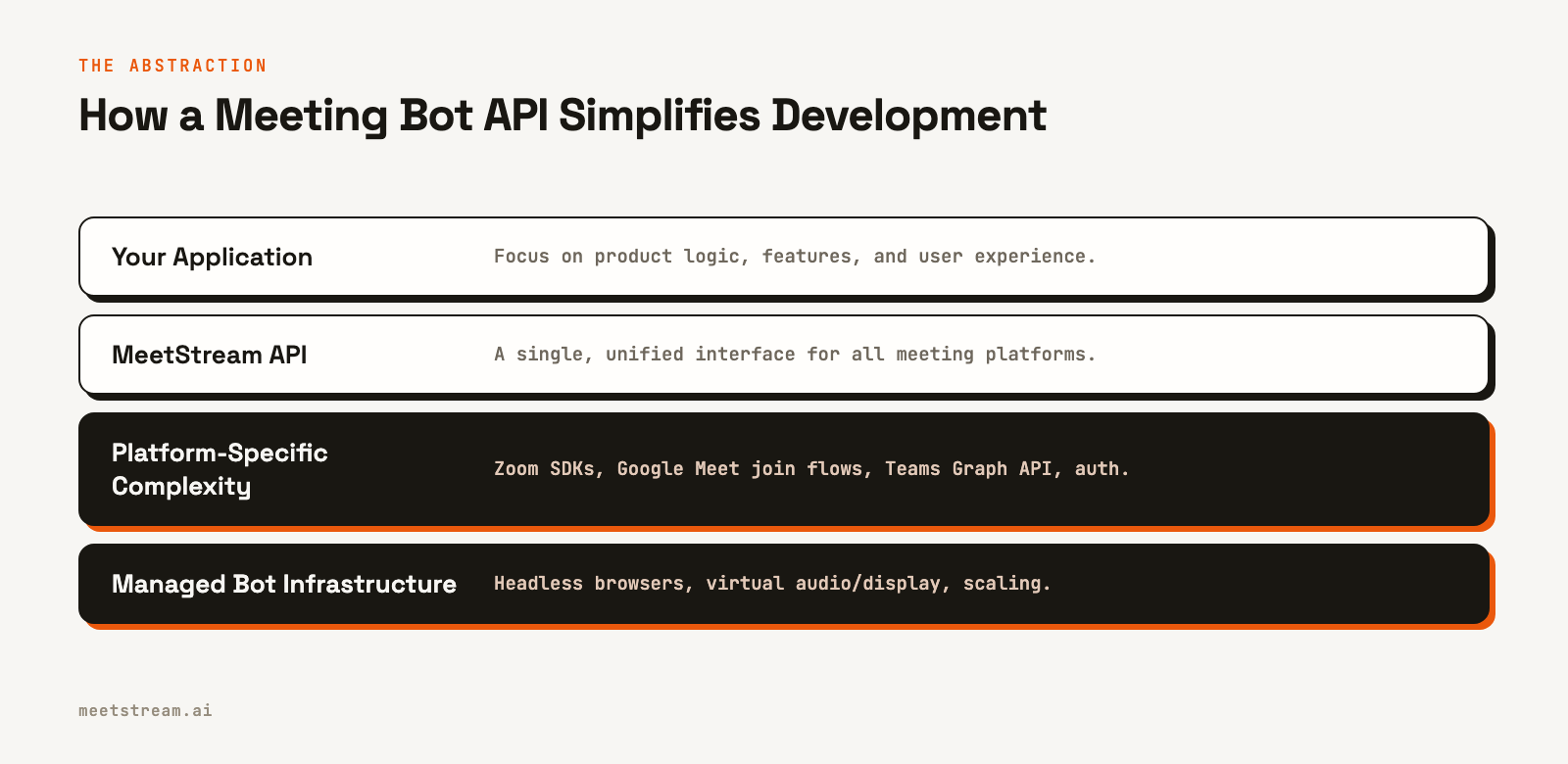
A meeting bot API provides a clear abstraction boundary. You call a single endpoint with a meeting URL, and the service handles the rest: spinning up a container, joining the call, extracting media, and delivering the results to your application via webhooks. You never have to manage a browser fleet or patch code when a "Join" button changes its CSS selector.
Key Features and Data Payloads
A capable meeting bot API provides more than just a recording. It delivers structured data and real-time streams you can build on. Here's how it works in practice with the MeetStream API.
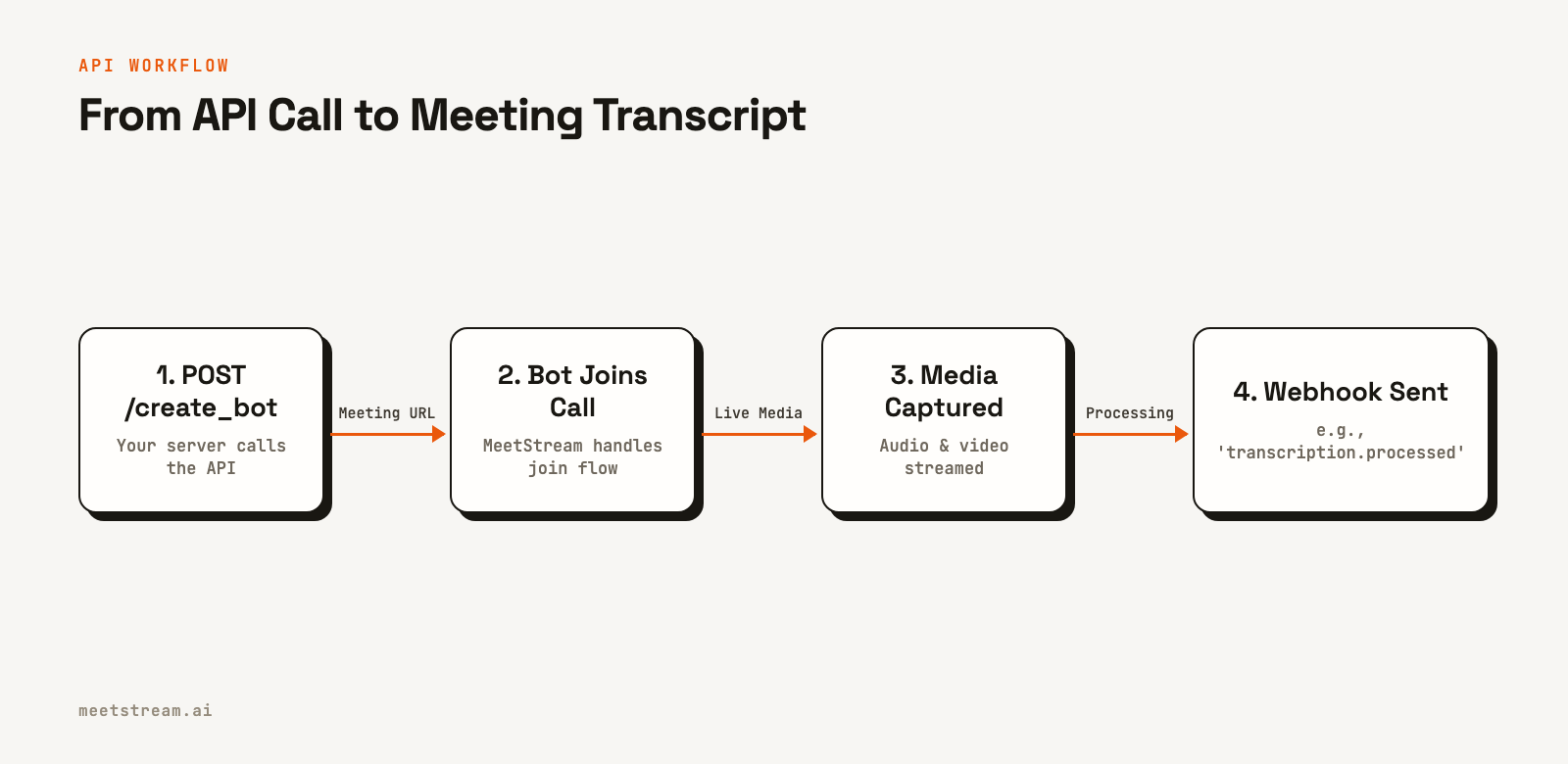
The core action is creating a bot with a POST request. This example sends a bot to a Google Meet call, specifies a webhook URL for events, and requests a transcript from MeetStream's in-house provider.
curl -X POST "https://api.meetstream.ai/api/v1/bots/create_bot" \
  -H "Authorization: Token <YOUR_API_KEY>" \
  -H "Content-Type: application/json" \
  -d '{
    "meeting_link": "https://meet.google.com/abc-defg-hij",
    "bot_name": "Notetaker",
    "callback_url": "https://your-app.com/webhooks/meetstream",
    "recording_config": {
      "transcript": {
        "provider": {
          "meetstream": {}
        }
      }
    }
  }'
Your application then receives a series of webhook events. You should always check the bot_event field in the payload to determine the event type. Key events include bot.joining, bot.inmeeting, and bot.stopped. When processing is complete, you will get events like audio.processed and transcription.processed.
For real-time applications, you can request a raw audio stream by setting the live_audio_required parameter in your create bot request. MeetStream establishes a WebSocket connection to your server and streams binary frames containing mixed audio. The format is raw PCM16 little-endian at 48kHz mono, with each frame prefixed by speaker metadata. This enables you to build live meeting agents that can process audio with very low latency.
What to Build with a Meeting Bot API
With access to structured meeting data, you can build many features and products. Here are a few common patterns.
- Note-taking and Summarization: This is the classic use case. A bot joins a call, a webhook delivers the final transcript, and a large language model (LLM) generates a summary and extracts action items. The output can be sent to Slack, Notion, or a CRM.
- Compliance and Archival: For regulated industries, a bot can join every customer call or board meeting to create an audit trail. The audio and video are recorded and stored according to a defined data retention policy.
- Sales Intelligence and Coaching: Analyze transcripts after a sales call to measure talk-to-listen ratios, detect objections, and identify competitor mentions. This data can populate a coaching dashboard or update fields directly on a deal record in your CRM.
- Real-Time Meeting Agents: This is where the technology is heading. Using a real-time audio stream and live transcription, an AI agent can listen to the conversation and act. It could look up customer data when a name is mentioned, find relevant documents when a question is asked, or even respond verbally using text-to-speech (TTS).
Choosing an API: Key Considerations
Not all meeting bot APIs are the same. When evaluating a provider for your project, consider these factors.
Platform Coverage: Does the API support Zoom, Google Meet, and Microsoft Teams? A single integration should cover all major platforms. Check their documentation for how they handle platform-specific features and authentication.
Data Access and Latency: Can you get more than just a post-call transcript? Look for support for real-time audio streaming via WebSockets and live, streaming transcription. For advanced use cases, ask if the API provides per-participant audio streams. This is difficult to implement correctly; on MeetStream, Zoom streams are fully isolated, while Google Meet and Teams are speaker-attributed.
Agent Capabilities: Can the bot only listen, or can it also act? A true agent-first platform allows the bot to send chat messages, speak using TTS, and change its video frame to display information. This is essential for building interactive experiences.
Security and Compliance: The provider will be handling sensitive conversational data. Check for security certifications like ISO 27001 and their SOC 2 status. If you operate in healthcare, confirm they are HIPAA compliant and will sign a Business Associate Agreement (BAA). For data residency, ensure they can process and store data in your required region, such as the EU or US.
How MeetStream Provides This Infrastructure
MeetStream is the infrastructure layer for developers building products on top of meetings. We provide a single API for Zoom, Google Meet, and Microsoft Teams that handles the complexity of bot management, media extraction, and real-time streaming.
Our focus is on providing the voice infrastructure for AI agents. You can get post-call transcripts, but you can also get low-latency audio streams and use our control APIs to have your bot speak and act in the meeting. This lets your team focus on the product logic that makes your application unique, not on maintaining headless browser fleets. You can see the full API reference at docs.meetstream.ai.
Conclusion
A meeting bot API is a powerful tool that abstracts away the hardest parts of programmatic meeting access. It handles the platform-specific integrations, virtual display management, and media pipelines, delivering clean audio and structured data to your application. By choosing the right API, you can stop worrying about infrastructure and start building the next generation of meeting-aware tools and agents.
Get started free at meetstream.ai.
Frequently Asked Questions
What is a meeting bot API and how does it work?
A meeting bot API is a service that lets you programmatically send a bot into video conferences to extract audio, video, and transcripts. It typically works by running headless browsers with virtual displays and audio devices to join calls like a normal participant. The API hides the complexity of integrating with Zoom, Google Meet, and Teams behind a single REST interface.
Do I need to build meeting bot infrastructure myself?
Building this infrastructure from scratch is a significant project, often taking 6-12 months to stabilize. It requires managing virtual displays, platform-specific join logic, audio pipelines, and scaling. Using a managed meeting bot API like MeetStream lets you skip this infrastructure work and build your product on top of reliable data streams from day one.
What platforms does a meeting bot API support?
MeetStream supports Google Meet, Zoom, and Microsoft Teams through one API. While Google Meet and Teams require no extra setup, integrating with Zoom requires a registered App Marketplace application due to Zoom's policies on automated participants. Support for other platforms like Webex and Slack Huddles is often on the roadmap for API providers.
Can I use a meeting bot for real-time AI agent features?
Yes, if the API supports real-time streaming. APIs that provide a live audio stream over a WebSocket allow you to build AI agents that listen and respond during a call. MeetStream is designed for this, offering low-latency audio and control APIs for the bot to speak and send chat messages, enabling interactive agent development.
What is the difference between an AI meeting notetaker and a meeting bot API?
An AI meeting notetaker is a finished product that joins your meetings and gives you summaries. A meeting bot API is the developer infrastructure used to build such products. The API gives you the raw materials, like transcripts and audio streams, and the control to create custom applications, from compliance tools to real-time sales agents.


