Best Meeting Bot API for Recruiting (2026)
A meeting bot API for recruiting gives every panelist and candidate a clean separate track, returns diarized transcripts, and pushes results into your ATS the moment a call ends.
What recruiting teams need from a meeting bot API
Interview intelligence works when every panelist judges from the same record, so consistency starts at the capture layer.

Each panelist and candidate arrives separately.
Scorecards and highlight clips are easy to build.
Your ATS updates itself through events.
Zoom, Google Meet and Microsoft Teams from the same request.
A named bot that candidates can see helps with disclosure and consent.
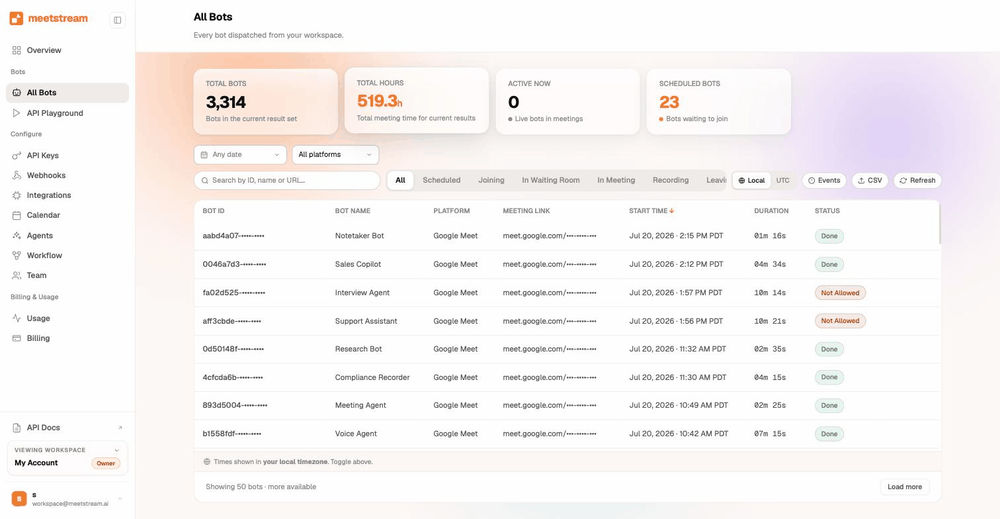
From a meeting link to your product
One request puts a bot in the call. A webhook tells you when the files are ready.
- A named bot in the roomCandidates can see it, which helps with disclosure and consent.
- Records and streams liveAudio and video while the interview runs, on all three platforms.
- Structured results, no typingYour app pulls the transcript and participant data and writes the scorecard.
What you get from every interview
The meeting bot API overview covers all three platforms.
Fair, consistent interview capture
Each speaker is an isolated stream, so structured interview scoring rests on real separation.
- Talk time per personMeasured from a stream of their own, not from a blended track.
- Follow-up depthEach question and answer maps to the person who said it.
- Candidate answers, intactThe record every panelist reviews is the same one.
From call end to scorecard, automatically
Webhooks fire when a call ends, and your app takes it from there.
| Step | What happens |
|---|---|
| The call ends | A webhook reaches your endpoint |
| Your app pulls the data | Transcript and participant data, on demand |
| Your app writes the result | A scorecard, a highlight clip or an ATS update |
| Coverage | The same path on Zoom, Google Meet and Microsoft Teams |
The webhooks page lists every event your handler will see.
How MeetStream handles interview-scale workloads
A hiring sprint can put twenty panels on the calendar for the same Tuesday morning.
- Open concurrencyThere is no per-account limit on how many bots run at once.
- Under ten seconds to joinA bot created on demand joins in under ten seconds on average, so a pulled-forward interview still gets recorded.
- Six transcription enginesDeepgram, AssemblyAI, Sarvam, JigsawStack, the in-house engine or native captions, picked for language and accent coverage.
Scheduling a whole interview loop
Interview loops already live on the recruiter calendar, so connect it once.
Bots move when a candidate reschedules. The Google Calendar page has the connection steps.
Enterprise-level security, keep your data private.
The certificate, the audit status and the Trust Center are all on the security page.
MeetStream is ISO 27001 certified. SOC 2 Type 2 is under audit rather than complete.
MeetStream is GDPR compliant, and bots run in the United States by default.
Bring your own S3 bucket and every interview lands in your account.


Recruiting bot limits and defaults
Conversation intelligence covers scoring and coaching.
Got a question? We got the answer.
Common questions about interview capture. Scoring per person, ATS updates, and how long a panel day can run.
Can we score each interviewer separately?
Yes. Each person gets their own audio stream. You can measure talk time and answers per person, not from one mixed track.
How does data get into our ATS?
Webhooks fire when a call ends. Your app receives the event, pulls the transcript and participant data, and writes structured results into your ATS.
Which platforms are covered?
Zoom, Google Meet, and Microsoft Teams, all from one API and one bot deployment.
Can a bot join an interview that was just rescheduled?
Yes. Scheduled bots join at the scheduled time. A bot created on demand joins in under ten seconds on average. A last-minute move does not mean a missing recording.
How long can a bot stay in a panel day?
Four hours by default. You can extend that to five hours through the API, which covers back-to-back loops without the recording stopping partway.
Every panel on the same record.
Interviews across Zoom, Google Meet and Microsoft Teams, captured per person and delivered to your ATS.
Build it in an afternoon
One API to join, record, stream, and transcribe meetings across Zoom, Google Meet, and Microsoft Teams.