
Claude Meetings vs MeetStream: A Feature-by-Feature Look
See how Claude Meetings and MeetStream compare on platforms, voice, agent controls and developer access, and which one fits your use case.

Claude Meetings went into beta on 12 November 2026, and it is a good product. Claude joins a Google Meet call, follows the conversation, and builds a plan or a whiteboard while the team is still talking. For a team that lives in Google Meet and already pays for Claude, it removes a whole category of meeting admin.
The question we keep hearing since then is a different one. It is not whether Claude Meetings is good. It is whether it can do the job someone actually has: put an agent in a Zoom call, or a Microsoft Teams call, or inside a product their own customers use, with control over how that agent listens and when it speaks.
That is a fair thing to compare, because Claude Meetings and MeetStream sit at different layers. One is a finished feature inside a workspace product. The other is the infrastructure underneath an agent you build. They overlap in the middle, and the overlap is where most of the decisions get made.
In this comparison we will cover platform coverage, how each one listens and speaks, the controls that decide whether a voice agent is usable in a real meeting, tools and actions, where Claude Meetings is clearly ahead, and how to run Claude itself inside a Zoom or Teams call today. Let's get into it.
Introducing Claude Meetings: add Claude to your team’s video call and it builds docs, whiteboards, and other artifacts with you while you’re still talking.
Claude (@claudeai) November 12, 2026
Starting to roll out in beta on Team and Enterprise plans. pic.twitter.com/qlZYTcXBsC
The comparison at a glance
Every Claude Meetings row below comes from Anthropic's own announcement and help documentation as of 12 November 2026. Every MeetStream row comes from our published documentation. Where Anthropic has not published something, the table says so rather than guessing.
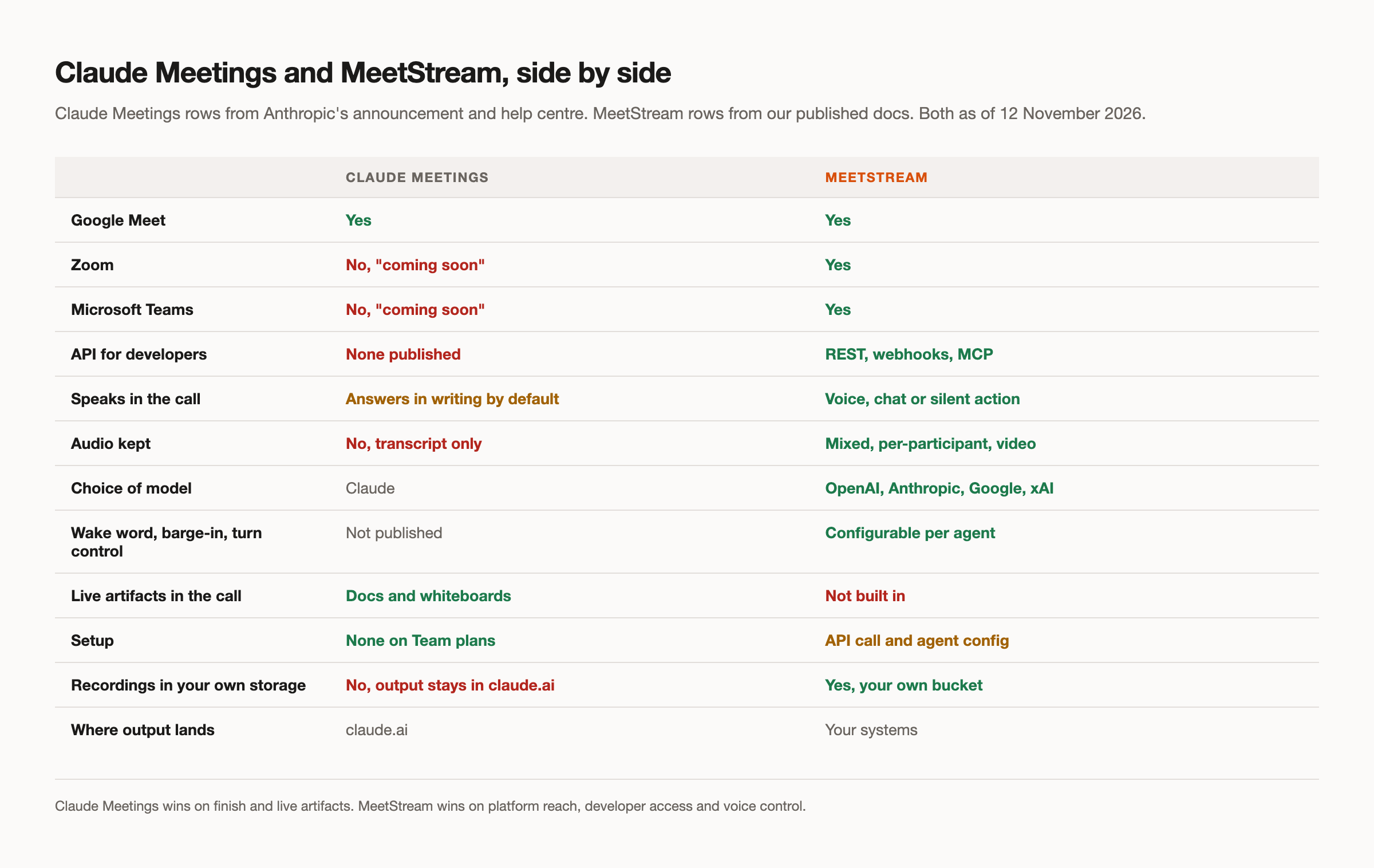
The short reading is that Claude Meetings wins on finish and MeetStream wins on reach and control. If the job fits inside one platform and one workspace, Claude Meetings needs nothing built. If it does not, the comparison stops being close.
Platforms
This is the largest single difference, and it is not a matter of opinion. Claude Meetings supports Google Meet only. Anthropic describes other platforms as coming soon, without naming one or giving a date.
MeetStream joins Zoom, Google Meet and Microsoft Teams from the same API call. You pass a meeting link and the platform is detected from it. The differences between the three grew sharper during 2026. Zoom has required Meeting SDK apps to carry a token minted on behalf of an authorising user since March, but MeetStream needs no Zoom setup: no Zoom app and no tokens. Microsoft gave tenant administrators a switch to block detected external bots. Our platform rules guide covers those changes in detail.
The practical consequence is about who your users are. If everyone you work with is on Google Meet, the gap does not touch you. If a customer, a candidate or a partner sends a Zoom link, it is the whole answer.
How each one listens and speaks
Claude Meetings can be asked questions out loud or in the meeting chat, and by default it answers in writing. It stores a transcript, a summary and descriptions of what was on screen, and explicitly does not keep audio. That is a deliberate choice for a product aimed at internal calls, and it removes a whole category of privacy concern.
MeetStream's in-meeting agent runtime, MIA, offers three response modalities. In audio the agent speaks. In chat it answers in the meeting chat and stays silent. In action it produces no output at all and only runs tools, which suits an agent that should quietly update a CRM or open a ticket from what it hears.
Underneath sit two operating modes. Realtime mode uses one provider for speech recognition, reasoning and speech, for the lowest latency. Supported realtime providers are OpenAI, Google and xAI. Pipeline mode lets you choose each stage separately, at some cost in speed: speech recognition from Deepgram, OpenAI, AssemblyAI or xAI; the language model from OpenAI, Anthropic, Google or xAI; and speech from OpenAI, ElevenLabs or xAI. Provider keys are your own, configured once in the dashboard rather than stored in agent configurations.
The controls that make a voice agent usable
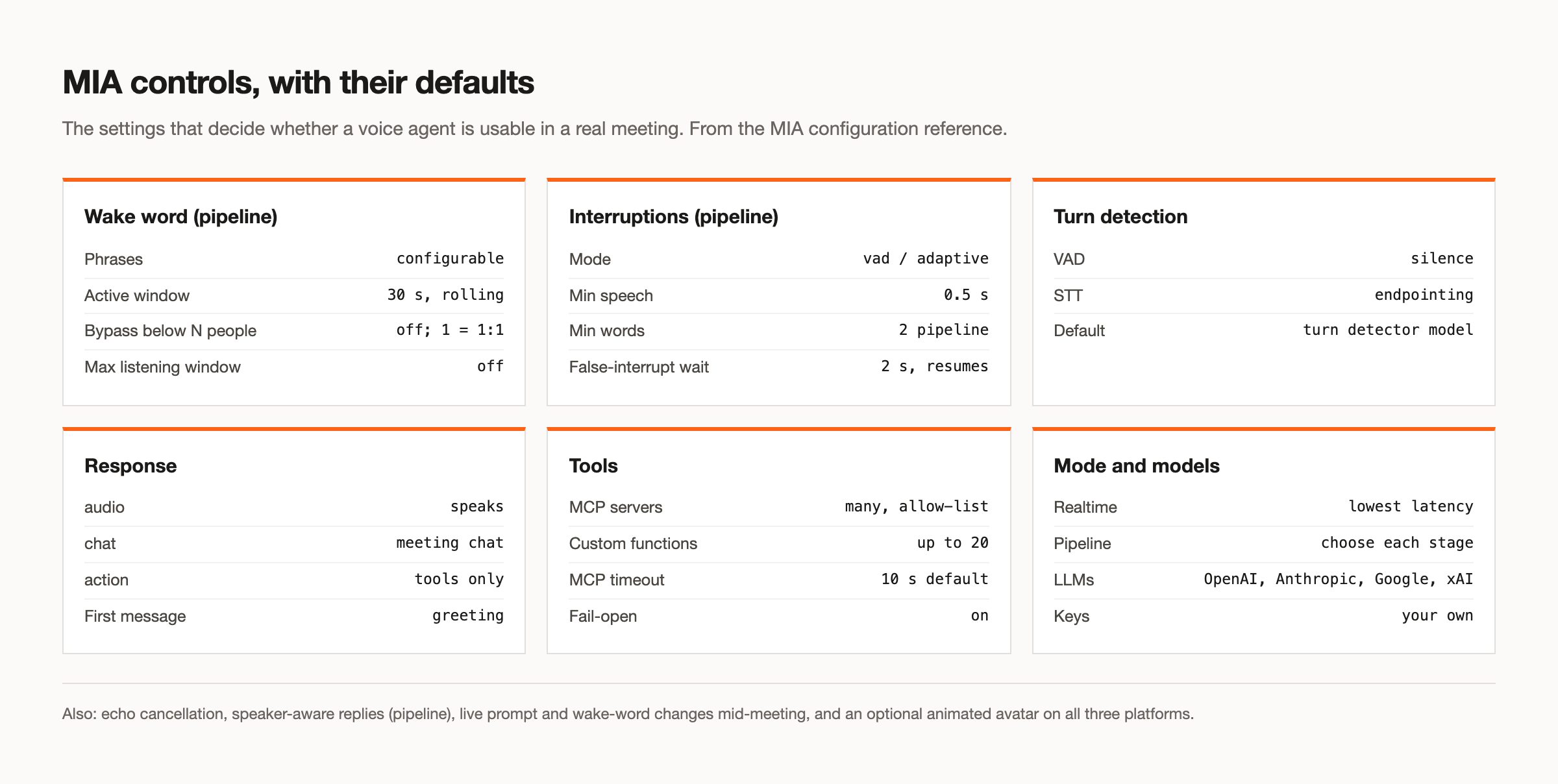
An agent that can speak is easy. An agent that speaks only when it should is the hard part, and it comes down to a handful of controls that most products never expose. These are the ones MIA does.
Wake word gating
In pipeline mode the agent waits for a wake phrase before it listens. You set one or more phrases, and an activation window that defaults to 30 seconds and rolls forward with every new utterance. Two settings make this work in practice. A participant-count bypass turns gating off when the meeting is small, so a one to one call needs no wake word at all, and it reacts live as people join and leave. A maximum listening window puts a hard ceiling on any single session, which matters in a busy shared meeting.
Interruption handling
People talk over agents. In pipeline mode, adaptive interruption handling uses a trained barge-in model to tell a real interruption from backchanneling, so the agent keeps speaking through an "uh-huh" and stops for a genuine question. The thresholds are configurable: a minimum speech duration of half a second, a minimum of two transcribed words in pipeline mode, and a two second window before a noise-triggered interrupt is declared false and the agent resumes speaking.
Turn detection
Deciding when a person has finished talking is its own problem. By default MIA uses a turn detection model, and you can switch to silence-based detection or to the speech provider's own endpointing.
Echo control and speaker awareness
The agent filters out its own voice before processing, with additional suppression while it is speaking and a noise floor on all incoming audio. In pipeline mode, speaker-aware responses, when you turn them on, prefix each utterance with the participant's display name before it reaches the model. We document the limits honestly: attribution is strongest on Zoom, approximate on Google Meet, and uses isolated tracks on Teams where available.
Live changes mid-meeting
While a bot is in a call you can merge new variables, replace the system prompt, and switch wake word gating on or off, without restarting the session. Prompts and greetings accept template variables filled in when the bot is created.
Tools and actions
Claude Meetings uses each person's connected tools with that person's permission, asked the first time and remembered afterwards. It is a clean model, and it suits a workspace where everyone has already connected their own accounts.
MIA connects tools at the agent level, in two ways. Any number of MCP servers, each with its own URL, authentication headers, timeout and an allow-list of the tools the agent may use. If an MCP server is unreachable when the session starts, the agent carries on without those tools rather than failing. Or up to 20 custom functions per agent: any HTTPS endpoint you host, described with a JSON Schema, with automatic retries, a cap on how much of the response reaches the model, and dot-notation extraction of fields for later use.
Two small options do a lot for how a call feels. An agent can speak a short filler line while a slow custom function runs, so the meeting does not go silent. And it can end its turn silently after a pure side effect, such as creating a ticket, rather than announcing it. Our MCP server guide covers the dispatch side of this.
Where Claude Meetings is ahead
A comparison that only lists one side's strengths is not much use, so here is the other side.
It builds things with you. Claude Meetings produces documents and whiteboards during the call that the people on the invite edit together while the conversation continues. MeetStream gives you the raw material and the agent runtime. It does not ship a collaborative document editor, and building one is real work.
It needs nothing built. On a Team plan it is available by default. You add Claude to a meeting and it works. MeetStream is infrastructure: there is an API call to make and, for anything beyond notetaking, an agent to configure.
It lives where your team already works. Notes, action items and artifacts land on a page in claude.ai, and you can go back and ask Claude about a meeting later. That continuity is valuable, and it comes free with the workspace.
If your meetings are internal, on Google Meet, and your team is on a Team or Enterprise plan, those three points probably settle it.
Running Claude itself in Zoom or Teams
Here is the part that surprises people. If what you want is specifically Claude, in a call that is not on Google Meet, you can do that today.
Anthropic is one of the language model providers MIA supports in pipeline mode. Configure a MIA agent with Anthropic as its model, pick a speech recognition and a speech provider, and attach it to a bot. The bot joins a Zoom, Google Meet or Microsoft Teams call, and Claude is doing the reasoning. Model availability depends on what is enabled on your own Anthropic account, since the key is yours.
This is not Claude Meetings. It does not build artifacts in claude.ai, and it is not Anthropic's product. It is Claude as the brain of an agent you configure, running on infrastructure that reaches all three platforms. For many teams that is the thing they were actually looking for. The Claude MCP guide covers the simpler route, where Claude dispatches bots from your chat client instead.
Which to choose
Choose Claude Meetings if your calls are internal, on Google Meet, your team is on a Team or Enterprise plan, and what you want is notes, action items and live artifacts with nothing to set up.
Choose MeetStream if you need Zoom or Microsoft Teams, if the agent belongs inside a product other people use, if it needs to speak with real control over when, if you need the audio, or if your organisation uses a configuration the beta does not cover, such as zero data retention or customer-managed keys, and you want recordings in your own storage.
Plenty of teams will reasonably use both: Claude Meetings for their own planning calls, and MeetStream for the agent they ship. The voice agents page and the documentation go further into MIA, and you can get started free at meetstream.ai.
Frequently asked questions
What is the best Claude Meetings alternative?
It depends on why Claude Meetings does not fit. If the problem is platform coverage, you need something that joins Zoom and Microsoft Teams as well as Google Meet. If it is that the agent has to live inside your own product, you need meeting infrastructure with an API rather than a workspace feature. MeetStream covers both, and can run Claude as the agent's model.
Does Claude Meetings work with Zoom or Microsoft Teams?
Not at launch. The beta supports Google Meet only, and Anthropic has said other platforms are coming without naming one or giving a date. You can run Claude in a Zoom or Teams call today by configuring it as the model behind a MIA agent.
Can Claude speak in a meeting?
Claude Meetings can be addressed out loud, but answers in writing by default. With MIA you can choose spoken replies, chat replies, or silent tool actions, and Anthropic is one of the supported model providers in pipeline mode, so Claude can speak through the bot.
Is MeetStream better than Claude Meetings?
For different jobs, yes and no. Claude Meetings is better at building documents and whiteboards live with your team and needs nothing set up. MeetStream is better when you need Zoom or Teams, need the agent inside your own product, or need fine control over how a voice agent listens, interrupts and speaks.
Does Claude Meetings record audio?
No. According to Anthropic it saves a transcript, a summary and screen descriptions, but not audio. MeetStream provides mixed audio, isolated per-participant tracks and video, with retention you set.


