
AI Meeting Bot Consent: Etiquette for Calls With Guests
Learn AI meeting bot consent basics: what to ask before the call, what a join message says, external guests and data, and how Grok Bot and others show up.

On 13 November 2026, xAI posted that Grok Bot can now join meetings. Within an hour the replies had moved past the feature and onto the room. One person pictured a Teams call with a large, traditional company and the moment you ask if you can add a bot. That moment is what AI meeting bot consent is really about, and most teams have no plan for it.
The question is not new, but the stakes changed this week. Anthropic shipped Claude Meetings on 12 November, xAI followed a day later, and a lot of people now have a capable agent one paste away from any call on their calendar. A notetaker that sits quietly in the corner is one thing. An agent that answers questions, remembers earlier conversations and can be told to do work is a different guest, and people on the other side of the call react to it differently.
Consent here has two layers. There is the legal layer, which depends on where you and your guests are. And there is the etiquette layer: whether people know what the bot is, who sent it, what it keeps and how to get rid of it. This post is practical guidance, not legal advice. Recording consent rules differ by country and, in the US, by state, and some of them require everyone on the call to agree.
In this guide we will cover what consent covers for a meeting bot, how Grok Bot, Claude Meetings and MeetStream identify themselves, what to ask before the call, what to put in a join message, how to handle external guests and their data, and what not to do. Along the way we will answer the questions people asked in the Grok Bot thread. Let's get into it.
Why consent became the first question
Meeting bots have been around for years, mostly as notetakers. People learned to spot them in the participant list, sometimes tolerated them, and sometimes asked the host to remove them. What changed in November 2026 is that two of the biggest assistant products now put an agent into the call as a participant that talks back.
Grok Bot listens, takes notes and answers questions in the meeting chat when someone addresses it by name. xAI's 2 November announcement says Bots "participate through the chat" and bring "information from earlier conversations into the discussion". Claude Meetings joins Google Meet as a visible participant and builds docs and whiteboards while people talk. Our Grok Bot meetings guide covers the Grok side in detail.
That raises the bar for consent. When a bot only records, people mostly worry about the recording. When a bot can answer, people also worry about what it knows, what it will say, and whose instructions it follows. A guest from another company has no way to see any of that unless you tell them.
What AI meeting bot consent actually covers
Start with the legal layer, because it sets the floor. Laws on recording conversations differ by country, and in the United States they differ by state. Some places allow a recording if one person on the call agrees, which can be you. Others require every participant to agree. When a call crosses borders or state lines, the stricter rule is the one to plan for. If your calls involve regulated industries, employees in several countries or recorded customer conversations at scale, ask a lawyer. This post cannot answer that for you.
People often ask whether it matters that the bot only transcribes and does not keep audio. In practice, treat a transcript as a recording of what people said. It captures the same words, it can be searched and shared, and guests rarely see the difference. The safest working assumption is that anything that captures the conversation needs the same notice.
Then there are the rules that are not laws. Meeting platforms have their own terms. Your employer probably has a policy on which tools can join calls. Your customer may have a vendor policy that bans AI notetakers outright. None of these show up in the meeting link, which is why the etiquette layer matters as much as the legal one.
So the short answer to "is it legal to record meetings with an AI bot" is: often yes, with notice and, in some places, with everyone's agreement. The practical answer is to tell everyone in advance, say it again when the bot joins, and make it easy to say no.
How Grok Bot, Claude Meetings and MeetStream identify themselves
All three products put a visible participant in the call. What differs is how much they tell the room, and how much control the person who sent the bot has over that message. The table below is dated, because both assistant products are new and their docs will change.
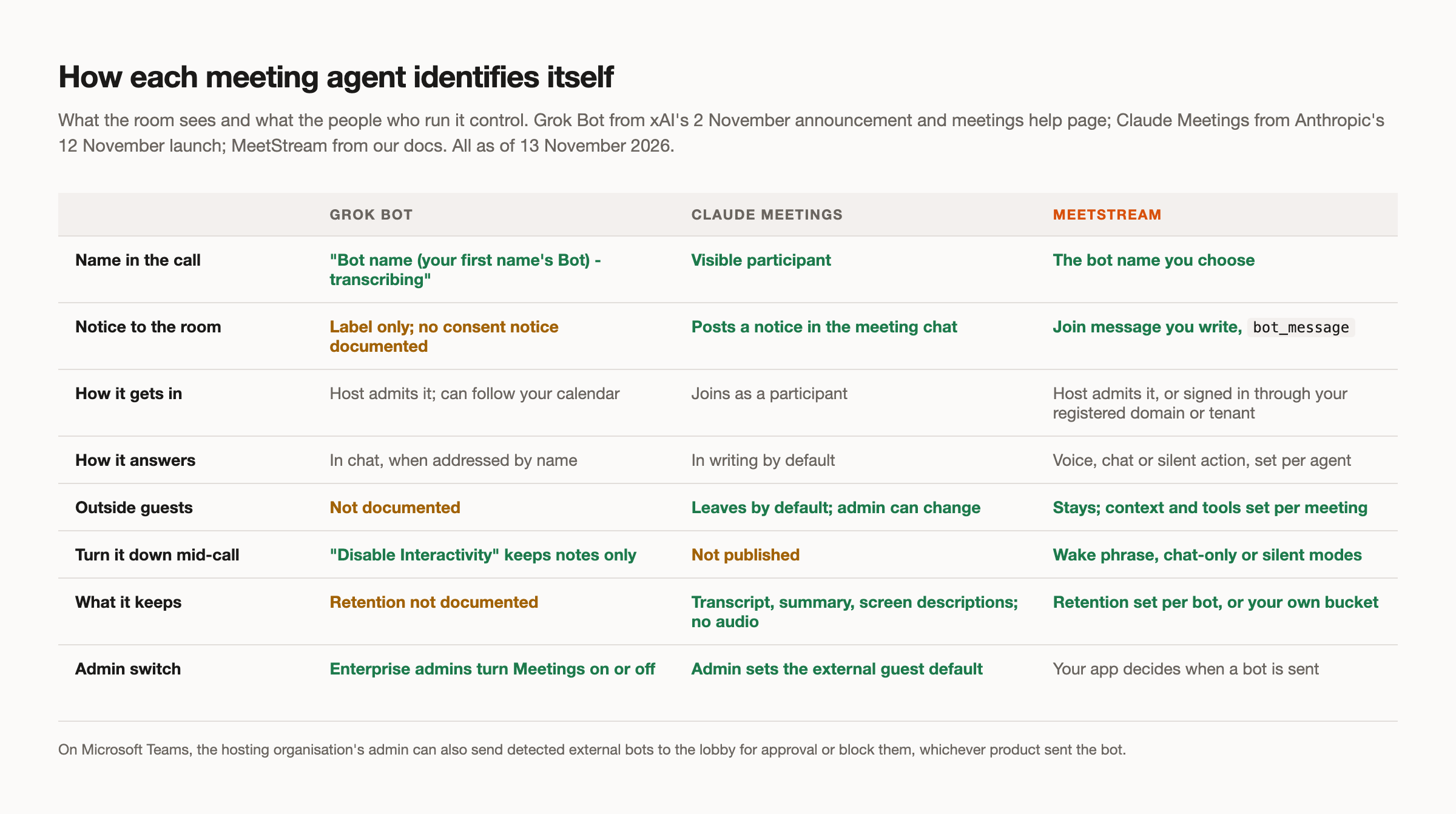
Grok Bot. You paste the meeting link into your chat with the Bot, ask it to join and take notes, and approve the card. The host admits it. In the call it shows as "Bot name (your first name's Bot) - transcribing", or "Bot name (Team Bot) - transcribing" for a Team Bot. That label is useful: it names the bot, ties it to a person and says what it is doing. As of 13 November 2026, the meetings help page does not document a consent or recording notice to participants, or how it handles external participants. A Bot that follows your calendar can also join scheduled meetings on its own, so the host still has to admit it, but you may not have sent it by hand. Our platform guide covers how it behaves on each platform.
Claude Meetings. It joins Google Meet as a visible participant and posts a notice in the meeting chat. By default it stays out of calls with people outside your organisation and leaves if one joins, although the default differs by plan and an admin can change it. That is a conservative default, and for many teams it is the right one. Our page on external guests covers what that means for sales and partner calls.
MeetStream. You choose the bot name, and the bot_message field posts a join message in the meeting chat when the bot joins. If you do not set one, the default is "{bot_name} is here". The bot joins as a guest that the host admits, or signs in through a Google Workspace domain or Microsoft 365 tenant you register for it. Because the name and message are yours, so is the job of making them honest.
Meeting bot etiquette before the call
Most consent problems are solved before the meeting starts. The worst time to ask whether a bot can join is when it is already in the waiting room and ten people are watching.
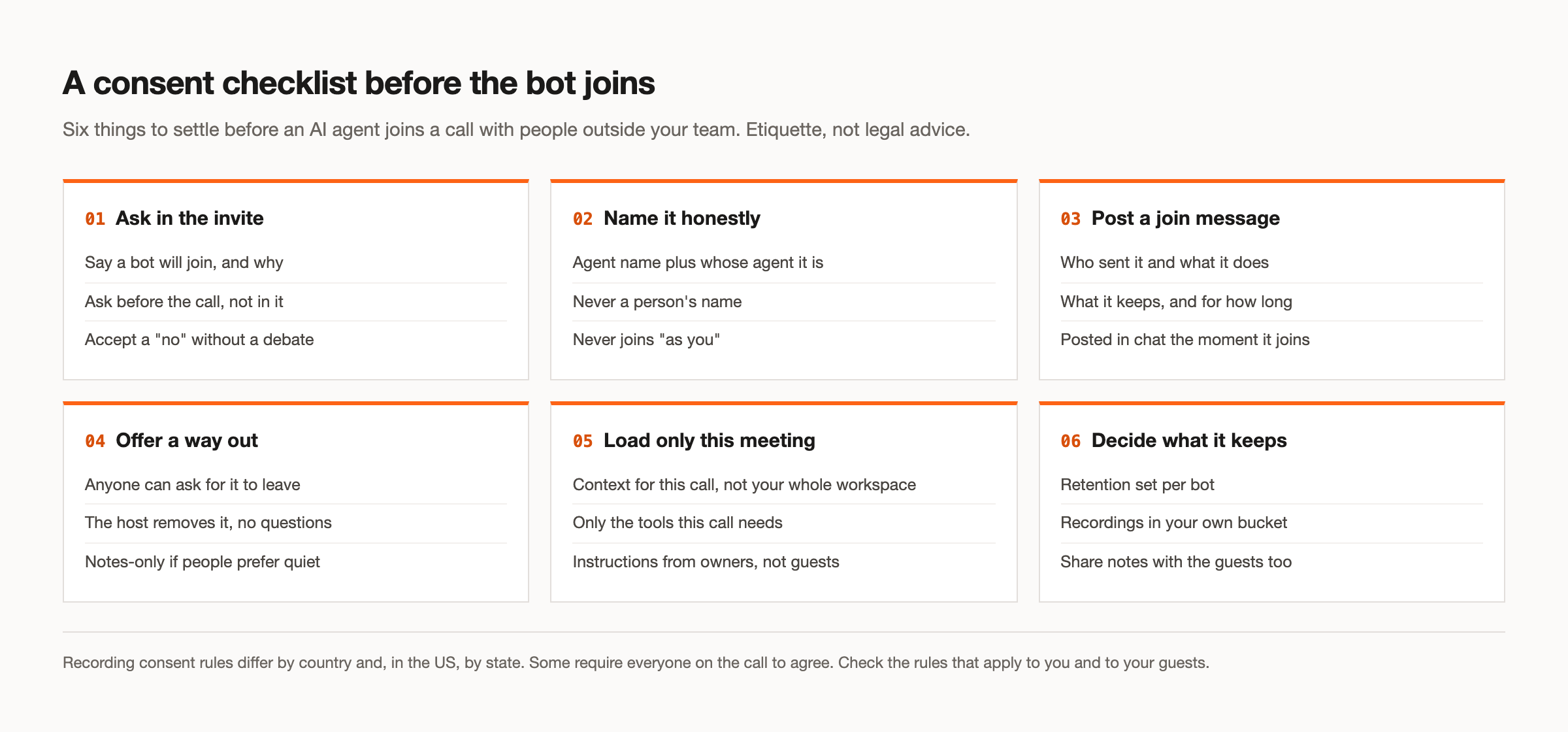
Put it in the invite. One line is enough: an AI notetaker will join, here is what it does, and reply if you would rather it did not. That gives guests time to check their own policy, ask their legal team, or say no without an audience. It also gives you a written record that you asked.
This is the real answer to the Teams call with the large, traditional company. Asking live puts the other side in an awkward spot, and many of them will have a policy that says no. Ask in the invite, expect a no sometimes, and have a fallback ready: you take notes yourself and share them afterwards. Accepting a no gracefully does more for the relationship than any summary will.
For customer and partner calls, also say whose bot it is. "Our notetaker" is clearer than a product name the guest does not know. If the bot will answer questions or take actions during the call, say that too. People accept a quiet notetaker far more readily than an agent that might speak up.
What to put in a join message
The join message is the second notice, for the people who did not read the invite and for anyone who joined late. It should answer four questions in two or three sentences: who sent the bot, what it does, what it keeps and for how long, and how to ask it to leave.
With MeetStream, the name, join message and retention period are set on the create-bot request. Here is a notetaker that names its owner, says what it keeps, and deletes its recording after a day:
curl -X POST "https://api.meetstream.ai/api/v1/bots/create_bot" \
  -H "Authorization: Token <YOUR_API_KEY>" \
  -H "Content-Type: application/json" \
  -d '{
    "meeting_link": "<YOUR_MEETING_LINK>",
    "bot_name": "Atlas (Dana'\''s notetaker)",
    "bot_message": "Hi all, I am Atlas, an AI notetaker sent by Dana. I take notes for this call only, and the recording is deleted after 24 hours. Ask Dana or the host to remove me at any time.",
    "recording_config": {
      "retention": { "type": "timed", "hours": 24 }
    }
  }'
Worth noting: the message should match the configuration. If the join message says 24 hours, the retention period should say 24 hours. If the message says notes only, the agent should not be set up to speak. A join message that promises more restraint than the bot has is worse than no message at all.
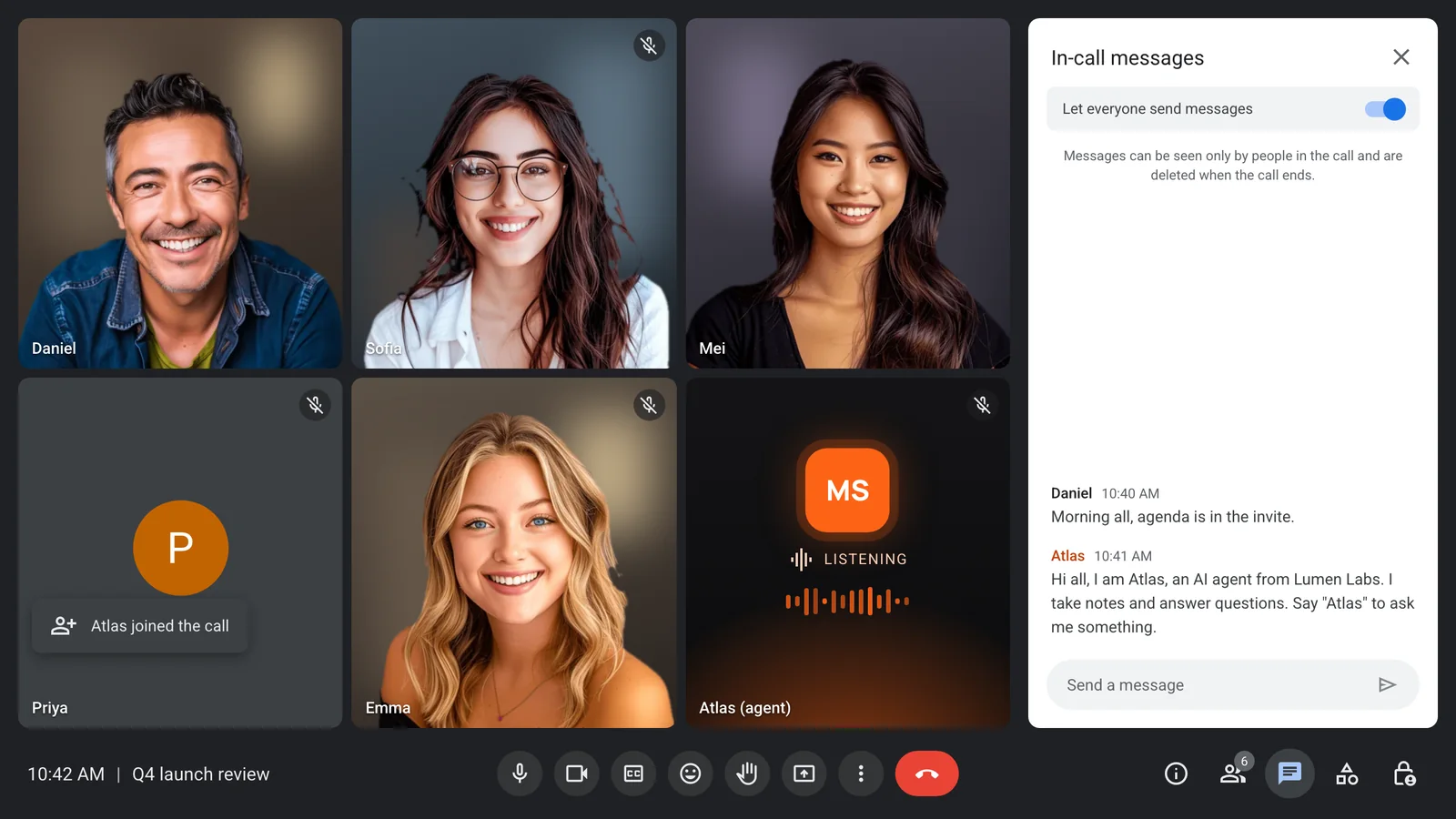
If the agent answers questions, add how to address it. When an agent uses a wake phrase such as its own name, saying so in the join message tells people both how to use it and that it will not jump in uninvited.
Letting people ask the bot to leave
A way out is part of consent. If a guest asks for the bot to leave, the host removes it, without a debate and without asking why. Every platform lets the host remove a participant, and that includes bots. Say this in the join message so nobody has to work out whether it is allowed.
Sometimes people are fine with notes but not with an agent that talks. Grok Bot has a control for this: scheduled meetings appear under "Upcoming", where "Disable Interactivity" keeps notes and stops answering, and "Cancel" or "Quit" takes the Bot out. With MeetStream you choose the reply mode per agent: speak, post in chat, or act silently through tools. A wake phrase limits when it answers at all. And POST /bots/{bot_id}/update_mia can replace the system prompt or switch the wake phrase on mid-call without restarting the bot, if the room asks the agent to hold back.
On the engineering side, handle the exit cleanly. MeetStream sends a bot.stopped webhook with a reason, so your product can record that the bot was removed and stop any follow-up that assumed it stayed.
AI meeting bot consent with external guests
Calls with people from another company are where a meeting agent is most useful and where it needs the most care. Guests did not choose your tools, did not read your data policy, and cannot see what your agent knows. Three principles cover most of it.
Load only what this meeting needs. An assistant that brings memory from your whole workspace into a customer call can surface things the customer should not hear. Grok Bot and Claude Meetings are workspace features: their context comes from your workspace and your connected tools. With MeetStream, context is set per meeting. The system_prompt and first_message accept {{variable}} placeholders that you fill for each bot, so the agent in a renewal call gets that account's notes and nothing else. An allowed_tools list limits which MCP tools it can call. Our post on context control goes deeper.
Take instructions from owners, not guests. An agent in a call with outsiders should not do whatever anyone in the room asks. Grok Bot has a sensible behaviour here: if someone asks for something it held back, it tells you who asked and offers to send it. On MeetStream, speaker_aware_responses (opt-in, pipeline mode) passes speaker names to the model, and a speaker_aware_prompt can tell the agent to act only on named owners and treat everyone else as a guest.
Decide what it keeps. Set a retention period per bot, and if the recordings should stay inside your own infrastructure, write them to your own storage bucket. Tell guests what you keep, and offer to share the notes with them. Our security page covers how data is handled.
Microsoft Teams admins can block detected bots
Teams gives the hosting organisation a say, whatever product sent the bot. The Teams meeting policy has an ExternalBotAccessMode setting with three values, per Microsoft's documentation read on 13 November 2026. AllowAllBots treats bots like other participants. RequireApprovalWhenDetected, the default, sends detected bots to the lobby for approval regardless of the meeting's lobby setting. BlockDetectedBots keeps detected external bots out entirely.
For etiquette, the takeaway is simple: on a large company's Teams call, their admin may have already answered the question for you. If your bot sits in the lobby, that is not a bug to work around. Ask the host, and accept the answer.
What not to do
Do not impersonate a person. A bot named after you, or after a colleague, misleads everyone in the room. The name should say it is an agent and whose agent it is. Grok Bot's label does this by design, and when you choose the name yourself you should do the same.
Do not join "as me". One reply in the thread wished it could join the meeting as them for a daily standup. The honest version of that is fine: an agent named as yours that posts your update in the chat and takes notes for you. Grok Bot joins as your Bot, not as you, and MeetStream bots join under the name you give them. An agent that pretends to be you, speaks as you or answers as you is where it stops being a shortcut and becomes deception.
Do not hand a customer to an unsupervised agent. Another reply asked for a bot to join and respond to their difficult customer. An agent answering a customer is a customer communication with your company's name on it. If you build that, label it clearly, scope what it can say, keep it to chat so the answer is on the record, and do not let it make commitments a person has not approved.
Do not let it make attendance decisions quietly. Someone asked whether it can decline meetings too. As of 13 November 2026, the Grok Bot meetings help page does not describe declining invitations; what it documents is cancelling the Bot's own attendance. Whatever tool you use, a decline sent on your behalf should say that an assistant sent it.
When everyone brings a bot
"Cool, everyone wants a seat in your meetings now," one reply said, and another predicted that the future of corporate communication will be bot to bot. Both are already partly true. A call with four companies can easily carry four notetakers, each recording the same conversation into four different systems.
A few norms help. Agree on one notetaker per meeting and share its notes, rather than stacking bots. When both sides bring an agent, both should announce themselves, and the hosts should decide which one keeps the record. And bots can exchange information, but people should still make the decisions. A meeting where two agents negotiate while the humans watch has lost its purpose.
The host is the natural owner of this. They admit participants, they can remove them, and on Teams their admin can set a policy. If you host, it is reasonable to say in the invite how many bots you will accept.
Where MeetStream fits
If you want an agent in your own team's calls, Grok Bot and Claude Meetings are the easier choice. There is no setup, they live inside a workspace you already pay for, and Claude Meetings' default of leaving when outside guests join is a careful choice for internal tools.
MeetStream fits when the agent lives inside a product you are building, across Zoom, Google Meet and Microsoft Teams, and you need the consent behaviour to be yours to set. You choose the bot name and join message, the context and tools for each meeting, whether it speaks, chats or stays silent, how long recordings are kept and where they are stored. The integration layer page shows how those pieces fit together.
That control cuts both ways. A tool that lets you write the join message also lets you write a bad one. The checklist above is how we would use it.
Getting consent right
AI meeting bot consent comes down to a few habits. Know the recording rules for where you and your guests are, and when in doubt plan for everyone's agreement. Ask in the invite. Name the bot honestly and post a join message that matches what it does. Make leaving easy. With external guests, load only that meeting's context, take instructions only from the people who own the bot, and keep data only as long as you need it.
None of this is hard, and all of it makes the bot more welcome the next time. If you are building an agent that joins calls with other people's customers and partners, get started free at meetstream.ai.
Frequently asked questions
Is it legal to record a meeting with an AI bot?
It depends on where you and the other participants are. Recording laws differ by country and, in the US, by state, and some require everyone on the call to agree. This is not legal advice; for regulated or cross-border calls, ask a lawyer and plan for the strictest rule that applies.
Do I need consent to use an AI notetaker?
In many places you need at least notice, and in some you need everyone's agreement. Treat a transcript the same as a recording. The practical approach is to mention the notetaker in the invite, post a join message when it arrives, and remove it if anyone asks.
Should I tell people an AI is in the meeting?
Yes. Give the bot a name that says it is an agent and whose it is, mention it in the invite, and post a short join message covering what it does, what it keeps and how to ask it to leave. People accept a bot they were told about far more readily than one they discover.
Can Microsoft Teams block meeting bots?
Yes. The Teams meeting policy setting ExternalBotAccessMode lets the hosting organisation's admin allow bots, send detected bots to the lobby for approval, which is the default, or block detected external bots. This applies to bots from any product joining that organisation's meetings.
Can an AI bot join a meeting as me?
Grok Bot joins as your Bot, labelled with your first name, not as you, and a MeetStream bot joins under the name you give it. Do not name a bot after a person or have it speak as you. An agent that posts your update under its own name is fine; one that pretends to be you is not.


