
Best Meeting Bot API for Startups: Pricing and Free Tiers Compared

The best meeting bot API for startups is one with predictable pricing that scales, a single integration for Zoom, Google Meet, and Microsoft Teams, and an architecture designed for building interactive AI agents. For an early-stage team, choosing the right API is critical. You need to ship product features, not manage complex infrastructure or get surprised by a usage-based bill.
This choice often comes down to two platforms: MeetStream and Recall.ai. Both provide APIs to get bots into meetings for recording and transcription. But their underlying philosophies, API designs, and pricing models are different. MeetStream is built as agent-first voice infrastructure, where bots are active participants that can hear, speak, and act in real time. This contrasts with APIs designed primarily for passive, post-call recording and data extraction.
A startup building an AI notetaker has different needs than one building a live sales coach or a voice-controlled agent. This article directly compares MeetStream and Recall.ai on the factors that matter most to a startup: pay-as-you-go pricing, free tiers for development, and the technical capabilities that determine what you can build. We will look at the exact costs and API differences to help you decide.
Why Startups Need a Meeting Bot API
An early-stage startup runs on meetings. Sales demos, customer support calls, investor updates, and daily stand-ups create a constant stream of information. Without a system, critical context gets lost. Decisions made on a Tuesday call are forgotten by Friday, and valuable customer feedback from a demo never makes it into the product roadmap. Startups can't afford a dedicated operations team to manually take notes and track action items.
The goal is to turn unstructured conversations into structured, searchable data automatically. Native platform recordings from Zoom or Google Meet are a start, but a folder of video files is not a solution. No one has time to re-watch hours of meetings. What a startup actually needs is an automated system that produces structured summaries, tracks action items, and extracts customer feedback without manual work.
A meeting bot API is the foundational layer for this system. It handles the difficult infrastructure problem of getting a programmatic participant into a call on any major platform. Instead of building and maintaining separate, brittle integrations for Zoom, Google Meet, and Teams, you use a single API. This lets your developers focus on the application logic that delivers value, like NLP for summarization or integrations with your CRM and project management tools.
Pricing Comparison: MeetStream vs. Recall.ai
For a startup, predictable cost is essential. Both MeetStream and Recall.ai offer pay-as-you-go pricing, but the rates and what they include are different. This directly impacts your burn rate as you scale from a few internal test calls to hundreds of customer meetings.
MeetStream's pricing is built for scalable use. The base rate is $0.35 per hour, prorated to the second. At higher volumes, this rate drops to $0.25 per hour. An optional in-house transcription provider is available as a $0.10 per hour add-on. Every plan includes 30 days of recording storage for free, which is usually sufficient for processing and analysis before archiving to your own storage.
Recall.ai's pay-as-you-go rate is $0.50 per hour. Transcription is an additional $0.15 per hour. Recording storage is included for 7 days, after which it costs $0.05 per hour. This model can be effective for very low usage, but the costs for storage and the higher base rate become more significant as your meeting volume increases.
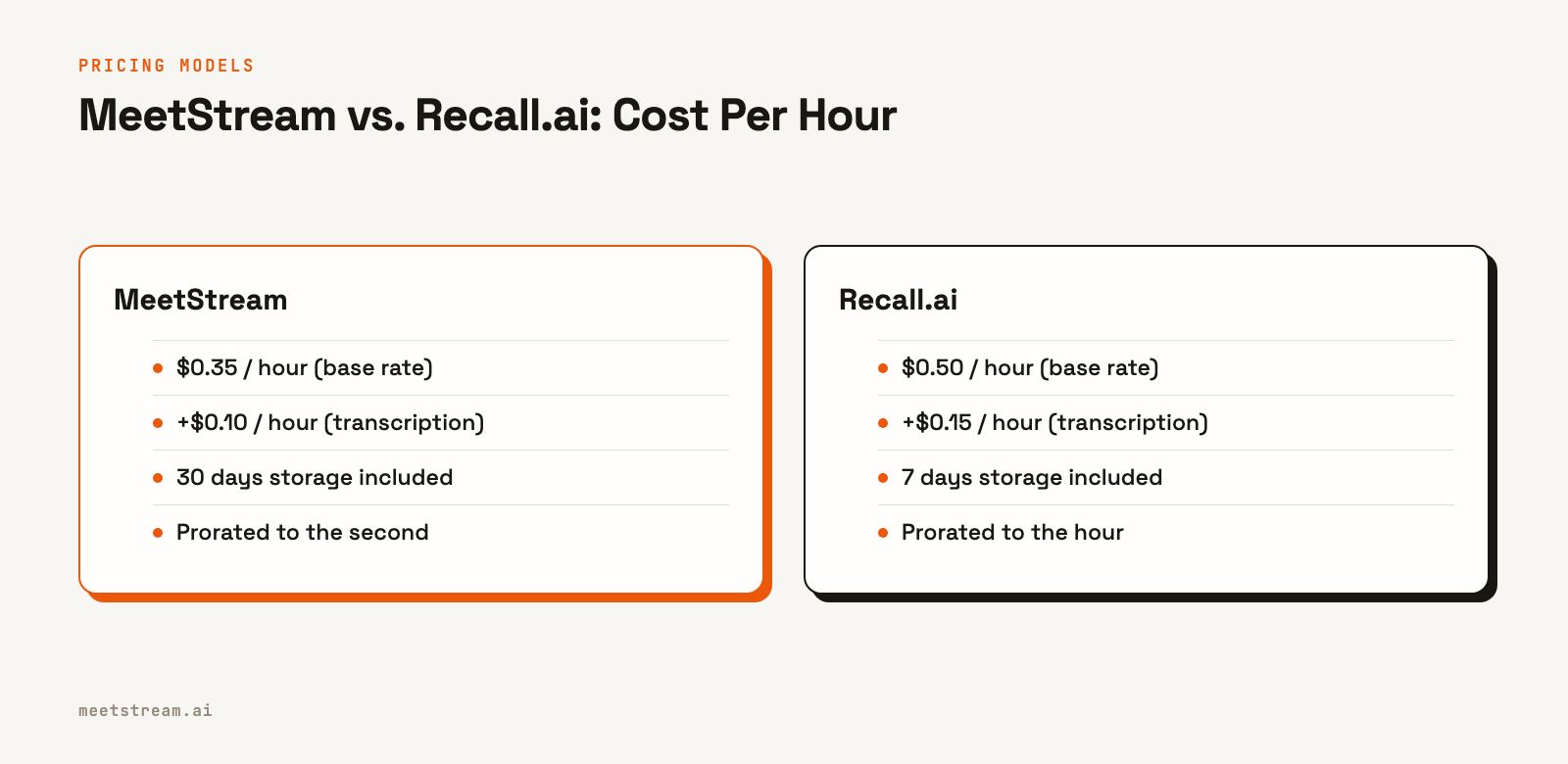
The key difference is the all-in cost at scale. A startup running 100 hours of transcribed meetings per month would see a clear cost difference based on these rates. MeetStream's per-second billing also means you only pay for the exact duration of your meetings, which avoids paying for a full hour when a bot is only in a call for 25 minutes.
Free Tiers and Getting Started
Getting started without a large upfront commitment is important. Both platforms provide a way to build and test for free, but they approach it differently.
Recall.ai offers the first 5 hours of recording free. This is a generous starting credit for developers experimenting with a new idea or building a small-scale internal tool. It provides enough time to build a proof-of-concept and process a handful of real meetings.
MeetStream provides $5 of starting credit, with no credit card required to sign up. This is enough for over 14 hours of bot usage at the standard rate, allowing for significant development and testing before you need to add a payment method. The focus is on providing enough runway to build and test a production-ready application that is expected to scale beyond a few hours.
The choice here depends on your goal. For a weekend project or a very low-volume internal tool, Recall's free hours may be sufficient. For a startup planning to build a commercial product, MeetStream's credit and lower ongoing rates provide a more sustainable cost structure after the initial testing phase.
Technical Tradeoffs: API Design and Flexibility
Beyond price, the API's architecture determines what you can build. The main distinction is between a passive recording API and an active agent API.
Recall.ai offers broad platform support, including Zoom, Google Meet, Teams, Webex, GoTo Meeting, and Slack Huddles. This is an advantage if you need to support many conferencing tools. Its API is primarily focused on scheduling a bot to join, record, and deliver post-call data like transcripts and recordings.
MeetStream focuses on the core platforms, Zoom, Google Meet, and Teams, with an API designed for real-time interaction. This is what we mean by agent-first. You can get a live audio stream from the meeting over a WebSocket by setting the live_audio_required parameter. To make the bot act, you use a separate control WebSocket, enabled via socket_connection_url, to make it speak using text-to-speech (TTS). Sending chat messages is done via a simple POST request to the REST API.
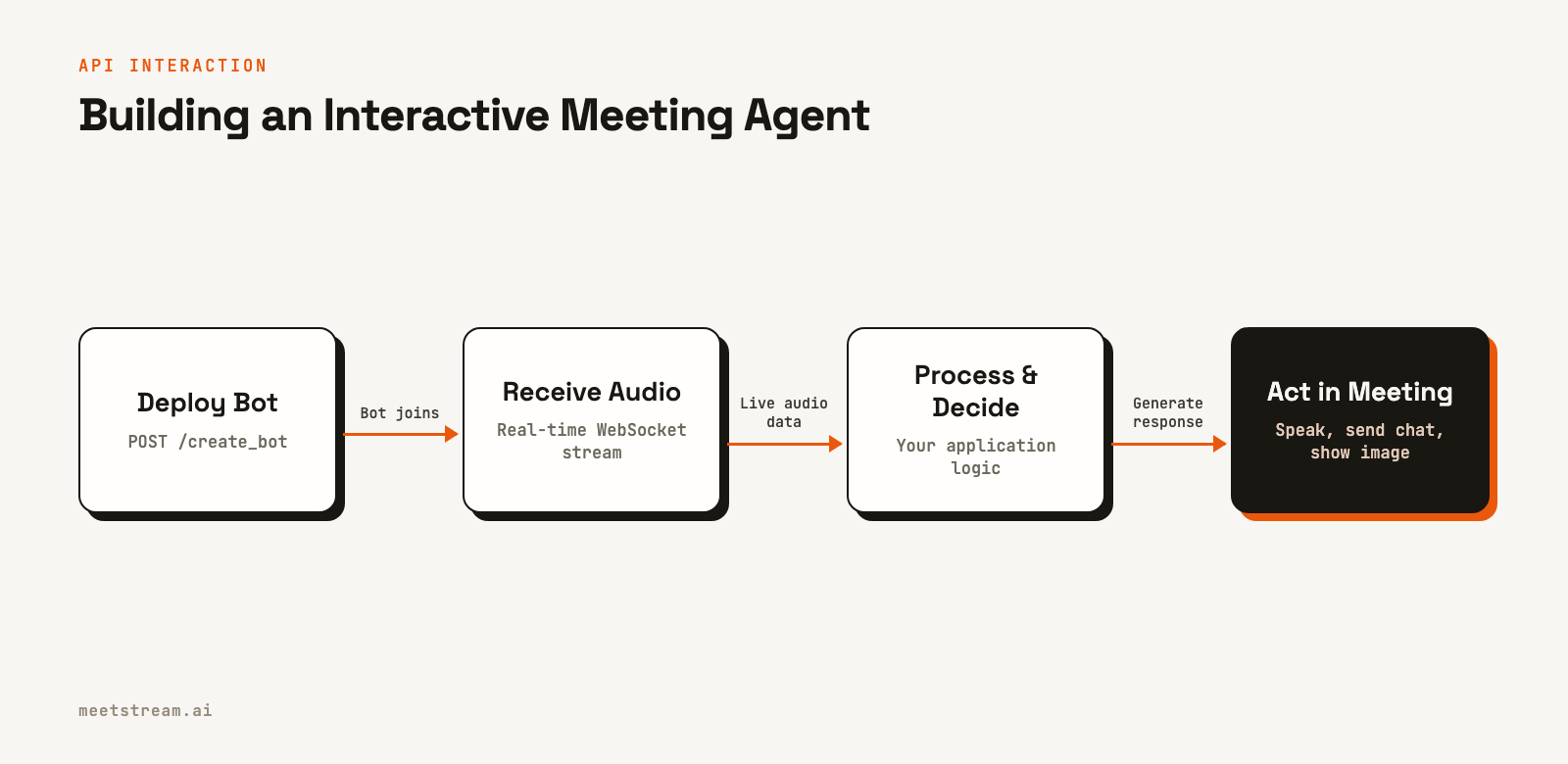
This architecture is designed for building interactive agents that can respond to events during a live call. For example, a sales coaching bot could detect a keyword in the real-time transcript and post a helpful link in the chat. This is more difficult to achieve with an API designed for post-call data delivery.
Another key technical detail is per-participant audio. MeetStream provides fully isolated audio streams for each participant on Zoom, and speaker-attributed streams on Google Meet and Teams. This is critical for high-accuracy speaker diarization. Recall.ai offers per-participant audio behind a feature flag, with a mixed stream as the default.
How MeetStream is Built for Startups
MeetStream is designed to be the infrastructure layer for startups building the next generation of AI meeting products. Our focus is on providing a simple, scalable, and powerful API for creating interactive agents.
The developer experience is streamlined. For Google Meet and Microsoft Teams, no platform-specific setup is needed. For Zoom, you configure a Zoom Marketplace app once. We handle complexities like Zoom's On-Behalf-Of (OBF) token flow, where you provide a URL and our infrastructure fetches the short-lived token at join time. This keeps sensitive user credentials out of your system.
You can deploy a bot with a single API call:
curl -X POST "https://api.meetstream.ai/api/v1/bots/create_bot" \
  -H "Authorization: Token <YOUR_API_KEY>" \
  -H "Content-Type: application/json" \
  -d '{
    "meeting_link": "<YOUR_MEETING_LINK>",
    "bot_name": "AI Assistant",
    "callback_url": "https://your-app.com/webhooks/meetstream"
  }'
From there, you can build simple post-call summary workflows or complex, real-time conversational agents using our MIA agent platform. The pricing model is transparent and scales predictably, so you can focus on your product, not your infrastructure bill. We've processed over 1,000,000 meeting minutes and run approximately 80,000 bots, hardening the platform for production workloads.
Conclusion: Choosing the Right API for Your Product
Choosing the best meeting bot API for your startup depends on what you are building. If your product requires passive recording across the widest possible range of meeting platforms and your volume is very low, Recall.ai's broad support and 5 free hours are a good starting point.
However, if you are building an interactive AI agent, need real-time audio for live analysis, or plan to scale your service to a meaningful number of users, MeetStream is the more logical choice. The agent-first API design, simpler scaling costs, and reliable infrastructure provide a stronger foundation for building ambitious meeting-based products. The core mission is to give you the tools to create bots that are active, helpful participants, not just silent recorders.
See the full API reference at docs.meetstream.ai.
Related guides
- Best Meeting Bot API for Startups (2026)
- Meeting Bot API for Zoom, Google Meet & Teams
- Google Meet Bot API
- Microsoft Teams Bot API
Frequently Asked Questions
What is the most affordable meeting bot API for a startup?
For startups expecting to scale beyond a few hours per month, MeetStream is generally more affordable. Its pay-as-you-go rate of $0.35/hour (plus $0.10/hour for transcription) is lower than Recall.ai's $0.50/hour (plus $0.15/hour for transcription), and its per-second billing is more precise.
Can I build a real-time sales coaching tool with these APIs?
Yes, but an agent-first API like MeetStream is better suited for this. Building a real-time tool requires low-latency audio streaming and the ability for the bot to speak or send messages during the call, which are core features of the MeetStream API via WebSockets and REST endpoints.
How much engineering work is required to integrate a meeting bot API?
Basic integration is straightforward with either API. You can deploy a bot and receive a post-call transcript with a few API calls. Building a full application with features like automated summaries and action item tracking requires more work, but the API handles the core infrastructure of joining and recording the call.
Do I need to handle OAuth for Zoom, Google, and Microsoft?
With MeetStream, you do not need to manage user-level OAuth tokens for all platforms. For Zoom, you set up a single Marketplace app and can use our OBF token flow to authorize joins. For Google Meet and Teams, bots can join directly via a meeting link with no additional setup.
Which API is better for a simple transcription and recording service?
Both APIs can provide reliable transcription and recording. Recall.ai's support for more platforms may be an advantage if you need to cover niche providers. MeetStream offers a competitive, integrated transcription option and a simpler pricing model as your storage needs grow.


