
Zoom vs Teams vs Google Meet for Developers: API Capability Comparison

Building an AI agent that works across Zoom, Microsoft Teams, and Google Meet requires three separate, complex integrations. Each platform offers a different API, a different authentication model, and a different method for accessing real-time media. This forces developers to maintain distinct codebases and navigate platform-specific limitations just to ship a single feature.
This fragmentation is a significant barrier for any team building AI notetakers, sales coaching tools, or in-meeting voice agents. The core challenge is not just joining a call, but getting reliable, low-latency access to the audio, video, and metadata needed to power an intelligent application. As AI moves from post-call analysis to real-time interaction, the need for a consistent developer experience across these platforms has become critical.
The API landscape for meeting automation is defined by the native capabilities each platform exposes. Zoom provides a dedicated Software Development Kit (SDK), Microsoft Teams integrates through its Graph API, and Google Meet offers no official bot framework at all, forcing developers to use standard web clients. Understanding these fundamental differences is key to choosing the right integration strategy.
This guide compares the developer APIs for Zoom, Microsoft Teams, and Google Meet. We will cover media access, bot architecture, authentication, and the practical tradeoffs of building on each platform. Let's get into it.
Why Meeting APIs Are So Fragmented
The differences in the Zoom vs Teams vs Google Meet API capabilities are not accidental. They reflect each company's history and strategic focus. Zoom began as a video-first company and built a developer ecosystem around its core product with the Zoom Meeting SDK. This gives developers deep access to the meeting client itself, including raw media streams.
Microsoft Teams, by contrast, is an extension of the Microsoft 365 ecosystem. Its developer story is centered on the Microsoft Graph API, a unified endpoint for accessing data across the entire suite of Microsoft products. For developers, this means meeting automation is treated as one part of a much larger enterprise surface, requiring familiarity with Azure Active Directory and a more complex, permissions-based access model.
Google Meet evolved from consumer products like Hangouts and is tightly integrated with Google Workspace. It has historically been the least open of the three, with no official API for third-party bots to join meetings or access real-time media. Developers are often forced to build solutions using headless browsers that act like regular users, an approach that is functional but can be unstable.
Core Architectures for Meeting Bots
A meeting bot's architecture is dictated by the entry point the platform provides. In practice, this means there are three primary models for getting a bot into a call to capture data or interact with participants.
Zoom's model is the most direct. Developers use the native Meeting SDK, which is a library that handles the WebRTC connection and media processing. You can run this SDK on a server, and it joins a meeting much like a standard client, giving you programmatic control over audio and video. This provides a stable and well-documented path for building bots.
The Microsoft Teams approach uses the Graph API to create a `call` resource and connect it to a meeting. The bot itself is an application hosted on a server, typically on Azure, that must handle real-time media protocols. While powerful, this requires a significant amount of infrastructure setup and a deeper understanding of the Microsoft ecosystem.
For Google Meet, the most common method is to use a headless browser controlled by a framework like Puppeteer or Selenium. The bot joins the meeting by navigating to the meeting URL in the browser, just as a human user would. This approach can be brittle, as changes to the Google Meet web interface can break the bot's ability to join or interact with the meeting controls.
API Comparison: Media Access and Authentication
For developers building AI agents, the most important API feature is access to clean, real-time media streams. Here, the differences between platforms are stark, especially when it comes to multi-speaker audio.
Real-Time Audio
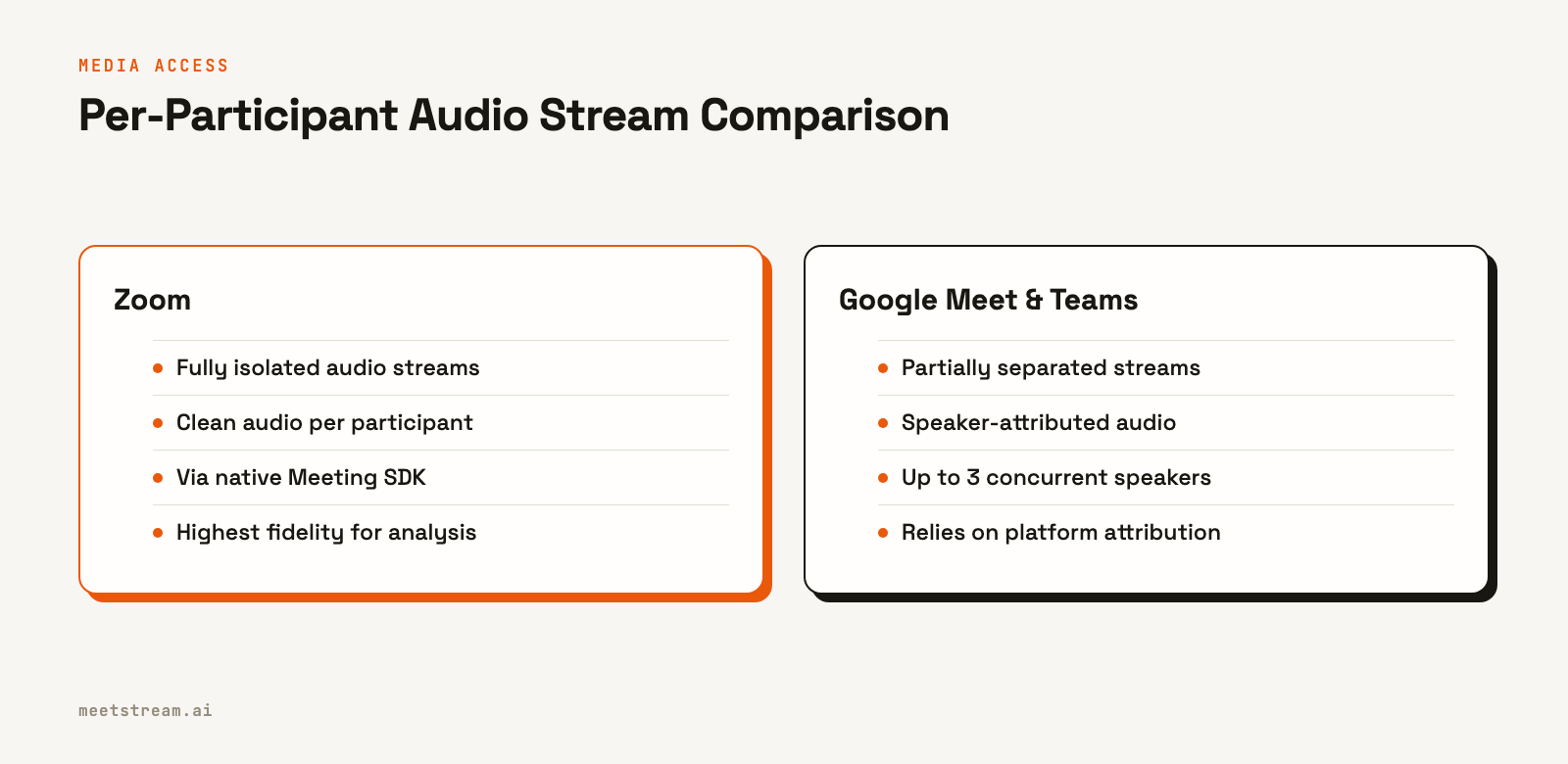
Accessing per-participant audio is critical for accurate speaker diarization and analysis. Zoom is the only platform that provides fully isolated audio streams for each participant through its Meeting SDK. This means you get a separate, clean audio track for every person in the meeting, which is ideal for high-fidelity transcription and voice analysis.
Microsoft Teams and Google Meet offer a more limited form of this. They provide speaker-attributed audio, which is a mixed stream that includes metadata indicating who is speaking at any given time. This works for up to three concurrent speakers but is not a true multi-track recording. It is a significant improvement over a single mixed stream but lacks the precision of Zoom's isolated tracks.
Authentication and Setup
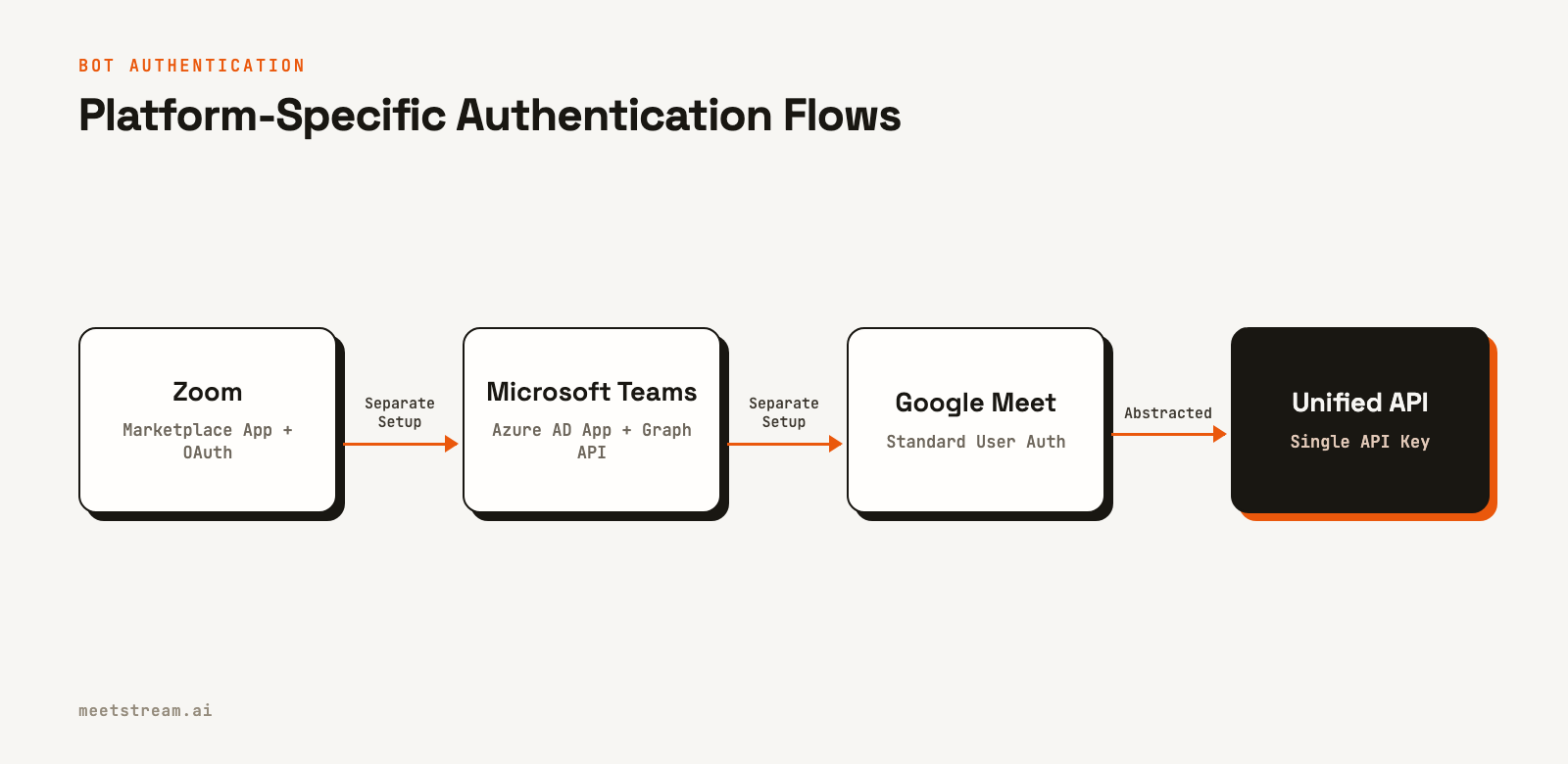
Getting a bot authorized to join a meeting is another area with major differences. Zoom requires creating a Zoom App Marketplace application and implementing an OAuth 2.0 flow. Since a recent platform update, bots must join on behalf of an authenticated user already in the meeting, using a short-lived On Behalf Of (OBF) token. This adds security but also increases implementation complexity.
Microsoft Teams requires registering an application in Azure Active Directory and granting it specific Graph API permissions, such as `Calls.JoinGroupCall.All`. This is a familiar process for developers in the Microsoft ecosystem but can be a steep learning curve for others. All bot activity is managed through this centralized Azure application.
Google Meet has no formal bot authentication. A bot joins as a standard user, typically using a service account or a regular Google account. This is simpler to start with but lacks the security controls and programmatic management of the other platforms. It also means the bot often has to be manually admitted from the lobby.
Developer Experience and Webhooks
Beyond media access, the overall developer experience, including documentation, SDKs, and event notifications, shapes how difficult it is to build and maintain a reliable integration.
Zoom offers the most mature developer experience. Its documentation is extensive, and the SDKs are generally stable. The platform provides a rich set of webhooks for lifecycle events, such as `meeting.started`, `participant.joined`, and `recording.completed`. These are configured easily through the app marketplace dashboard.
Microsoft's developer resources are complete but vast. Finding the specific information for Teams meeting bots within the larger Graph API and Azure documentation can be challenging. Webhooks are available as "change notifications" through the Graph API, which are powerful but require a subscription model where you must periodically renew your subscription to keep receiving events.
The developer experience for Google Meet is largely community-driven. Since there is no official bot API, there is no official documentation or SDK. Developers rely on open-source libraries and shared knowledge. For event notifications, you can use the Google Workspace Events API to get limited information about meetings, but this requires a paid Workspace account and does not provide real-time, in-meeting events.
Tradeoffs and What to Watch For
When building directly on these platforms, each comes with its own set of operational challenges. For Zoom, the complexity of managing OBF tokens and the infrastructure to run the Meeting SDK at scale are the primary obstacles. You are responsible for managing the servers that run the bot instances.
With Microsoft Teams, the main challenge is the dependency on the Windows Server ecosystem for the real-time media platform SDK and the general complexity of Azure AD configuration. It is a powerful but opinionated environment that may not fit every team's tech stack.
For Google Meet, the biggest risk is reliability. Because bot integrations rely on reverse-engineering the web client, any change Google makes to its front end can break your application without warning. This makes it difficult to build a production service on top of it.
How MeetStream Fits In
Handling the differences in the Zoom vs Teams vs Google Meet API is a significant engineering effort. MeetStream provides a unified API that abstracts this complexity. Instead of building and maintaining three separate integrations, you can send a bot into any meeting on any of the three platforms with a single API call.
MeetStream manages the platform-specific authentication, media handling, and scaling infrastructure. You interact with a consistent API to receive low-latency audio and video streams, get real-time transcriptions, and send commands to the bot. In practice, this means you can focus on your application's core logic instead of meeting infrastructure.
Here is how you would send a bot to any meeting URL:
curl -X POST "https://api.meetstream.ai/api/v1/bots/create_bot" \
  -H "Authorization: Token <YOUR_API_KEY>" \
  -H "Content-Type: application/json" \
  -d '{
    "meeting_link": "<YOUR_MEETING_LINK>",
    "bot_name": "My AI Assistant",
    "live_audio_required": {
      "websocket_url": "wss://your-server.com/audio"
    }
  }'
This call instructs MeetStream to deploy a bot that streams real-time audio directly to your WebSocket server, regardless of whether the `meeting_link` is for Zoom, Teams, or Google Meet.
Conclusion
Choosing the right platform to build on depends on your specific needs. Zoom offers the most powerful and direct API for media access, making it the best choice for applications that require high-fidelity, per-participant audio. Microsoft Teams provides deep integration with the Microsoft 365 ecosystem, ideal for enterprise applications already built on Azure. Google Meet remains a challenging environment for developers due to its lack of an official bot API.
For teams that need to support users across all three platforms, the engineering overhead of managing separate integrations is substantial. A unified meeting bot API can simplify development, allowing you to build your product once and deploy it anywhere. The key takeaway from comparing the Zoom vs Teams vs Google Meet API is that there is no single native solution, and a successful strategy requires navigating a fragmented landscape.
See the full API reference at docs.meetstream.ai.
Related guides
- AI Voice Agents for Zoom, Meet and Teams
- Real-Time Audio Streaming API: Live Meeting Audio over WebSocket
- Meeting Bot API for Zoom, Google Meet & Teams
Frequently Asked Questions
Which is better for developers, Zoom or Teams?
Zoom is generally considered more developer-friendly for building standalone meeting bots due to its dedicated Meeting SDK and straightforward webhook system. Teams is more powerful if you are building an application that needs deep integration with the broader Microsoft 365 ecosystem, but it comes with the complexity of Azure AD and the Graph API.
Does Google Meet have an API for bots?
No, Google Meet does not have an official API for third-party bots to join meetings or access real-time media. Developers typically use headless browser automation to have a bot join as a standard participant, which can be unreliable as it depends on the web interface not changing.
Can a bot get per-participant audio from all platforms?
Only Zoom's Meeting SDK provides fully separate, isolated audio streams for each participant. Microsoft Teams and Google Meet can provide speaker-attributed audio, which identifies the active speaker on a mixed stream, but this is not the same as a true multi-track recording.
What is the hardest part of building a meeting bot?
The most difficult challenge is reliably accessing real-time, low-latency media streams at scale across multiple platforms. Each platform has a different method for media capture, authentication, and error handling, which requires significant investment in specialized infrastructure and maintenance.


