
Zoom OAuth 2.0 Explained for Developers: JWT vs OAuth, ZAK, and OBF Tokens

The main challenge with Zoom OAuth 2.0 is that it is not one system. It is a collection of at least six distinct credential types, from OAuth tokens and client secrets to Meeting SDK JWTs, ZAKs, and the now-required OBF token. None work interchangeably, and it is not always clear from Zoom's documentation why you need more than one to build a simple meeting bot.
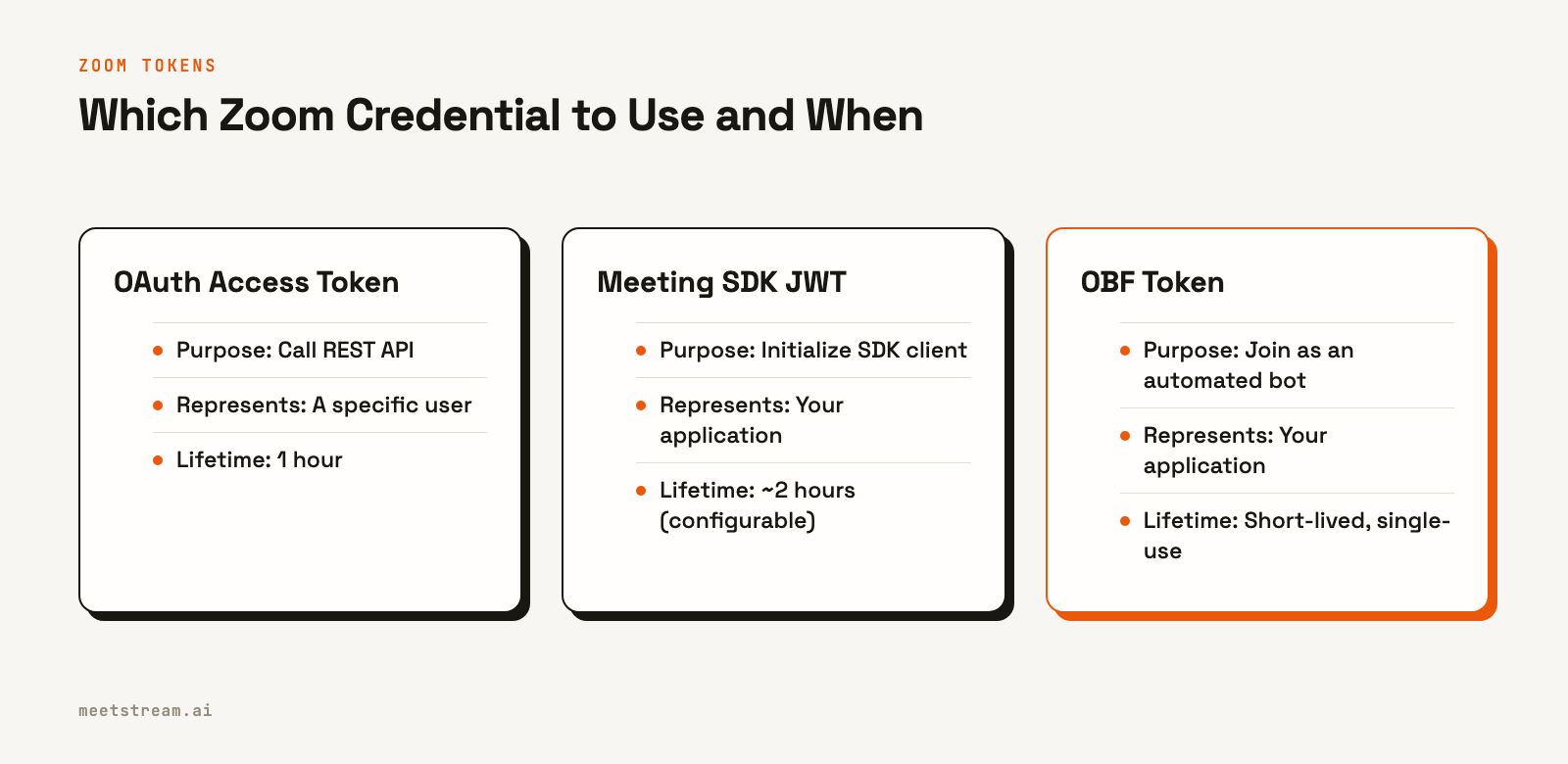
This complexity exists for security reasons. Each token type was created to solve a specific problem, often replacing a previous, broader credential with one that has a narrower scope. An OAuth 2.0 access token that works for the REST API is useless for initializing the Meeting SDK. A ZAK token, which lets an app act as a user, is now restricted for automated bots, which must use an OBF token instead.
For developers building AI agents that need to join meetings, understanding this is critical. The goal is to give your agent a reliable way to enter a call, hear the room, and act on what is said. This requires navigating Zoom's authentication layers correctly. We have processed over a million meeting minutes at MeetStream, and this is a breakdown of each layer and how they fit together in a production system.
The Core Problem: API vs. SDK Authentication
Most confusion comes from the separation between authenticating against the REST API and authenticating a live Meeting SDK session. These are two different tasks that use different credentials.
- REST API Authentication answers the question: "Who is making this API call?" This is handled by standard OAuth 2.0 or Server-to-Server OAuth. It is used for managing users, scheduling meetings, or listing recordings.
- Meeting SDK Authentication answers: "Is this client allowed to join this specific meeting, and as whom?" This is handled by a combination of a self-signed SDK JWT and either a ZAK or OBF token.
- Webhook Verification answers a third question: "Did this event payload really come from Zoom?" This uses a static webhook secret token for HMAC signature validation.
These credentials have different issuers, scopes, and lifetimes, from five minutes for some ZAK tokens to ninety days for an OAuth refresh token. Knowing which one to use starts with identifying which of these three questions you are trying to answer.
REST API Authentication: OAuth 2.0 and S2S
This is the layer most developers encounter first. To call the REST API on behalf of a user, you use the standard OAuth 2.0 authorization code flow. You register a General App in the Zoom Marketplace, send the user to an authorization URL, and exchange the returned code for an access token.
curl -X POST https://zoom.us/oauth/token \
     -H "Authorization: Basic BASE64_ENCODED_CLIENT_ID_AND_SECRET" \
     -H "Content-Type: application/x-www-form-urlencoded" \
     -d "grant_type=authorization_code&code=AUTHORIZATION_CODE&redirect_uri=YOUR_REDIRECT_URI"
The resulting access token represents that user for one hour. For machine-to-machine communication without a user, like a backend service accessing your own account's data, you use Server-to-Server (S2S) OAuth. This flow has no redirect or refresh token; you mint a new one-hour token when needed.
POST https://zoom.us/oauth/token?grant_type=account_credentials&account_id=YOUR_ACCOUNT_ID
Authorization: Basic BASE64(client_id:client_secret)
S2S OAuth is the modern replacement for Zoom's old JWT app type, which was deprecated in September 2023. If you see references to a "JWT app," it describes this older, now-retired system.
Meeting SDK Authentication: JWT, ZAK, and OBF
Authenticating a live meeting participant is a multi-step process. The Meeting SDK does not use your OAuth access token directly. Instead, it requires a sequence of specific, short-lived credentials.
Meeting SDK JWT
First, you must initialize the SDK client itself. This uses a self-signed JWT that you generate using your Meeting SDK app's Client ID and Client Secret. This token proves that the SDK session belongs to your application.
const KJUR = require("jsrsasign");

const iat = Math.round(new Date().getTime() / 1000) - 30;
const exp = iat + 60 * 60 * 2;
const oHeader = { alg: "HS256", typ: "JWT" };
const oPayload = {
    appKey: process.env.ZOOM_CLIENT_ID,
    mn: "ZOOM_MEETING_NUMBER",
    role: 0,
    iat,
    exp,
    tokenExp: exp,
};

const MEETING_SDK_JWT = KJUR.jws.JWS.sign(
    "HS256",
    JSON.stringify(oHeader),
    JSON.stringify(oPayload),
    process.env.ZOOM_CLIENT_SECRET,
);
This JWT authorizes the SDK to open a session for a specific meeting number. It does not identify a user. That is the job of the next two tokens.
ZAK and OBF Tokens
A ZAK (Zoom Access Key) allows your SDK client to join a meeting as a specific, authenticated Zoom user. You fetch it from the API using that user's OAuth access token. It is the right choice when your app is acting directly on behalf of a person, like a dashboard that starts a meeting for them.
An OBF (On-Behalf-Of) token is for when your app joins as an automated participant, like a note-taking bot. Since March 2, 2026, an OBF token is required for a Meeting SDK app to join a meeting hosted by an external account. This was a significant change, as it retired the use of ZAK tokens for most third-party bot use cases.
The OBF Token Flow in Detail
The OBF requirement changes the architecture for any application that deploys bots into meetings you do not own. You cannot simply mint an OBF token with your own credentials. Instead, you need authorization from a user who is a valid participant in the target meeting.
In practice, this means your application must manage the OAuth flow and token lifecycle for your users. MeetStream does not store your users' Zoom refresh tokens. The responsibility for minting the OBF token remains with your application.
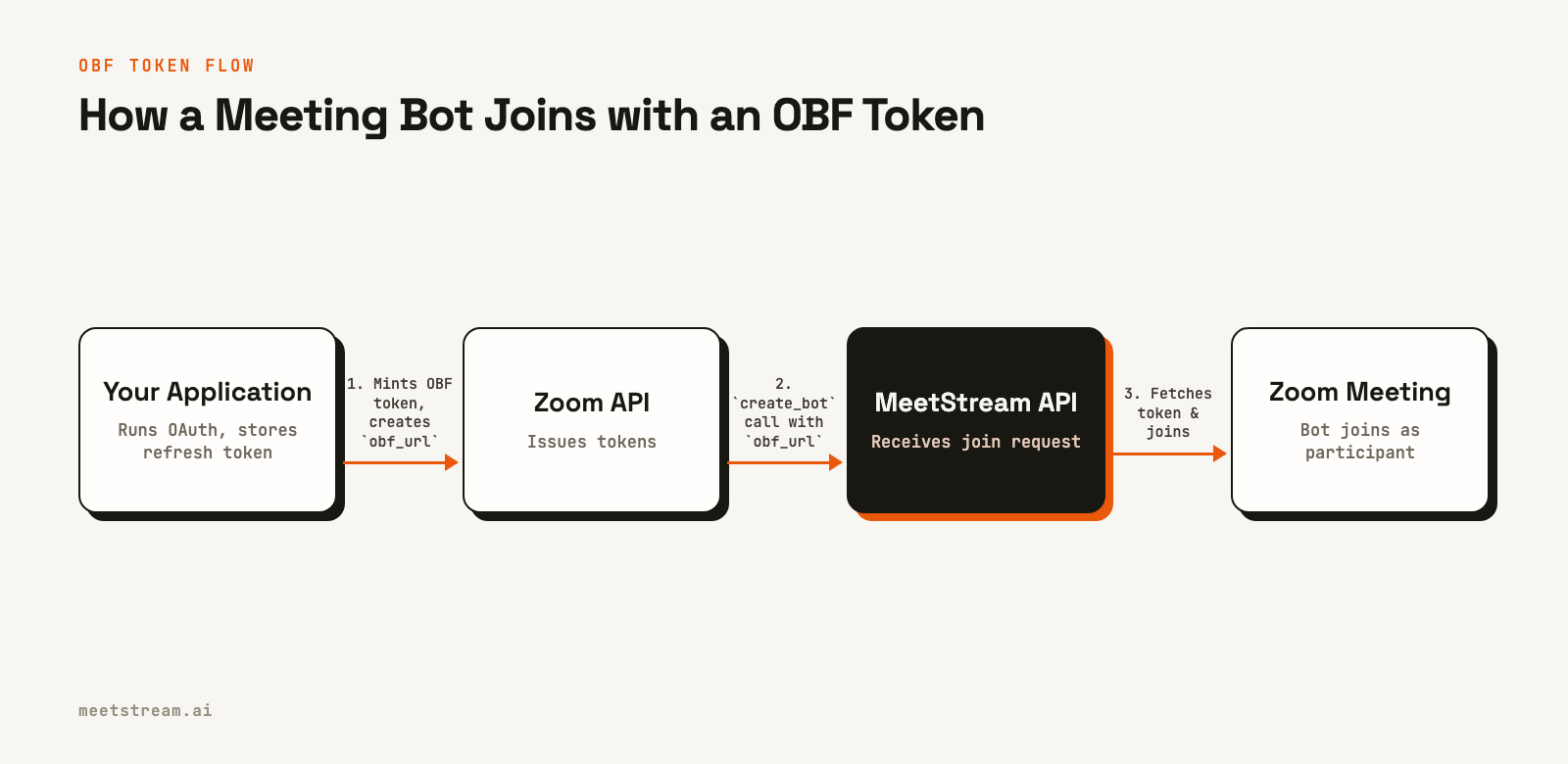
Here's how it works:
- Your user authorizes your Zoom Marketplace app via OAuth, granting scopes like
user:read:token. Your server stores the resulting refresh token securely. - When you need to send a bot into a meeting, your server uses the stored refresh token to generate a short-lived, single-use OBF token from the Zoom API.
- Your server exposes this OBF token at a secure, single-use URL. This URL is your responsibility to create and manage.
- You call the MeetStream API to create a bot, passing that URL in the request body.
curl -X POST "https://api.meetstream.ai/api/v1/bots/create_bot" \
  -H "Authorization: Token <YOUR_API_KEY>" \
  -H "Content-Type: application/json" \
  -d '{
    "meeting_link": "https://zoom.us/j/123456789?pwd=...",
    "bot_name": "MeetStream Bot",
    "zoom": {
      "obf_url": "https://your-app.com/zoom/obf-token/<SINGLE_USE_ID>"
    }
  }'
Just before joining, MeetStream's infrastructure fetches the OBF token from your `obf_url`. This architecture keeps user credentials securely on your servers while allowing our bots to join meetings on your behalf. The user who authorized your app must be in the meeting for the bot to join, and the bot is removed if they leave.
Verifying Webhooks: The Final Layer
The final piece of the puzzle runs in the other direction. To verify that an incoming webhook request genuinely came from Zoom, you use a static webhook secret token. Zoom includes a signature in the `x-zm-signature` header of every webhook it sends.
You can verify it by creating an HMAC-SHA256 hash of the message payload, timestamp, and your secret token.
const message = `v0:${request.headers["x-zm-request-timestamp"]}:${JSON.stringify(request.body)}`;
const hashForVerify = crypto
    .createHmac("sha256", ZOOM_WEBHOOK_SECRET_TOKEN)
    .update(message)
    .digest("hex");
const signature = `v0=${hashForVerify}`;

if (request.headers["x-zm-signature"] === signature) {
    // Verified: this came from Zoom
}
This is the simplest layer because it solves the most straightforward problem: proving the origin of a request.
How MeetStream Handles Zoom Authentication
The complexity of Zoom's authentication is a significant obstacle when building reliable AI voice agents. An agent's primary job is to participate in the conversation, not to manage a half-dozen rotating credentials. Abstracting the token management is necessary for deploying agents at scale.
MeetStream provides a unified meeting bot API that handles the underlying platform specifics. For Zoom, you provide the `obf_url` as shown above, and our infrastructure manages the low-level SDK initialization and join sequence. This lets your agent join any meeting with a single API call, without your application needing to handle the logic of token injection at join time.
This approach keeps your users' credentials secure within your own environment while giving your agents programmatic access to the live meeting. The result is a simpler, more secure integration that lets you focus on the agent's conversational abilities, not the plumbing required to get it into the room.
Conclusion
Zoom's authentication system has evolved to prioritize security and granular scopes, trading some initial developer convenience for a more reliable model. Understanding the distinction between REST API access via Zoom OAuth 2.0 and Meeting SDK access via OBF tokens is key to building bots that can reliably join meetings. While the layers are complex, each serves a specific purpose designed to reduce the blast radius of any single credential.
By managing the OBF token flow on your own server and passing the token URL to an API like MeetStream, you can build secure, scalable AI agents for Zoom. See the full API reference at docs.meetstream.ai.
Related guides
Frequently Asked Questions
What is the difference between Zoom JWT and OAuth 2.0?
The JWT app type was Zoom's original machine-to-machine credential, which was retired in 2023. It was replaced by Server-to-Server OAuth. Standard OAuth 2.0 is for user-level authentication, allowing an app to act on behalf of a specific person who has granted consent.
How does Zoom Server-to-Server OAuth work?
You send a POST request to Zoom's token endpoint with your account ID and `grant_type=account_credentials`, authenticated with your client ID and secret. Zoom returns a one-hour access token. There is no user-facing consent screen or refresh token in this flow.
What Zoom OAuth scopes do I need for a meeting bot?
For an OBF-based join, which is required for bots joining external meetings, your app must request the `user:read:token` scope. You will also typically need `user:read:user` to identify the user who authorized your application.
Is Zoom JWT authentication still supported?
No. The legacy JWT app type was deprecated on September 8, 2023, and can no longer be created. Existing JWT apps should be migrated to Server-to-Server OAuth for continued machine-to-machine API access.