
Zapier + MeetStream: Automate Your Meeting Workflows

Connecting meeting events to Zapier is the fastest way to automate post-call tasks. Instead of manually copying notes or creating tickets, you can use an API to trigger Zaps that update your CRM, notify a Slack channel, or add tasks to a project board the moment a meeting ends. This approach turns meeting data into immediate, structured actions.
MeetStream provides the core infrastructure for this: an agent-first platform where bots join meetings as participants. These bots can hear the room, speak, and act, but critically for automation, they generate a stream of events. These events, from a finished transcript to a participant joining, become the triggers for your entire workflow.
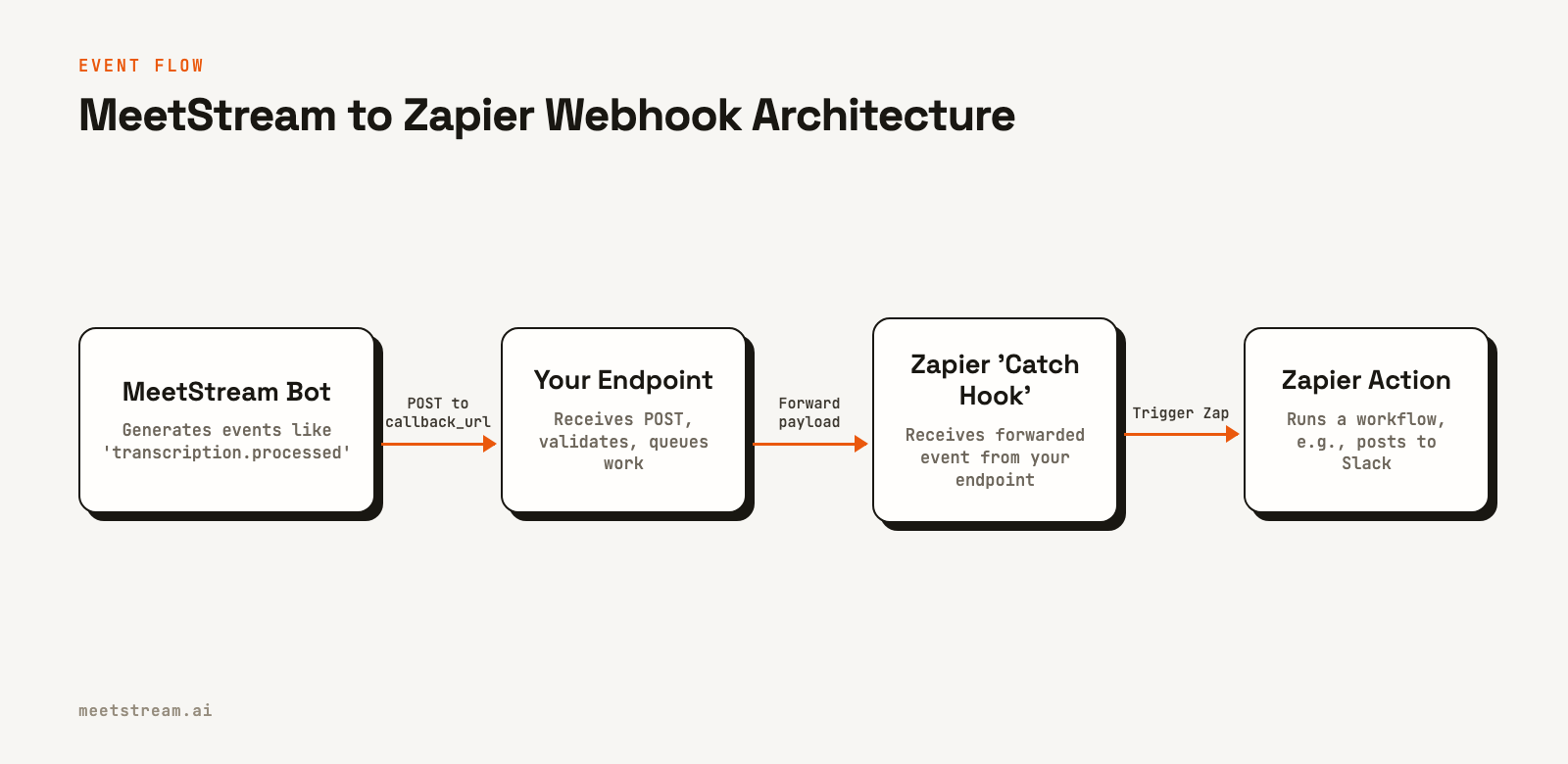
The connection between a MeetStream event and a Zapier workflow is typically a webhook. A webhook is an HTTP POST request sent from one system to another when an event occurs. By pointing MeetStream's webhooks at an endpoint you control, you can forward that data to Zapier to run any automation you need.
This article explains how to connect MeetStream's API to Zapier. We will cover the architecture, provide functional code examples for creating bots that fire webhooks, and walk through the patterns for building a reliable and secure integration. Let's get into it.
Why Automate Meeting Workflows?
Developers build meeting automations to solve a few common problems. The first is eliminating manual data entry. After a sales call or user interview, someone has to update the CRM, create tickets, and share notes. This is slow and error-prone. An automated workflow can parse a transcript for action items and update Salesforce or Jira directly.
The second problem is information delay. A critical customer issue mentioned on a support call might not get escalated for hours. A real-time keyword alert, triggered by a live transcript event, can post a message to an engineering Slack channel in seconds. This shortens response times by making meeting intelligence available immediately.
Finally, building these integrations from scratch for each meeting platform is a significant engineering effort. Each platform, Zoom, Google Meet, Microsoft Teams, has a different API, authentication model, and set of capabilities. A unified meeting bot API provides a single integration point, reducing the complexity of building cross-platform automations.
How MeetStream Events Trigger Zapier
The process involves three main components: the MeetStream bot, your webhook handler, and a Zapier trigger. The bot joins a meeting and generates events. You configure the bot to send these events to a public URL you control. Your code at that URL then forwards a structured payload to a unique URL provided by Zapier.
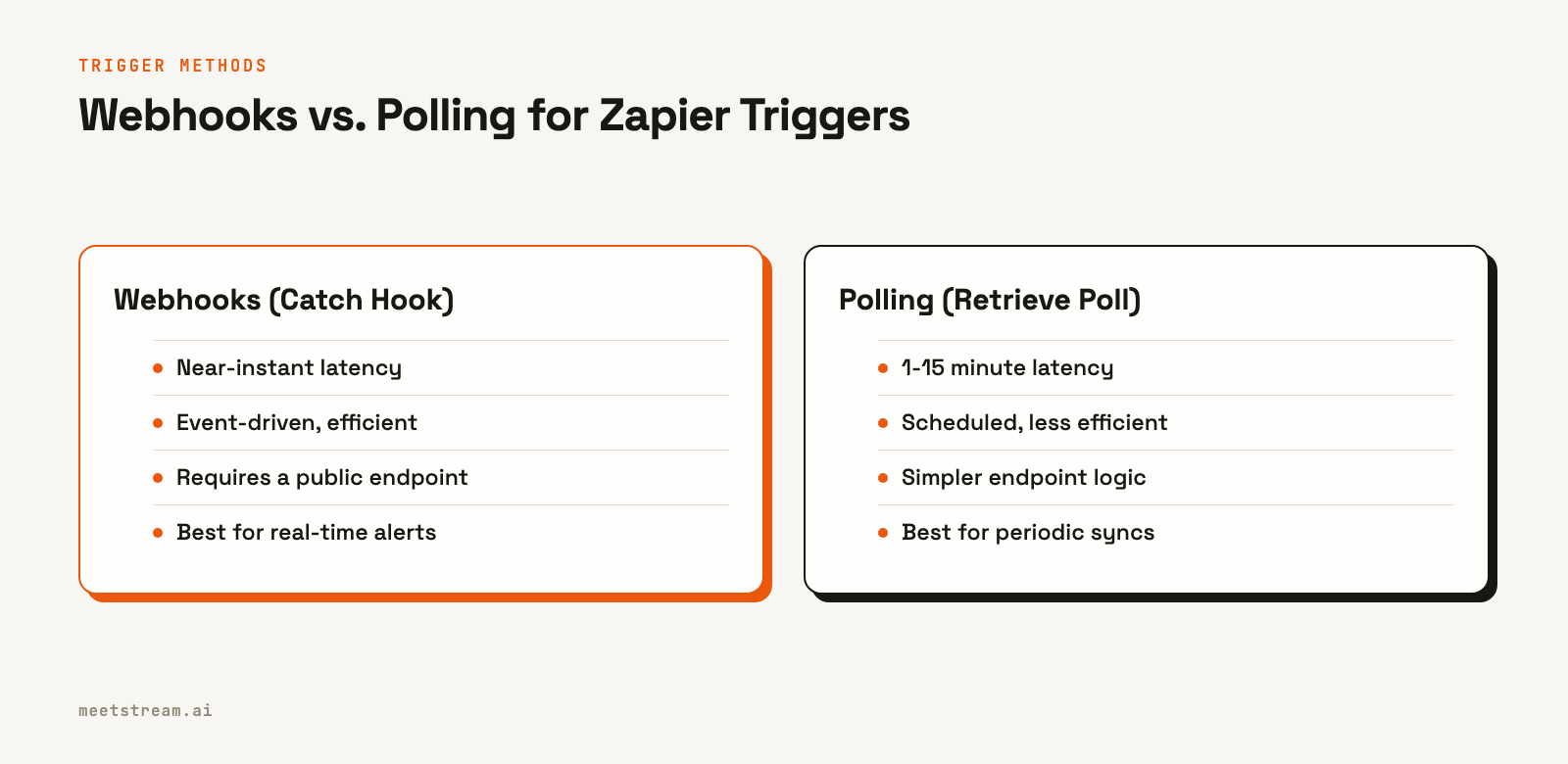
There are two primary methods for getting this data into Zapier: webhooks and polling. The "Catch Hook" trigger in Zapier's Webhooks app gives you a URL that starts a Zap instantly when it receives a POST request. This is the best choice for low-latency workflows.
The alternative is the "Retrieve Poll" trigger, where Zapier makes a GET request to your endpoint on a schedule, typically every 1 to 15 minutes. Your endpoint must return a reverse-chronological array of new events. Polling is simpler to implement but introduces latency, making it better for periodic tasks like a daily summary report, not for real-time alerts.
A Practical Guide: Webhooks to Zapier
The most common and effective pattern is using webhooks for instant triggers. This section provides the steps to set up a bot that sends an event to your server, which then triggers a Zap.
Step 1: Get a MeetStream API Key
First, you need an API key from the MeetStream dashboard. All API requests must include this key in the `Authorization` header.
Authorization: Token <YOUR_API_KEY>
This key authenticates your requests to the MeetStream API, such as the request to create a new bot.
Step 2: Create a Zap with a "Catch Hook" Trigger
In your Zapier account, create a new Zap. For the trigger, search for and select the "Webhooks by Zapier" app. Choose the "Catch Hook" event. Zapier will generate a unique webhook URL. Copy this URL; you will need it in your server-side code to forward events from MeetStream.
Step 3: Create a Bot Configured for Webhooks
To get events out of MeetStream, you specify a callback_url when you create a bot. This tells MeetStream where to send lifecycle and processing events. The following API call creates a bot that will join a Google Meet call, request a transcript, and send events to your endpoint.
curl -X POST "https://api.meetstream.ai/api/v1/bots/create_bot" \
  -H "Authorization: Token <YOUR_API_KEY>" \
  -H "Content-Type: application/json" \
  -d '{
    "meeting_link": "https://meet.google.com/abc-defg-hij",
    "bot_name": "Zapier Bot",
    "callback_url": "https://your-app.com/webhooks/meetstream",
    "recording_config": {
      "transcript": {
        "provider": {
          "meetstream": {}
        }
      }
    }
  }'
When the meeting ends and the transcript is ready, MeetStream will send a POST request with a `transcription.processed` event to your `callback_url`. You can see all possible events in the webhooks and events documentation.
Step 4: Forward the Event to Zapier
Your webhook handler at `https://your-app.com/webhooks/meetstream` should be lightweight. Its job is to receive the event, acknowledge it quickly with a 2xx status code, and then forward the relevant data to the Zapier URL you copied in Step 2.
A minimal handler in Node.js with Express might look like this:
const express = require('express');
const axios = require('axios');
const app = express();
app.use(express.json());

const ZAPIER_HOOK_URL = 'YOUR_ZAPIER_HOOK_URL';

app.post('/webhooks/meetstream', async (req, res) => {
  // Acknowledge the webhook immediately
  res.status(200).send('OK');

  const event = req.body;

  // Forward to Zapier asynchronously
  if (event.bot_event === 'transcription.processed') {
    try {
      await axios.post(ZAPIER_HOOK_URL, {
        bot_id: event.bot_id,
        message: event.message
      });
    } catch (error) {
      console.error('Failed to forward to Zapier:', error);
    }
  }
});

app.listen(3000, () => console.log('Server listening on port 3000'));
Once you send a test event, Zapier will detect the fields, allowing you to map them to subsequent actions in your Zap, like creating a new row in a Google Sheet or sending a Slack message.
Common Automation Patterns
With the basic connection established, you can build many useful workflows. Here are a few common patterns we see developers implement.
- Post-Call Summaries to Slack: When a `transcription.processed` event is received, fetch the full transcript, generate a summary using an LLM, and post it to a specific Slack channel.
- CRM Task Creation: Use a post-call transcription bot to listen for keywords like "next steps" or "action item." When detected, create a new task in your CRM assigned to the meeting host.
- Internal Knowledge Base Updates: For internal design reviews or planning sessions, automatically append the meeting transcript and key decisions to a Confluence or Notion page.
- Calendar-Based Scheduling: Connect MeetStream to Google Calendar or Outlook. Bots can then be scheduled to automatically join all events matching certain criteria, ensuring every important meeting is processed without manual intervention.
Building for Reliability and Security
Production workflows need to handle failure gracefully. A few things to keep in mind: MeetStream webhook delivery is best-effort. If your endpoint returns a non-2xx status code or times out, the event is dropped. MeetStream does not retry failed deliveries. Your endpoint must be highly available and respond quickly, typically by placing the inbound event onto an internal queue for processing.
For security, your public webhook endpoint is a potential attack vector. Always use HTTPS. For more reliable security, use a workspace-level webhook endpoint configured in the MeetStream dashboard. These endpoints support signature verification. MeetStream will include an `X-MeetStream-Signature` header containing an HMAC-SHA256 hash of the raw request body. You can verify this signature using a shared secret to ensure the request is authentic and hasn't been tampered with. Note that per-bot `callback_url` webhooks are not signed.
How MeetStream Provides the Foundation
MeetStream is designed to be the event-driven layer for meeting automation. Our single API for Zoom, Google Meet, and Microsoft Teams simplifies the process of getting a bot into a call. From there, you can choose the data you need, whether it's a post-call transcript, a real-time audio stream, or lifecycle events like participant joins and leaves.
This model allows you to build sophisticated workflows in Zapier without managing the complex infrastructure of real-time media processing. You can focus on the business logic of your automation while MeetStream handles the challenges of connecting to and extracting data from live meetings. For interactive use cases, you can even deploy AI voice agents that can respond to commands and trigger Zaps mid-meeting.
Getting Started with Zapier and MeetStream
Automating meeting workflows with Zapier and MeetStream connects real-time conversation data to the business tools you use every day. By using webhooks as the bridge, you can build fast, reliable automations that save time and reduce manual work. What matters is to start with a simple, reliable webhook handler and expand your workflows from there. See the full API reference at docs.meetstream.ai.
Frequently Asked Questions
What kind of meeting events can trigger a Zap?
You can trigger Zaps from various bot lifecycle and data processing events. Common triggers include `bot.inmeeting` when a bot successfully joins, `bot.stopped` when it leaves, and `transcription.processed` when the full meeting transcript is ready for download.
Do I need my own server to connect MeetStream to Zapier?
Yes, a small server-side component is needed to act as an intermediary. This is because you need to receive the webhook from MeetStream and then forward it to the specific URL provided by your Zapier "Catch Hook" trigger. This also gives you a place to add logic, like filtering or reformatting events.
How can I handle high volumes of meeting events?
For high-volume applications, your webhook handler should immediately place incoming events onto a durable queue like Amazon SQS or RabbitMQ and then return a 200 OK response. A separate pool of workers can then process messages from the queue, which includes forwarding them to Zapier. This decouples ingestion from processing and improves reliability.
Can I trigger Zaps from live, in-meeting events?
Yes. By configuring a `live_transcription_required` webhook in your `create_bot` call, you can receive transcript segments in near real-time. Your server can then forward these to Zapier to trigger actions while the meeting is still in progress, such as for keyword-based alerts.


