
Meeting Engagement Metrics: What to Track and How to Build It

You can get meeting attendance and duration from calendar APIs, but the most valuable data, who spoke, for how long, and when, is locked inside the live audio stream. Without programmatic access to the conversation itself, developers are limited to surface-level statistics that reveal little about whether a meeting was actually effective.
This is where meeting bots provide an API to the conversation. For developers, this is not just about passive listening. It is about building AI agents that can join, hear, and even act within a live meeting on Zoom, Google Meet, or Microsoft Teams. The raw material for these agents is a clean, real-time stream of audio and metadata, which is also the foundation for any meaningful engagement analytics.
Meeting engagement metrics are the quantitative measures derived from this data. They move beyond simple attendance to track conversational dynamics like speaker balance, interaction patterns, and periods of silence. These metrics provide a structured view of a meeting's health and effectiveness, all accessible through an API.
This post covers the foundational metrics to track, the architecture for capturing them, and how to build a simple analytics pipeline using a meeting bot API. Let's get into it.
Why Traditional Meeting Analytics Fall Short
Most meeting platforms like Zoom or Google Meet provide a basic analytics dashboard for account administrators. These tools typically show high-level data such as total meeting minutes, number of participants, and a list of who attended. While useful for tracking adoption, this data is insufficient for building products that rely on understanding conversational dynamics.
The primary limitations are:
- Lack of Granularity: Platform dashboards do not provide speaker-attributed transcripts or talk-time breakdowns. You might know who was in the meeting, but not who spoke or for how long.
- No Real-Time Access: Data is usually available only after the meeting has ended, making it impossible to build applications that react to events as they happen.
- Not API-Driven: The analytics are presented in a web interface for human consumption. There is no public API to programmatically pull this data into your own application or data warehouse.
To build custom dashboards, trigger real-time alerts, or feed meeting data into a coaching application, you need a way to capture the raw conversational data directly. This requires a service that can deploy a bot into the meeting to act as your data source.
Core Meeting Engagement Metrics to Capture
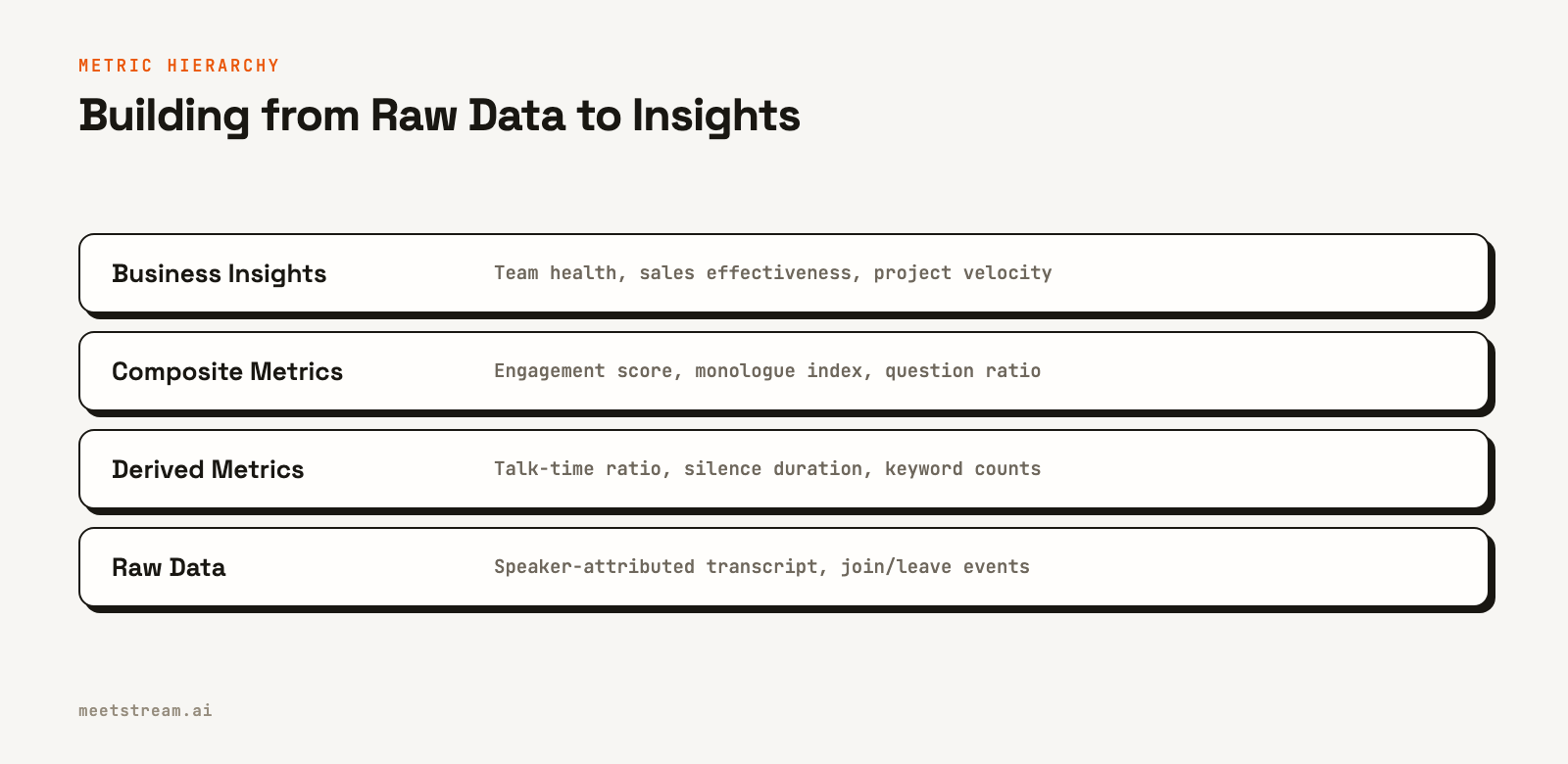
Once you have a bot in the meeting providing a stream of data, you can calculate a rich set of metrics. These start with fundamental building blocks derived directly from the audio and transcript, which can then be composed into more complex insights.
Speaker Diarization and Talk Time
The most basic metric is knowing who spoke and when. Speaker diarization is the process of partitioning an audio stream into segments and assigning each segment to a specific speaker. A high-quality, real-time transcript with speaker labels is the foundation for almost all other engagement metrics. From this, you can immediately calculate each participant's total talk time.
Participation Balance and Monologue Detection
A balanced conversation is often a healthy one. The talk-time ratio, calculated as a speaker's total talk time divided by the meeting's total speaking time, is a powerful indicator of conversational dominance. A meeting where one person has a talk-time ratio over 70% is likely a presentation, not a collaborative discussion. You can also detect monologues by looking for long, uninterrupted speaking segments from a single person.
Interaction Patterns
Metrics like interruptions and back-and-forth exchanges can signal high energy and engagement. By analyzing the timestamps of speaker turns, you can identify overlaps where one person begins speaking before another has finished. A high frequency of quick turn-taking between two participants can indicate a focused dialogue or debate.
Silence Detection
The amount of dead air in a meeting is also a useful signal. Long periods of silence can indicate that the group is thinking, but they can also signal confusion, disengagement, or a technical issue. Tracking the total silence duration and the frequency of long pauses provides another layer of context about the meeting's tempo.
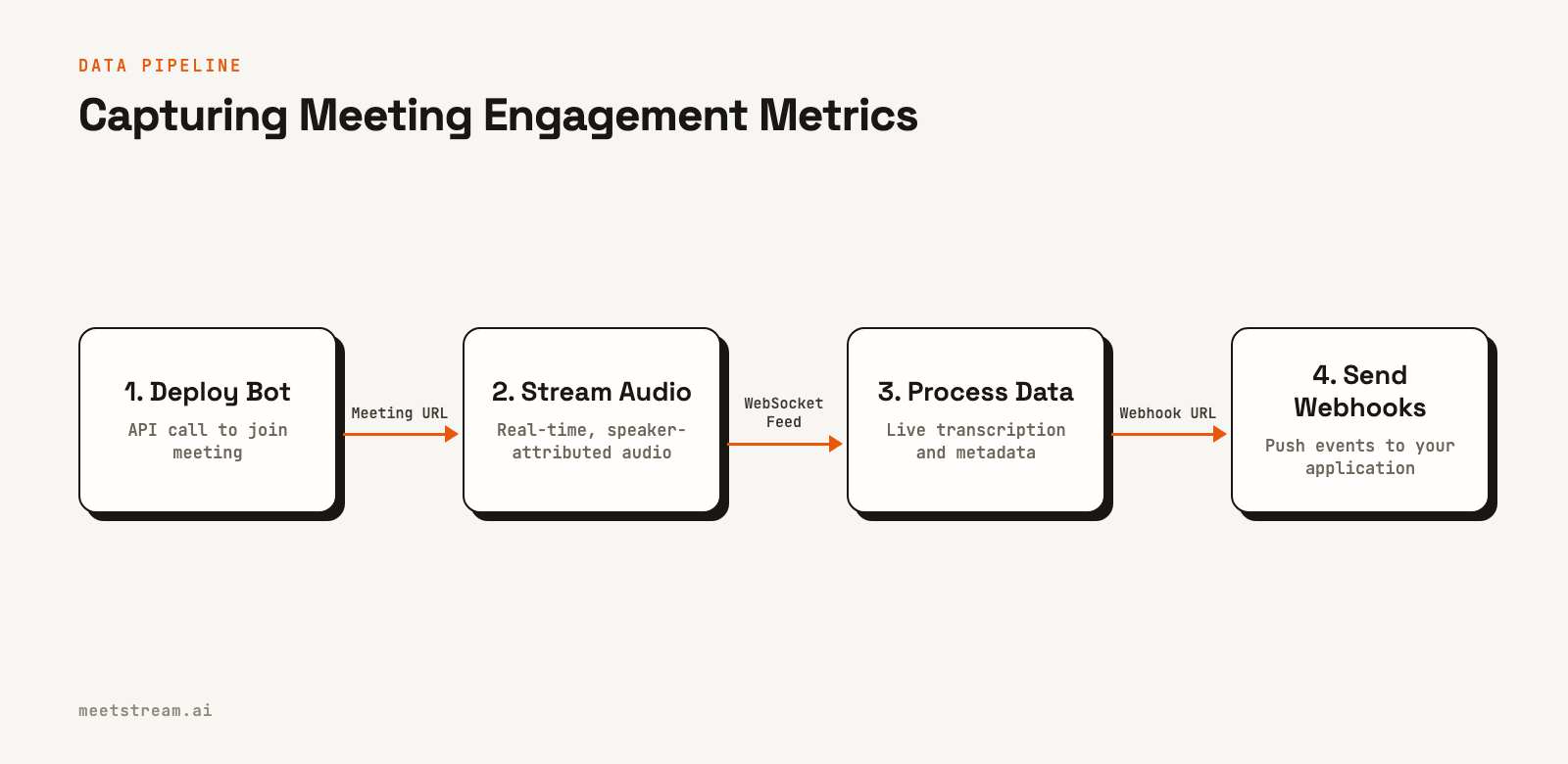
How to Build an Engagement Analytics Pipeline
Building a system to track these metrics involves deploying a bot, processing the data it streams, and storing the results for analysis. A modern meeting bot API handles the complexity of joining calls and capturing media, letting you focus on the application logic.
Here is a typical workflow:
- Deploy a Bot via API: Your application makes a REST API call to send a bot to a specific meeting URL. In this request, you specify what data you need, such as a live transcript, and provide a webhook URL for receiving events.
- Receive Real-Time Data: The bot joins the call and begins streaming data. For live transcripts, the service sends a continuous stream of webhook events to your endpoint. Each event contains a snippet of text, the speaker's name, and timestamps.
- Process and Store Metrics: Your webhook handler receives these events. It should be lightweight, immediately acknowledging the request with a 200 OK status and then passing the data to a background job. This job updates metrics in a database like Redis or a time-series database like InfluxDB. For example, for each transcript snippet, you would increment the total talk time for that speaker.
- Visualize the Data: A separate part of your application queries this database to populate dashboards. You can build your own interface or use tools that connect to your database to create visualizations of talk-time balance, silence ratios, and other key metrics.
This event-driven architecture is scalable and ensures your application remains responsive. It separates the real-time data ingestion from the final analysis and visualization.
Real-World Use Cases for Engagement Metrics
Developers use meeting engagement data to power a variety of applications. These tools help make meetings more productive, equitable, and effective.
Sales Coaching Platforms
For sales teams, the talk-listen ratio on a discovery call is a critical metric. Successful salespeople often listen more than they talk. An application can monitor sales calls in real time, calculate the ratio, and provide live feedback to a sales manager if a rep is dominating the conversation. It can also identify when key topics, like pricing or competitors, are mentioned.
Team Productivity Tools
For internal meetings, balanced participation is key. A tool can build a dashboard that visualizes talk time across the team for recurring meetings. This helps managers spot patterns where some team members consistently do not contribute, allowing them to adjust the meeting format or proactively ask for input from quieter participants.
Recruiting and Interviewing Software
In a job interview, engagement metrics can help ensure a fair and consistent process. An applicant tracking system can use meeting data to confirm the interviewer gave the candidate adequate time to speak and asked key questions. This data helps standardize the interview experience and reduce bias.
Limitations and What to Watch Out For
While powerful, meeting engagement metrics should be used with care. The data provides a quantitative view of a conversation, but it lacks the qualitative context that a human observer has.
A few things to keep in mind:
- Correlation is not Causation: A balanced talk-time ratio does not guarantee a good meeting, and a monologue is not always bad. A CEO giving an all-hands update is expected to speak the most. Context is critical when interpreting the data.
- Data Privacy and Consent: Deploying a bot to capture meeting data requires transparency. On platforms like Zoom, the bot will need permission from the host to record. Always ensure participants are aware that a bot is present and how the data will be used.
- Technical Accuracy: Speaker diarization is a complex problem, especially with poor audio quality or cross-talk. While modern systems are highly accurate, there will be occasional errors. Your application should be designed to be resilient to small inaccuracies in speaker attribution.
The goal of these metrics is to provide signals that help people, not to make automated judgments. They are best used as tools to foster self-awareness and guide improvements in communication habits.
How MeetStream Fits In
MeetStream is the infrastructure for building applications on top of live meetings. Our platform provides a unified Zoom, Google Meet, and Teams API for deploying bots that can stream real-time audio, video, and metadata.
Instead of building and scaling a fleet of bots, you can make a single API call. To get a live, speaker-attributed transcript, you include the live_transcription_required parameter with your webhook URL in the create_bot request.
curl -X POST "https://api.meetstream.ai/api/v1/bots/create_bot" \
  -H "Authorization: Token <YOUR_API_KEY>" \
  -H "Content-Type: application/json" \
  -d '{
    "meeting_link": "<YOUR_MEETING_LINK>",
    "bot_name": "Metrics Bot",
    "live_transcription_required": {
      "webhook_url": "https://yourapp.com/webhooks/transcript"
    }
  }'
MeetStream then handles joining the meeting and will begin sending POST requests to your URL with transcript fragments. This lets you focus on building your analytics layer, not on the underlying voice infrastructure. We also provide post-call transcripts, participant metadata, and the ability for bots to speak and act in the meeting, enabling many AI agent use cases.
Conclusion
The effectiveness of meetings no longer needs to be a matter of guesswork. By using a meeting bot API to access the raw conversational data, developers can build powerful tools that provide objective, actionable insights. Tracking core meeting engagement metrics like talk-time ratios, participation balance, and interaction patterns creates a feedback loop for continuous improvement.
This data-driven approach allows teams to understand their communication dynamics and build healthier, more inclusive, and more productive collaboration habits. The foundation is an API that treats a live conversation as a developer-accessible resource. See the full API reference at docs.meetstream.ai.
Frequently Asked Questions
What signals indicate high engagement in a meeting?
High engagement often correlates with a low silence ratio, balanced talk-time distribution where no single speaker dominates, and a high frequency of quick conversational turns. These quantitative signals provide a strong proxy for the qualitative feeling of an interactive and productive meeting.
How do you measure participant attention in a video meeting?
From a bot, the most reliable signal for attention is audio activity. Participants who speak are clearly engaged. You can also monitor in-meeting chat messages. Platform restrictions prevent bots from accessing webcam data to measure visual focus.
What is talk time ratio and how is it calculated from a transcript?
Talk time ratio is a speaker's total speaking duration divided by the total duration of all speech in the meeting. To calculate it, you need a speaker-diarized transcript. You sum the duration of all speech segments for a specific speaker and divide by the sum of durations for all speakers.
How can you build an engagement score from these metrics?
An engagement score is a composite metric you define for your specific use case. You could create a weighted formula that combines several factors, such as rewarding balanced talk time, penalizing long monologues, and factoring in the number of questions asked, which can be identified with natural language processing.
Can you track meeting engagement without recording the content?
Yes. You can process the audio and transcript data in real time to extract engagement metrics without ever storing the raw audio or the full transcript. The bot can stream the data, your application can calculate the metrics on the fly, and then you can discard the source data to protect privacy.


