
How to Test Meeting Bots: QA and Simulation Frameworks

To effectively test meeting bots, you need a strategy that combines API-level integration tests with simulation frameworks that mimic real-world meeting conditions. This involves mocking meeting platform events, injecting pre-recorded audio to validate transcription, and running automated checks for latency and webhook delivery. This approach finds bugs that simple unit tests miss, without the cost and flakiness of running full end-to-end tests for every code change.
Meeting bots operate in a dynamic, real-time environment that is difficult to replicate. At MeetStream, we provide the agent-first voice infrastructure for these bots, and we have processed over a million meeting minutes. This experience shows that reliable testing is the difference between a reliable AI agent and one that fails under pressure. Our API is designed to make programmatic testing easier, allowing developers to spin up and tear down bots in automated test suites.
The core challenge is that a meeting is not a static webpage. It is a live, unpredictable event with multiple streams of audio, video, and chat data. A bot must handle this complexity across different platforms like Zoom, Google Meet, and Microsoft Teams, each with its own API and connection behavior. User expectations are also high, with little tolerance for transcription errors or delays.
This post breaks down the core strategies required to build a reliable testing framework for your meeting bot. We will cover functional accuracy, performance testing, and security validation, with specific examples and code.
Why Testing Meeting Bots Is a Unique Challenge
Testing a meeting bot is fundamentally different from testing a standard web application. The environment is volatile and the data streams are continuous, which introduces several unique engineering problems. A solid QA strategy must account for these differences from the start.
First, meetings are real-time, non-deterministic events. Unlike a REST API with predictable request-response cycles, a bot must process streaming audio and video data with very low latency. There is no room for buffering or delayed processing. Second, the bot must handle multiple, synchronized data streams. This includes identifying who is speaking, transcribing their words, and processing any in-meeting chat messages, all at once.
Finally, platform variability adds another layer of complexity. Zoom, Google Meet, and Microsoft Teams each have different APIs, authentication flows, and permissions for how bots can join and access media. A bot that works reliably on one platform may fail to even join a meeting on another. Your test suite must validate behavior across all supported platforms to ensure a consistent user experience.
Key QA Goals for Meeting Bot Reliability
A complete QA strategy for meeting bots focuses on four distinct areas. Each one is critical for building a production-ready application that users can trust.
Functional Accuracy is the foundation. This means verifying that the bot's core features work as expected. Can it reliably join a meeting? Does it start and stop recording correctly? Is the transcription output accurate? These are the basic functions that must be flawless.
Performance and Concurrency testing ensures the bot can handle real-world usage. It needs to maintain low latency and high accuracy in large meetings with many participants or when running across hundreds of concurrent meetings. This is where you identify and fix bottlenecks before they affect users.
Security and Compliance are non-negotiable. Meeting content is often sensitive, so you must validate that all data is protected. This includes verifying authentication mechanisms, testing data encryption, and ensuring your data handling practices align with standards like GDPR. For organizations subject to HIPAA, having a Business Associate Agreement (BAA) available is also a key requirement.
Cross-Platform Compatibility guarantees a consistent experience no matter where the meeting is hosted. Your tests should confirm that the bot's behavior is identical across your supported meeting platforms, from joining the call to generating the final output.
Automated and Simulation-Based Testing
While manual testing is useful for initial user experience checks, it is too slow and expensive to be the primary QA method. Automated testing is essential for scaling QA efforts and integrating them into a continuous integration and continuous delivery (CI/CD) pipeline. A good test suite combines several automated techniques.
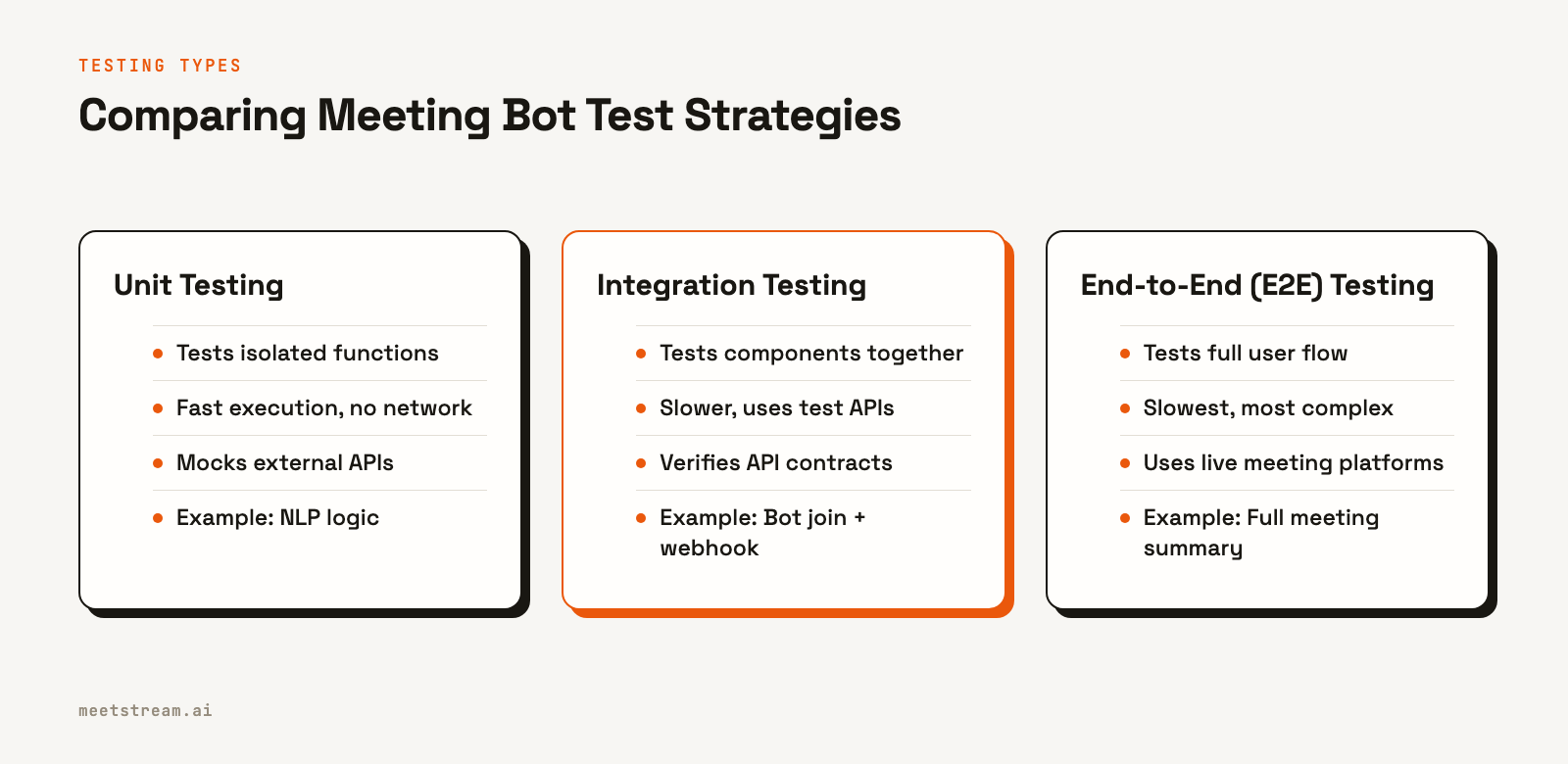
For core business logic, such as natural language processing (NLP) or summarization algorithms, standard unit tests are sufficient. These tests are fast because they run locally and use mock data to validate specific functions in isolation.
For testing how your bot interacts with meeting platforms, you need integration tests. Instead of joining a real meeting every time, your test environment can mock platform events. This involves creating a test server that simulates a meeting, allowing your bot to join and receive data streams. This approach is much faster and more reliable than end-to-end testing.
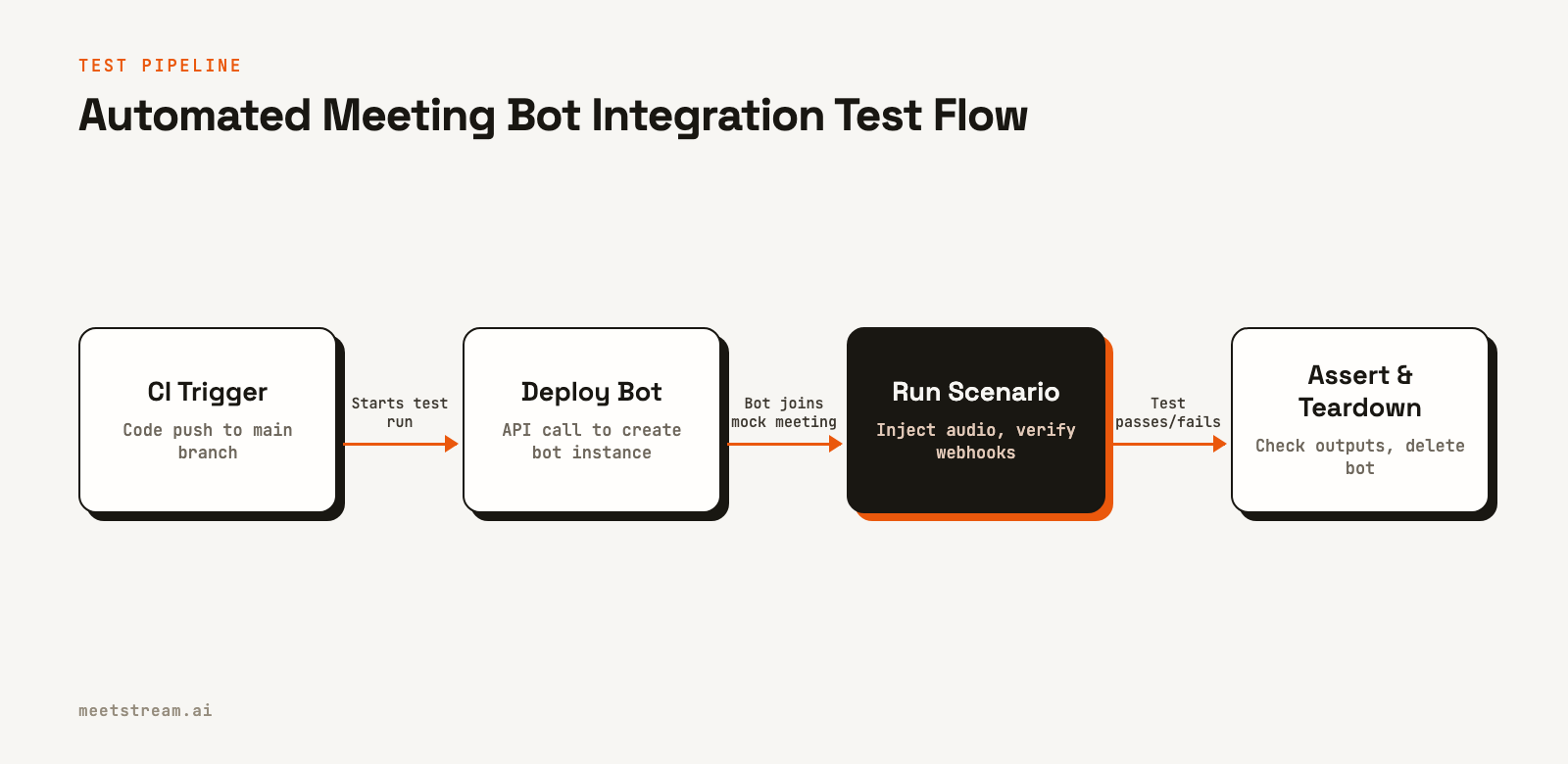
The most advanced technique is using a simulation framework. These frameworks programmatically generate synthetic meeting data, such as pre-recorded audio with background noise, different accents, or frequent interruptions. This allows you to stress-test your bot against many realistic and challenging scenarios that are difficult to create manually.
Implementing a Test Framework with Code
A practical test framework starts with the ability to programmatically control your bot. For an integration test, a CI runner can make an API call to deploy a bot into a mock meeting environment, perform actions, and then check the results.
Here is an example of using curl to create a MeetStream bot for a test run. The callback_url points to a test endpoint that will receive events, and custom_attributes can be used to pass a unique test ID.
curl -X POST "https://api.meetstream.ai/api/v1/bots/create_bot" \
  -H "Authorization: Token <YOUR_API_KEY>" \
  -H "Content-Type: application/json" \
  -d '{
    "meeting_link": "https://your-mock-server.com/test-meeting-123",
    "bot_name": "Test Bot",
    "callback_url": "https://your-test-runner.com/webhooks",
    "custom_attributes": {
      "test_run_id": "ci-build-456"
    }
  }'
Your test runner's webhook handler would then listen for events like bot.inmeeting to confirm a successful join or transcription.processed to fetch the output. You can then assert that the bot behaved as expected.
To validate transcription quality automatically, you can use a metric called Word Error Rate (WER). This compares the bot's transcript against a ground-truth text. You can use a library like jiwer in Python to calculate it. A typical test involves feeding the bot a known audio file and failing the build if the WER exceeds a set threshold.
import jiwer

# Ground truth from your test audio file
ground_truth = "the quick brown fox jumps over the lazy dog"

# Hypothesis from your bot's transcription output
hypothesis = "the quick brown fox jumped over a lazy dog"

# Calculate Word Error Rate
error = jiwer.wer(ground_truth, hypothesis)
print(f"Word Error Rate: {error:.2f}")
# Word Error Rate: 0.22
By combining API-driven bot creation with programmatic validation of outputs like transcripts, you can build a powerful and reliable automated test suite for your meeting bot.
What to Watch For: Common Failure Points
Based on our experience running infrastructure for thousands of bots, we see several common failure patterns that your tests should cover.
First, test bot admission failures. What happens if the bot tries to join before the host? Or if it gets stuck in a waiting room? Your bot needs graceful retry logic, and your tests should validate it. The MeetStream API provides explicit webhook events like bot.in_waiting_room and bot.denied to handle these states.
Second, prepare for mid-call interruptions. Audio or video streams can drop momentarily due to network issues. Your system should be resilient to this. Also, test for failures in your own services. If your webhook endpoint is slow or returns an error, how does your system recover? Webhooks are often best-effort, so your handler should respond with a 2xx status code immediately and queue work asynchronously.
Finally, be mindful of platform-specific rate limits. Running a large test suite can trigger API rate limits on platforms like Zoom. Your API client should handle 429 Too Many Requests errors with exponential backoff. For CI environments, consider using a dedicated test account with higher rate limits or mocking the platform API entirely for more deterministic runs.
How MeetStream Facilitates Bot Testing
MeetStream provides a unified API that simplifies how you test meeting bots. Instead of writing separate test harnesses for Zoom, Google Meet, and Teams, you can write one set of tests against our API. You can point the meeting_link to a mock server in your test environment to run integration tests without needing a live meeting.
Our webhook system provides detailed lifecycle events, from bot.joining to bot.stopped, giving your test framework clear signals to assert against. You can use custom_attributes in the create bot request to tag test runs, making it easy to correlate bots with specific CI jobs. This allows for a clean and manageable test suite.
For performance testing, our platform handles the infrastructure for running thousands of concurrent bots, so you can focus on testing your application's logic. You can simulate load by making concurrent API requests to create bots and measure your own system's ability to process the resulting webhooks and data streams, such as our real-time audio streaming API.
Conclusion
Specialized QA is critical for building reliable meeting bots. The challenges of real-time data processing and platform differences require a testing strategy that goes beyond standard application QA. The key is to focus on automation and simulation to effectively test meeting bots at scale.
By building a framework that uses a control API to deploy bots, injects synthetic data to simulate real-world conditions, and automatically validates the output, you can ensure your bot is reliable, scalable, and secure. This investment in testing is essential for shipping a product that users trust in their most important conversations.
See the full API reference at docs.meetstream.ai.
Related guides
Frequently Asked Questions
What is a meeting bot simulation framework?
A meeting bot simulation framework is a test environment that mimics a real meeting. It allows developers to programmatically inject synthetic data like pre-recorded audio, background noise, and chat messages to test a bot's behavior under various conditions without needing human participants.
How do you automate tests for Zoom meetings?
To automate Zoom tests, use an API like MeetStream to programmatically join a bot to a meeting. Your test script can then use webhooks to verify events like successful joins and use API calls to check outputs like transcripts. This avoids fragile UI automation and allows for integration into CI/CD pipelines.
What are the key metrics for voice bot performance?
The most important metrics are response latency, which is the delay between someone speaking and the bot acting, and transcription accuracy, often measured by Word Error Rate (WER). You should also monitor resource usage like CPU and memory under load to identify performance bottlenecks.
How can you test a bot's handling of different network conditions?
You can test for poor network conditions by using network proxy tools like `tc` (traffic control) on Linux or other specialized software. These tools can simulate packet loss, jitter, and high latency between your bot and the meeting server, allowing you to verify its resilience and recovery behavior.


