
Transcript API with Speaker Labels: Diarization Explained

To get a transcript with speaker labels, you need an API that can distinguish between different people speaking in the same audio recording. This process, called speaker diarization, analyzes acoustic features to segment the audio and cluster the parts spoken by the same person. The result is a transcript where every word or sentence is tagged with a speaker identifier, showing who said what.
This capability is not just for readability. For developers building AI features on meeting data, accurate speaker labels are a structural requirement. Without them, a large language model (LLM) cannot reliably assign action items, analyze sentiment by participant, or track commitments. The model sees a wall of text, unable to tell if a key decision came from a customer or a sales representative.
MeetStream is an agent-first voice infrastructure platform for meetings. Our API provides developers with the tools to deploy AI voice agents that can join calls, listen, speak, and act. A core output of this infrastructure is highly accurate, speaker-labelled transcription for Zoom, Google Meet, and Microsoft Teams, which is essential for building intelligent meeting applications.
This article explains how speaker labelling works, the difference between diarization and true identification, and the technical approaches for getting accurate names in a transcript. Let's get into it.
What Is the Difference Between Diarization and Identification?
The terms are often used interchangeably, but they answer two different questions. Understanding the distinction is important for building reliable systems.
Speaker diarization answers: “How many people are speaking, and when is each person talking?” It segments a single audio stream and groups the segments into clusters based on voice characteristics. The output is a series of timestamps with generic, anonymous labels like SPEAKER_00, SPEAKER_01, and so on. The system knows two voices are different, but it has no idea who they belong to.
Speaker identification answers: “Who is this specific person?” This process maps an acoustic cluster or an audio stream to a known identity, like "Jane Doe". It requires an external source of truth to connect the voice to a name, such as a pre-existing voiceprint database or, more commonly, participant metadata from a meeting platform.
Many transcription APIs only provide diarization. They leave the difficult task of converting generic labels into actual names to the developer. This final step is often harder than it seems.
Why Accurate Speaker Names Matter for AI Applications
LLMs are powerful but depend on structured input. Passing a transcript with ambiguous or incorrect speaker labels to a model for analysis leads to unreliable results. When an LLM has to guess who said what, it will often guess wrong, making any downstream automation untrustworthy.
Consider this excerpt from a project update meeting transcript without any speaker labels:
# Transcript WITHOUT speaker labels

"We need to get the final designs from the client."
"I can follow up with them this afternoon."
"Great. Also, the staging server needs a reboot."
"I'll take care of the server."
If you ask an LLM to extract action items, it cannot confidently assign owners. The output is ambiguous and not actionable.
# LLM action item extraction result:

- Action: Follow up with client for designs. Owner: Ambiguous
- Action: Reboot the staging server. Owner: Ambiguous
Now, let's provide the same transcript but with accurate speaker names, derived from the meeting platform's participant list.
# Transcript WITH speaker labels

Priya: "We need to get the final designs from the client."
David: "I can follow up with them this afternoon."
Priya: "Great. Also, the staging server needs a reboot."
Chloe: "I'll take care of the server."
With this structural context, the LLM can perform the task correctly and reliably.
# LLM action item extraction result:

- Action: Follow up with client for designs. Owner: David
- Action: Reboot the staging server. Owner: Chloe
The content of the transcript is identical. The addition of accurate speaker labels is what makes automated, trustworthy analysis possible. This holds true for any AI feature that depends on speaker attribution, including sales coaching, compliance monitoring, and talk time analysis.
How Acoustic Speaker Diarization Works
Traditional diarization systems that work from a single, mixed audio file use a multi-stage pipeline to produce their results. This process relies purely on the acoustic properties of the audio.
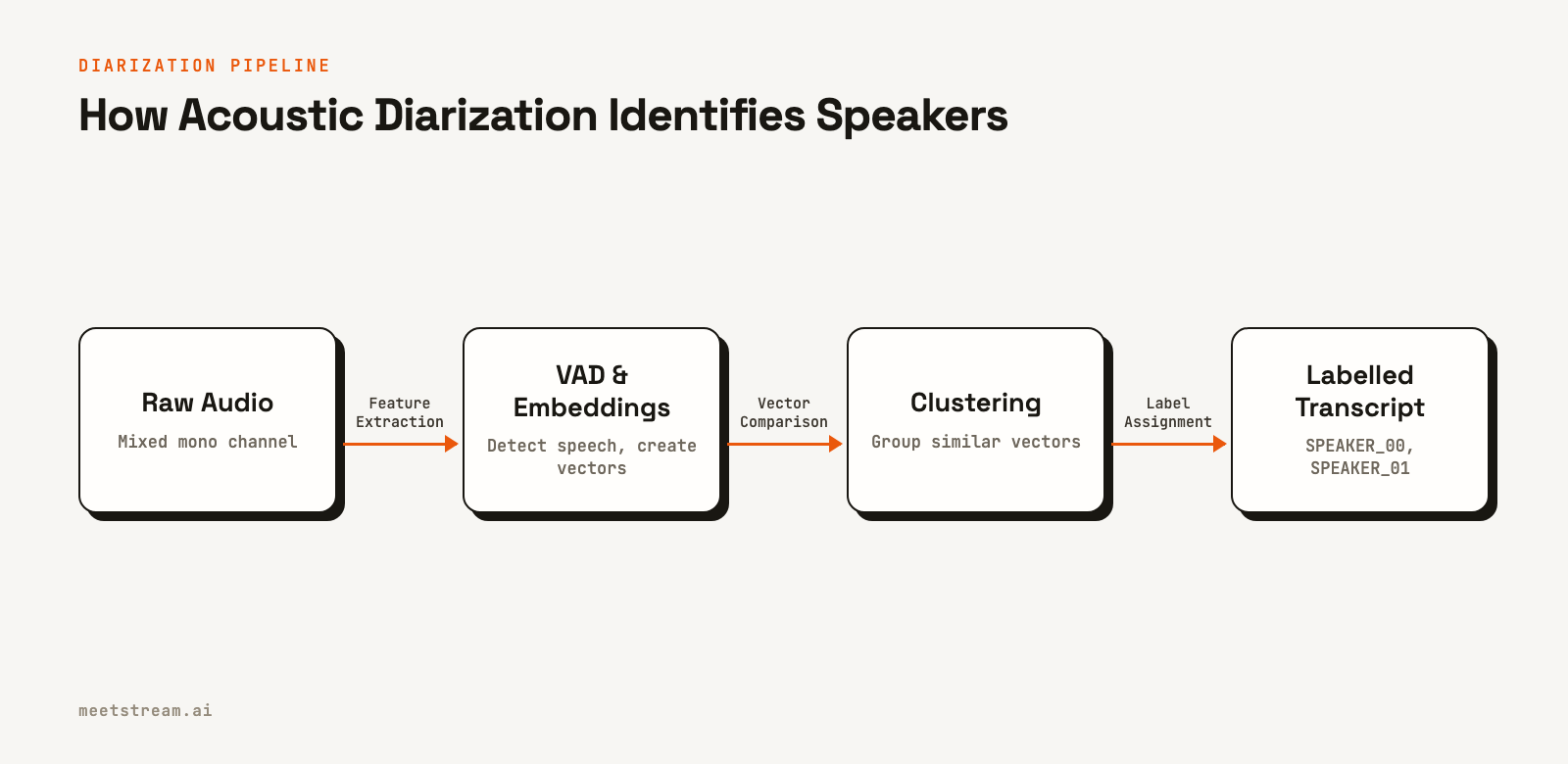
The main stages are:
- Voice Activity Detection (VAD): The system first identifies segments of the audio that contain human speech, filtering out silence and background noise. This ensures that only relevant audio is processed.
- Speaker Embedding: For each speech segment, a neural network model extracts a fixed-size vector, or an embedding, that represents the unique characteristics of the speaker's voice. Utterances from the same speaker will have similar embeddings that are close to each other in vector space.
- Clustering: The system then groups the embeddings into clusters. An algorithm like spectral clustering is used to group segments with similar vocal characteristics. The number of clusters is often determined automatically based on the data.
- Label Assignment: Finally, each cluster is assigned a generic label (
SPEAKER_00,SPEAKER_01), and these labels are applied to the corresponding segments in the final transcript.
This pipeline can produce a reasonably good segmentation of who spoke when. However, its accuracy degrades in common meeting scenarios with cross-talk, multiple speakers with similar voices, or poor audio quality. Because it has no external information, it can only make an educated guess based on acoustics.
Two Methods for Attaching Real Names to Transcripts
Once you have a diarized transcript with generic labels, the next step is to identify the speakers. There are two primary methods for achieving this, each with different technical requirements and levels of accuracy.
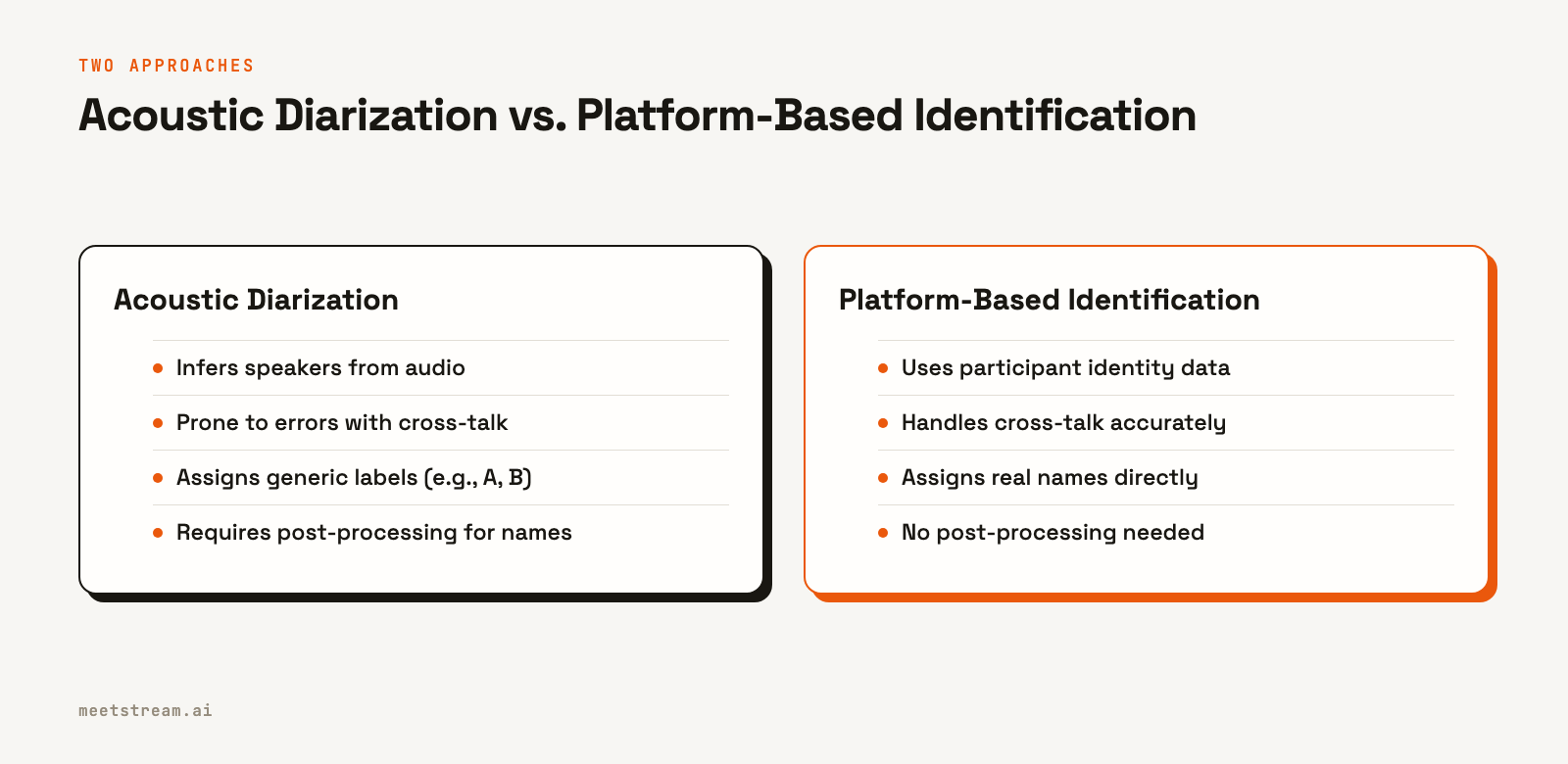
1. Platform-Based Identification
For conversations happening on platforms like Zoom, Google Meet, or Microsoft Teams, the platform itself is the source of truth for identity. Participants are already authenticated with their accounts, so the platform knows exactly who is speaking at any given time.
A meeting bot API can access this metadata. By joining a call as a participant, a bot can receive audio streams that are already tagged with the user ID of the speaker. This completely bypasses the need for acoustic diarization and its potential errors. The system does not have to guess who is speaking; it already knows.
This approach is the most reliable way to get a transcript with speaker labels. It is deterministic and not subject to the acoustic confusion that affects traditional diarization. The main limitation is that it only works for meetings on supported platforms.
2. Voiceprint Enrollment and Matching
When platform identity is not available, such as with pre-recorded audio files or phone calls, you can use voiceprints. This method requires a two-step process:
- Enrollment: First, you must collect a short, clean audio sample of each known speaker's voice (e.g., 30 seconds of them speaking). From this sample, you generate a speaker embedding that serves as their unique voiceprint, which you store with their name.
- Matching: During transcription, you generate an embedding for each speech segment from the meeting audio. You then compare this segment's embedding to your database of enrolled voiceprints. The closest match above a certain confidence threshold identifies the speaker.
This method can be effective but introduces complexity. You need to build and manage a secure system for voiceprint enrollment and storage. The accuracy depends heavily on the quality of the enrollment samples and the meeting audio. It is a viable alternative when platform integration is not possible, but it requires more engineering effort.
Limitations of Traditional Diarization
While powerful, acoustic-only diarization has known failure points that are common in real-world meetings. The primary metric for measuring performance is the Diarization Error Rate (DER), which combines errors from missed speech, false alarms, and incorrect speaker labels.
Factors that increase DER include:
- Cross-talk: When multiple people speak at the same time, a single mixed audio stream makes it very difficult for a model to separate the voices. Most systems will either misattribute the speech or merge the speakers.
- Similar Voices: Speakers with similar pitch and timbre can confuse the embedding model, causing their speech to be grouped into the same cluster.
- Variable Audio Quality: A speaker's voice can sound different depending on their microphone, distance from it, and network conditions. These variations can cause a single speaker's voice to be split into multiple clusters.
- Short Utterances: Very short phrases or interjections may not contain enough acoustic information to generate a reliable speaker embedding, leading to misattribution.
For applications that demand high accuracy, these limitations make traditional diarization on a mixed audio file a risky foundation. Using per-participant audio streams from the source platform is a much more reliable solution.
Getting Speaker Labels with the MeetStream API
MeetStream is designed to solve the problem of speaker identification at the infrastructure level. Our API provides a single integration to deploy bots into Zoom, Google Meet, and Teams. These bots act as AI participants, capturing media and metadata directly from the platform.
This architecture allows us to provide highly accurate speaker labels. For Zoom, we capture fully isolated audio streams for each participant. For Google Meet and Teams, we capture advanced speaker-attributed audio. This means our system doesn't rely on acoustic guesswork. The transcript is generated with real participant names from the start.
Here is how you would start a bot to get a post-call transcript with accurate speaker labels.
curl -X POST "https://api.meetstream.ai/api/v1/bots/create_bot" \
  -H "Authorization: Token <YOUR_API_KEY>" \
  -H "Content-Type: application/json" \
  -d '{
    "meeting_link": "https://meet.google.com/abc-defg-hij",
    "bot_name": "Meeting Analyzer",
    "callback_url": "https://your-app.com/webhooks/meetstream",
    "recording_config": {
      "transcript": {
        "provider": {
          "meetstream": {}
        }
      }
    }
  }'
When the meeting ends, MeetStream sends a transcription.processed event to your callback_url. You can then fetch the full, speaker-labelled transcript. The output includes a words array where each word is an object with a speaker field containing the name from the meeting platform.
Conclusion
Getting a transcript with accurate speaker labels is a critical first step for building any meaningful AI application on top of meeting conversations. While traditional acoustic diarization can provide generic labels, its performance suffers in the complex audio environments of real meetings.
The most reliable method is to use platform-level identity, where a meeting agent captures audio already associated with authenticated participants. This approach avoids the ambiguity of acoustic clustering and provides clean, structured data ready for analysis by LLMs. By solving speaker identification at the source, you can build more accurate and dependable AI features. See the full API reference at docs.meetstream.ai.
Frequently Asked Questions
What is a transcript API with speaker labels?
A transcript API with speaker labels is a service that converts audio into text and also identifies which person spoke each word or phrase. It processes a conversation and returns a structured transcript that attributes the dialogue to different speakers, such as "John Doe" or "Speaker 1".
How does speaker diarization work?
Speaker diarization works by analyzing an audio stream to detect unique vocal characteristics. It segments the audio into parts containing speech, creates a mathematical representation (an embedding) for each part, and then groups similar embeddings into clusters. Each cluster represents a distinct speaker.
What is the difference between speaker diarization and speaker recognition?
Speaker diarization determines *when* different speakers talk in an audio recording, assigning generic labels like "Speaker A" and "Speaker B". Speaker recognition (or identification) goes a step further by matching a voice to a specific, known person from a database of voiceprints.
How can I improve speaker diarization accuracy?
The best way to improve accuracy is to avoid traditional diarization on mixed audio. Instead, use an API like MeetStream that captures per-participant or speaker-attributed audio directly from meeting platforms like Zoom or Google Meet. This uses platform identity instead of acoustic guesswork.
Can you do speaker diarization in real-time?
Yes, speaker diarization can be performed in real-time. A real-time transcription API can process audio as it is streamed, applying diarization models to label speakers with low latency. This is useful for applications like live AI coaching or building in-meeting agents.


