
Speaker Diarization API: How It Works and When to Use It

A speaker diarization API is used to identify and label distinct speakers in an audio recording, answering the question of who spoke and when. Without diarization, a meeting transcript is an unstructured block of text. With it, you can attribute each sentence to a specific person, calculate talk time, and understand conversational dynamics for downstream AI tasks.
This process is the foundation for building reliable AI notetakers and voice agents. MeetStream is an agent-first platform that provides the voice infrastructure for these applications. Our API gives you access to real-time, speaker-labeled audio streams from Zoom, Google Meet, and Microsoft Teams, which is a direct way to get accurate diarization without running complex models yourself.
The core challenge is that real meetings are messy. Speakers interrupt each other, background noise bleeds across channels, and participants join through compressed codecs. A reliable diarization system must handle these conditions. The approach you take depends heavily on whether your application needs to act during the meeting or after it ends.
Why Standard Transcription Is Not Enough
Most transcription services convert speech to text. Diarization segments an audio timeline into regions and assigns each region a speaker label. Combining the two produces a structured transcript where every word is attributed to a voice. This structure is what makes features like conversation intelligence and action item extraction possible.
A diarization system’s output is a sequence of intervals, each tagged with a speaker ID, like Speaker_0: 0.0s-12.4s, Speaker_1: 12.6s-31.2s. The system does not know the speakers' actual names. It only identifies that the voice in segment A is different from the voice in segment B.
Assigning real names is a separate step. You can use voice biometrics with pre-enrolled voice prints, but a more direct method for meeting bots is to use the identity metadata from the meeting platform itself. This is the approach MeetStream uses, providing both a stable speaker_id and the participant's display name in every audio frame.
How Diarization Models Work Under the Hood
Traditional diarization systems use a multi-stage pipeline. First, voice activity detection (VAD) finds the parts of the audio that contain speech. Second, speaker change detection identifies the exact boundaries between different speakers. Third, a clustering algorithm groups all the speech segments from the same person under a single label.
A common technique for the clustering stage involves speaker embeddings. A model, often a Time Delay Neural Network (TDNN), converts short audio segments into fixed-size vectors, known as x-vectors. In this vector space, audio from the same speaker is geometrically close. An algorithm like agglomerative hierarchical clustering can then group these x-vectors. This approach works well on clean recordings but struggles with short speaker turns and overlapping speech.
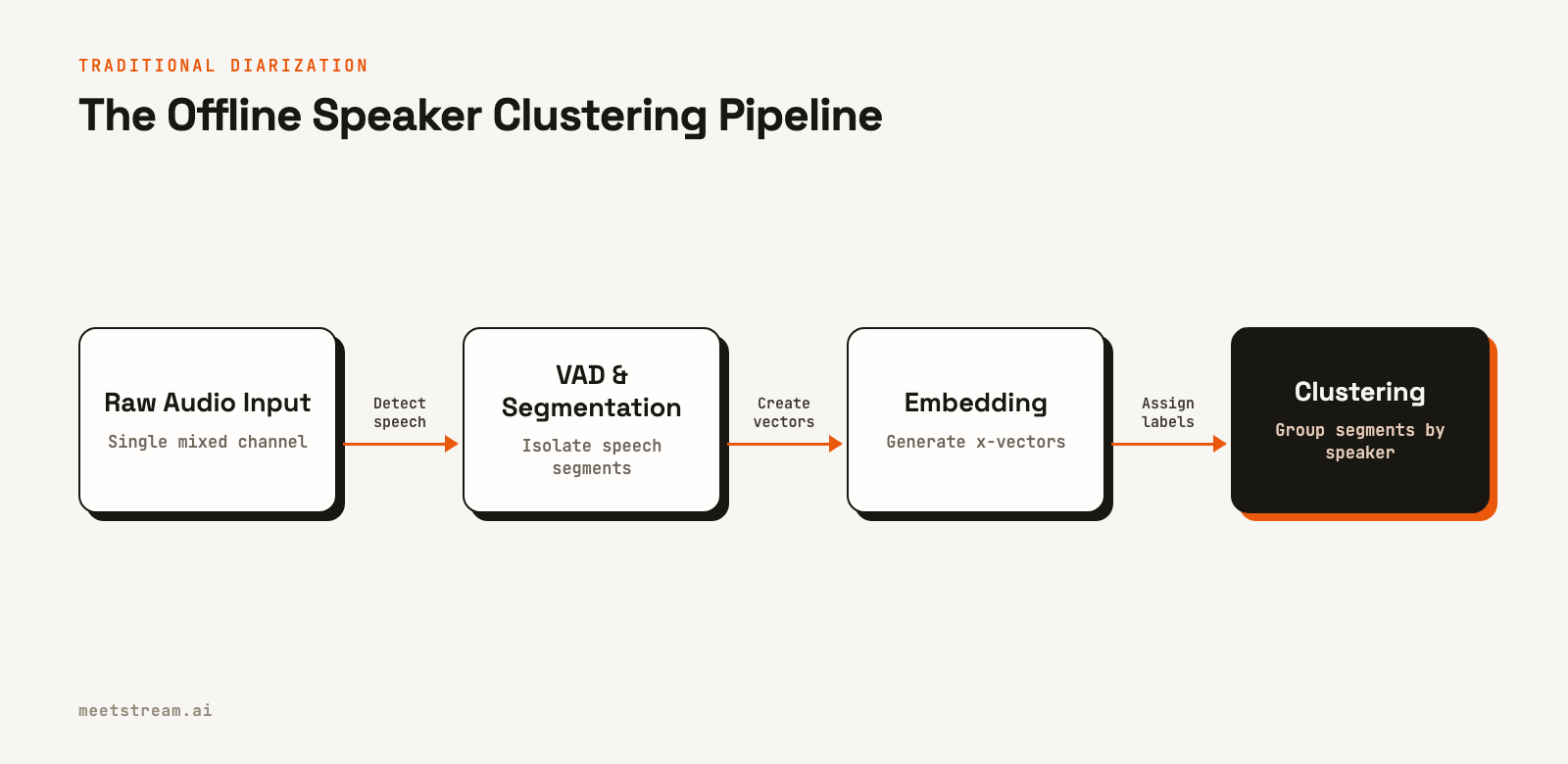
More recent methods use end-to-end neural models. These systems, like the EEND (End-to-End Neural Diarization) family, treat diarization as a single sequence-labeling problem. They take audio features as input and directly output per-frame probabilities for multiple speakers. This allows them to handle overlapping speech, a common occurrence in real meetings that clustering-based methods cannot model effectively.
The Accuracy vs. Latency Tradeoff
The main engineering decision when implementing a speaker diarization API is choosing between post-call processing and real-time streaming. Your choice determines the accuracy and latency your users will experience.
Post-call diarization runs its models on the complete audio file after the meeting has ended. It has full context, which allows for more accurate speaker clustering and boundary detection. This method produces the highest quality results, with a lower Diarization Error Rate (DER), and is best for applications like generating meeting summaries or populating a CRM.
Real-time diarization must make decisions with only a few hundred milliseconds of audio context. This is much harder. Offline clustering is not an option, and streaming end-to-end models can accumulate errors over time. For this reason, the most reliable real-time systems do not run their own diarization models. Instead, they get speaker identity directly from the source: the meeting platform itself.
Getting Speaker Labels from the Platform
Platforms like Zoom, Google Meet, and Microsoft Teams already know who is speaking because they manage each participant's audio. Accessing this information is the key to accurate, low-latency diarization. While the platforms provide different levels of stream separation, they all provide the necessary metadata to label speakers correctly.
Zoom offers the ability to capture a fully isolated audio stream for each participant via its SDK. This is the cleanest possible signal, as it completely removes cross-talk and background noise from other speakers. Google Meet and Teams provide a mixed audio stream but include reliable, real-time metadata indicating who is speaking at any given moment. For most multi-speaker transcription use cases, this speaker-attributed stream is highly effective.
The challenge for developers is that integrating with each platform’s SDK and real-time media stack is a significant infrastructure project. This is the problem a unified meeting bot API solves.
Implementing Diarization with MeetStream
MeetStream provides two primary ways to get a diarized transcript: a real-time WebSocket stream for live applications and a post-call webhook for asynchronous workflows. Both methods abstract away the complexity of integrating with individual meeting platforms.
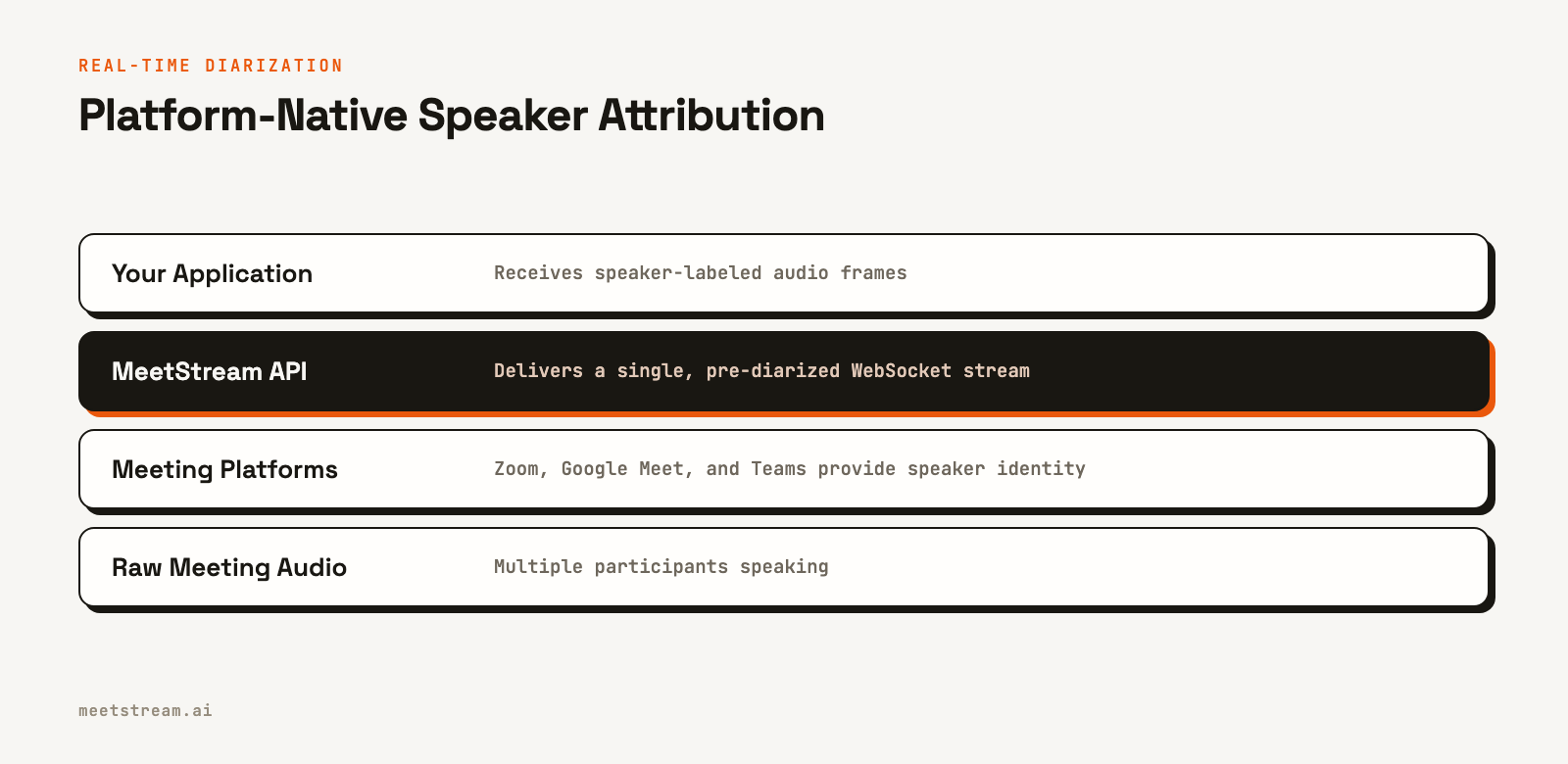
For real-time use cases, you can set the live_audio_required parameter when creating a bot. MeetStream will connect to your WebSocket server and stream binary audio frames. Each frame contains the raw audio data plus the speaker's ID and display name, giving you pre-diarized audio with latency around 200ms.
import struct

def parse_meetstream_frame(raw_bytes: bytes):
    """Parses a binary audio frame from MeetStream."""
    offset = 1  # Skip msg_type

    # Speaker ID
    sid_length = struct.unpack_from('<H', raw_bytes, offset)[0]
    offset += 2
    speaker_id = raw_bytes[offset:offset+sid_length].decode('utf-8')
    offset += sid_length

    # Speaker Name
    sname_length = struct.unpack_from('<H', raw_bytes, offset)[0]
    offset += 2
    speaker_name = raw_bytes[offset:offset+sname_length].decode('utf-8')
    offset += sname_length

    # PCM Audio Data
    pcm_data = raw_bytes[offset:]

    return {
        "speaker_id": speaker_id,
        "speaker_name": speaker_name,
        "pcm_data": pcm_data
    }
For post-call analysis, you can specify a transcription provider in the recording_config. MeetStream integrates with services like Deepgram and AssemblyAI, which can perform high-accuracy diarization on the full meeting recording. You configure this once in the API call, and MeetStream handles the recording and processing.
import requests

# Create a bot configured for post-call diarization
bot_payload = {
    "meeting_link": "https://meet.google.com/xyz-abcd-efg",
    "bot_name": "Notetaker Bot",
    "callback_url": "https://your-app.com/webhooks/meetstream",
    "recording_config": {
        "transcript": {
            "provider": {
                "deepgram": {
                    "diarize": True
                }
            }
        }
    }
}

response = requests.post(
    "https://api.meetstream.ai/api/v1/bots/create_bot",
    json=bot_payload,
    headers={"Authorization": "Token YOUR_API_KEY"}
)

# After the meeting, a 'transcription.processed' webhook will fire.
# You can then fetch the full, speaker-labeled transcript.
This approach lets you choose the best tool for the job. Use the real-time stream for live agent interactions and the post-call transcript for creating a permanent, accurate record.
Conclusion
A speaker diarization API is a critical component for any application that analyzes conversations. While traditional methods rely on complex, offline audio processing models, modern meeting bot infrastructure can get more accurate speaker labels directly from the meeting platform. This platform-native approach provides the low-latency, high-accuracy data needed to build the next generation of AI meeting agents.
By using a unified API, you can get reliable, real-time diarization across Zoom, Google Meet, and Teams without building and maintaining separate integrations. See the full API reference at docs.meetstream.ai.
Frequently Asked Questions
What is the difference between speaker diarization and speaker identification?
Speaker diarization answers "who spoke when" by assigning generic labels like Speaker_0 and Speaker_1. Speaker identification matches a voice to a known person from a pre-registered database. Meeting bots typically use platform metadata, like a participant's display name, for identification instead of voice biometrics.
How is diarization accuracy measured?
Accuracy is measured by Diarization Error Rate (DER), which is the sum of speaker confusion, missed speech, and false alarm speech. A lower DER is better. State-of-the-art models achieve a DER below 10% on clean recordings, but this can increase with more speakers, cross-talk, and poor audio quality.
Does a speaker diarization API provide names?
It depends on the implementation. A pure diarization model only outputs speaker labels. However, an API like MeetStream's provides the participant's display name from the meeting platform along with the audio, giving you named speakers out of the box.
Can diarization handle overlapping speech?
Modern end-to-end neural models can handle overlapping speech better than older clustering-based methods. However, the most accurate way to handle overlap is to get separate audio channels for each speaker, which is possible on platforms like Zoom.
How do I get a speaker-labeled transcript?
You can get a speaker-labeled transcript by combining the output of a diarization system with a speech-to-text engine. Alternatively, a meeting bot API can provide a real-time audio stream that is already labeled by speaker, which you can then pass to a streaming transcription service.


