
Post Meeting Summaries to Slack Automatically

To automatically send meeting summaries to Slack, you use a meeting bot API to capture the transcript and a webhook to trigger your server when the meeting ends. Your server receives the event, fetches the full transcript, generates a summary, and then calls the Slack API to post a formatted message to a specific channel. This creates a reliable, event-driven pipeline from a live conversation to a persistent record in Slack.
This integration solves a common developer pain point: critical decisions are made in Zoom or Google Meet, but the record of those decisions never makes it back to the team’s primary workspace. Building this bridge requires infrastructure that can reliably join any meeting, capture clean data, and provide a real-time eventing system. MeetStream provides this as an agent-first voice infrastructure for meetings, where bots can join calls as active participants to capture data and trigger workflows.
The core of this automation is the webhook, a POST request sent from MeetStream to your server when a specific event occurs, like a transcript being processed. By building a small service to listen for these webhooks, you can connect meeting outcomes to any other API, including Slack. Let's get into it.
Why Automate Meeting Summaries in Slack?
For many engineering and product teams, Slack is the system of record. It is where work is tracked, decisions are debated, and context is shared. Video meetings, while necessary for complex discussions, create an information silo. The output of a 30-minute planning session, action items, technical decisions, and open questions, often evaporates unless someone diligently takes notes and remembers to share them.
Manually transferring this information is slow and error-prone. It relies on an individual to capture, format, and post the summary. This manual step is often skipped during busy periods, leaving the rest of the team out of the loop. Automating this process with a meeting bot API ensures that valuable context is never lost. It makes meeting outcomes searchable, accessible, and integrated directly into the team's existing workflows without manual effort.
The Architecture: MeetStream Webhooks to Slack API
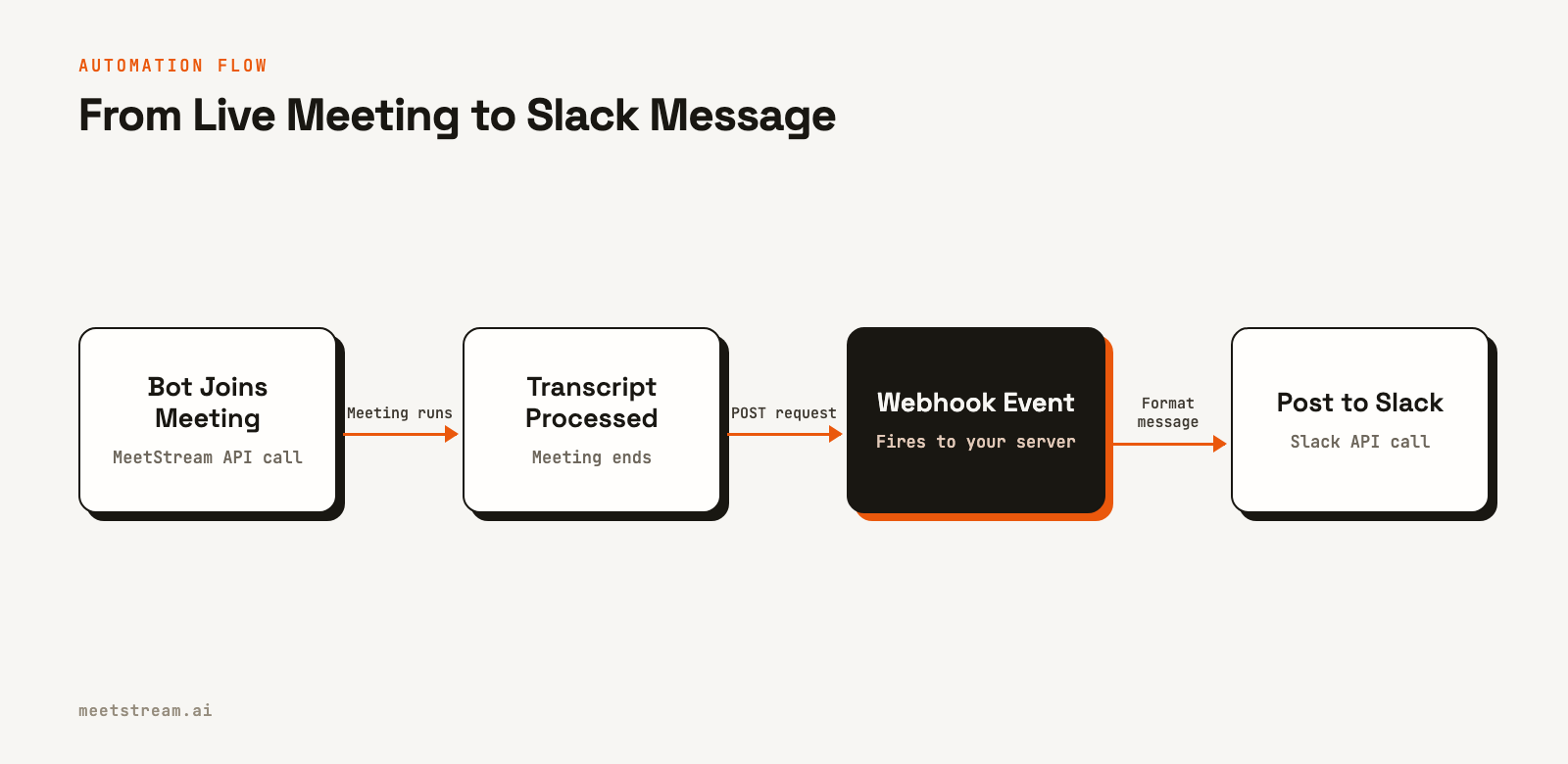
The integration relies on a simple, event-driven architecture. Instead of constantly polling an API to check if a meeting is over, your application waits for MeetStream to send a notification. This is more efficient and provides data as soon as it is available.
Here is how it works:
- Bot Deployment: Your application makes a single API call to MeetStream to send a bot to a meeting URL on Zoom, Google Meet, or Microsoft Teams. In this request, you specify a
callback_urland configure transcription. - Data Capture: The MeetStream bot joins the call, records the audio, and processes it to produce a speaker-labeled transcript after the meeting ends.
- Webhook Event: Once the transcript is ready, MeetStream sends a POST request to your
callback_url. The payload of this request contains an event object confirming that the process is complete. - Action Triggered: Your server receives the webhook. It can then use the
transcript_idfrom the initial API call to fetch the full transcript, generate a summary using an NLP model, and post the result to a Slack channel using Slack’s API.
This pattern is reliable and scalable. Since your server only does work when a meeting actually finishes, it uses minimal resources. We have processed over 1,000,000 meeting minutes with this architecture.
Step 1: Create a MeetStream Bot with a Webhook
The first step is to tell MeetStream where to send event notifications. You do this by providing a callback_url when you create a bot. This URL must be a publicly accessible endpoint on your server that can receive POST requests.
You also need to enable transcription. In the recording_config object, you can specify a provider. For this example, we will use MeetStream's in-house engine.
Here is a cURL example that deploys a bot to a meeting and configures it to send webhooks to your application.
curl -X POST "https://api.meetstream.ai/api/v1/bots/create_bot" \
  -H "Authorization: Token <YOUR_API_KEY>" \
  -H "Content-Type: application/json" \
  -d '{
    "meeting_link": "<YOUR_MEETING_LINK>",
    "bot_name": "Summary Bot",
    "callback_url": "https://your-app.com/webhooks/meetstream",
    "recording_config": {
      "transcript": {
        "provider": {
          "meetstream": {}
        }
      }
    }
  }'
The API will respond with a bot_id and a transcript_id. You should store both of these IDs in your database, associated with the meeting. You will need the transcript_id later to fetch the data.
Step 2: Build a Webhook Handler to Receive Events
Next, you need to create the server-side endpoint that will listen for incoming webhooks from MeetStream. This endpoint should parse the JSON payload and look for the specific events that signal a meeting has finished and the transcript is ready. The key event for this workflow is transcription.processed.
MeetStream sends several lifecycle events, so your handler should inspect the bot_event field to decide what to do. Always respond quickly with a 2xx status code to acknowledge receipt of the webhook, and then process the data asynchronously in a background job.
For production security, it is critical to verify that incoming webhooks are genuinely from MeetStream. The per-bot callback_url used in this example does not support signed requests. For authenticated delivery, you should use a workspace webhook endpoint, which you can configure in your MeetStream dashboard. Workspace webhooks are signed with a secret key, and each request includes an X-MeetStream-Signature header that you can use to verify the payload's integrity.
Here is a minimal example of a webhook handler using Node.js and Express:
const express = require('express');
const app = express();
app.use(express.json());

// This is the endpoint you provided as the callback_url
app.post('/webhooks/meetstream', (req, res) => {
  const payload = req.body;
  const eventType = payload.bot_event;

  console.log(`Received webhook event: ${eventType}`);

  // Acknowledge receipt immediately
  res.status(200).send('OK');

  // Handle the event asynchronously
  switch (eventType) {
    case 'transcription.processed':
      // Trigger the logic to fetch the transcript and post to Slack
      // You would look up the transcript_id from your database using the bot_id
      handleTranscriptionProcessed(payload.bot_id);
      break;
    case 'bot.failed':
      // Handle potential failures
      console.error(`Bot failed with status: ${payload.bot_status}`);
      break;
    // Add other event handlers as needed
    default:
      console.log('Ignoring unhandled event type.');
  }
});

function handleTranscriptionProcessed(botId) {
  console.log(`Processing transcript for bot: ${botId}`);
  // 1. Look up transcript_id in your database using botId
  // 2. Fetch the transcript from MeetStream API
  // 3. Generate summary
  // 4. Post summary to Slack
}

const PORT = process.env.PORT || 3000;
app.listen(PORT, () => console.log(`Server listening on port ${PORT}`));
This code sets up a simple server that listens on the /webhooks/meetstream path. When a transcription.processed event arrives, it calls a function to handle the rest of the workflow.
Step 3: Format and Post the Summary to Slack
The final step is to fetch the transcript, create a summary, and post it to Slack. First, your application uses the stored transcript_id to call the MeetStream API's transcript endpoint. You can find the full details in our guide to post-call transcription.
Once you have the transcript text, you can pass it to a large language model (LLM) to generate a concise summary with bullet points for key decisions and action items. Finally, you use Slack's chat.postMessage API to send the content to a channel. Using Slack's Block Kit is recommended for creating richly formatted messages that are easy to read.
Here is a JavaScript example showing how to call the Slack API with a formatted message:
const { WebClient } = require('@slack/web-api');

async function postSummaryToSlack(summary, actionItems) {
  const slackToken = process.env.SLACK_BOT_TOKEN;
  const channelId = 'C1234567890'; // Your target channel ID
  const web = new WebClient(slackToken);

  try {
    const result = await web.chat.postMessage({
      channel: channelId,
      text: 'Meeting Summary', // Fallback text for notifications
      blocks: [
        {
          type: 'header',
          text: {
            type: 'plain_text',
            text: '📝 Meeting Summary',
          },
        },
        {
          type: 'section',
          text: {
            type: 'mrkdwn',
            text: summary,
          },
        },
        {
          type: 'divider',
        },
        {
          type: 'section',
          text: {
            type: 'mrkdwn',
            text: '*Action Items:*\n' + actionItems.join('\n'),
          },
        },
      ],
    });
    console.log(`Successfully sent message ${result.ts} in conversation ${channelId}`);
  } catch (error) {
    console.error(`Error posting to Slack: ${error}`);
  }
}

// Example usage:
const meetingSummary = 'Discussed the Q4 roadmap and finalized the feature set for the next release.';
const meetingActionItems = [
  '- *@alice* to create the project plan by EOD Friday.',
  '- *@bob* to investigate the database performance issue.',
];

postSummaryToSlack(meetingSummary, meetingActionItems);
This function constructs a message with a header, a summary section, and a list of action items. The result is a clean, structured notification in your Slack channel that keeps the entire team informed.
How MeetStream Provides the Foundation
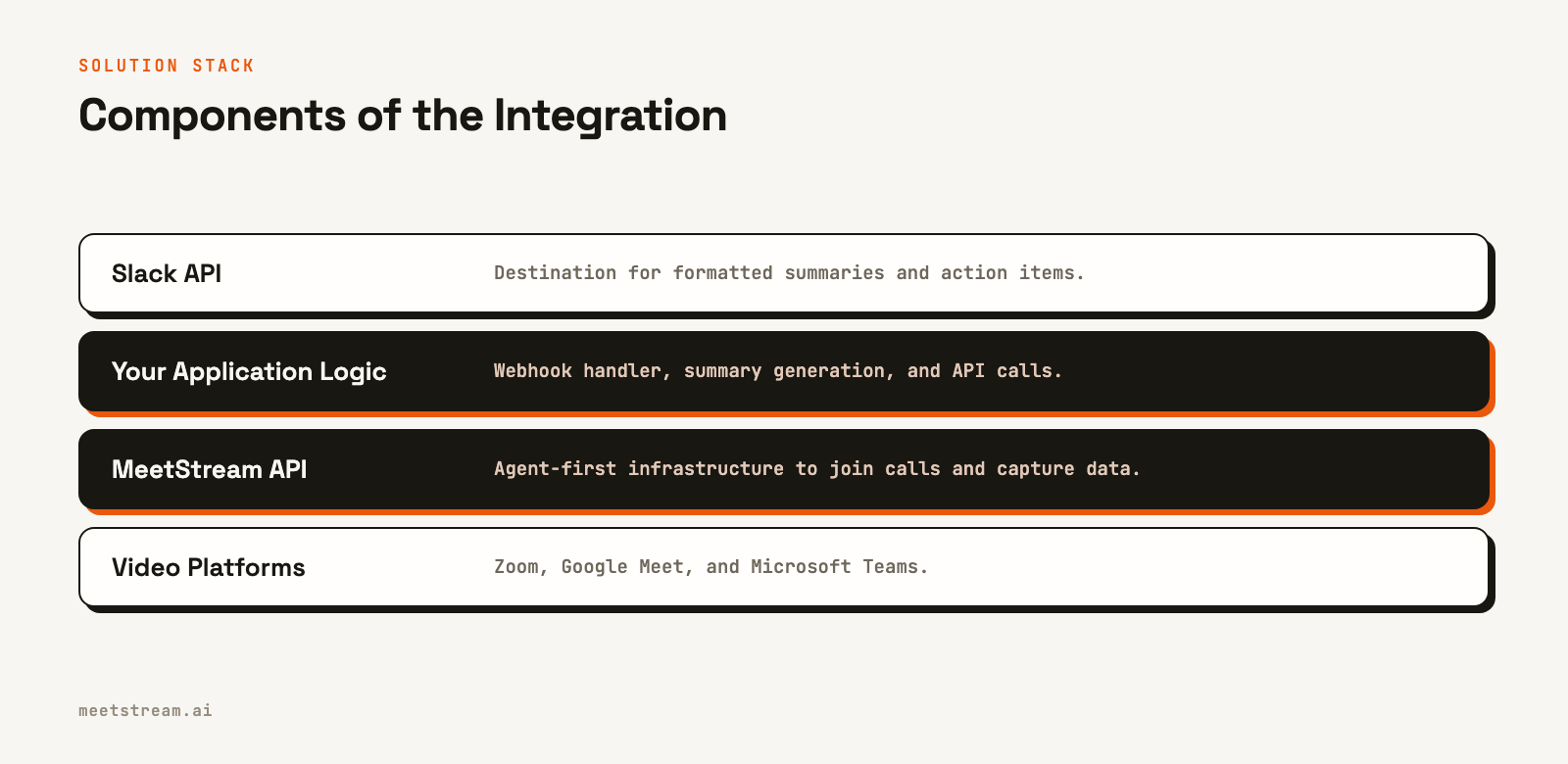
Building this integration requires a reliable data source. MeetStream acts as the foundational infrastructure layer, handling the complexity of connecting to different video platforms and capturing high-quality audio and metadata. Our unified AI voice agent platform is designed for developers building automated workflows on top of live conversations.
Instead of building and maintaining separate integrations for Zoom, Google Meet, and Microsoft Teams, you can use a single API. We manage the bot scaling, media processing, and eventing infrastructure, so you can focus on the application logic that delivers value to your users. Whether you are building a simple summary poster or a complex, interactive meeting agent, the data pipeline starts with a reliable bot in the call.
Conclusion
By connecting MeetStream's webhooks to the Slack API, you can build a powerful automation that closes the gap between conversations and documentation. This event-driven approach is efficient and ensures that important meeting outcomes are captured and shared automatically. Posting meeting summaries to Slack is a practical first step toward building more advanced meeting-native applications.
See the full API reference at docs.meetstream.ai.
Frequently Asked Questions
How do you trigger the Slack post only when the meeting is over?
You should listen for the transcription.processed webhook event from MeetStream. This event fires only after the bot has left the meeting and the full audio has been processed into a transcript, ensuring you have the complete data before generating a summary.
How do I get the meeting transcript data?
When you call the create_bot endpoint, the response includes a transcript_id. Store this ID. After you receive the transcription.processed webhook, use that ID to make a GET request to the /api/v1/transcript/{transcript_id}/get_transcript endpoint to retrieve the full, speaker-labeled transcript.
Can I customize the format of the Slack message?
Yes, Slack's Block Kit API allows for highly customized message layouts. You can use different blocks for headers, text sections, dividers, images, and interactive buttons to create messages that are well-structured and easy for users to read and interact with.
Does this integration work for Zoom, Google Meet, and Teams?
Yes. The MeetStream API is platform-agnostic. You provide a meeting link for Zoom, Google Meet, or Microsoft Teams in your create_bot request, and the process for receiving webhooks and fetching transcripts remains exactly the same for all platforms.
What happens if the webhook delivery fails?
MeetStream webhook delivery is best-effort, and non-2xx responses from your server are not retried. Your webhook handler should be highly available and designed to return a 200 OK response immediately before queuing any long-running tasks, like summary generation, to a background worker.

