
Real-Time vs Post-Call Transcription: Which to Use

Use real-time transcription for applications that require immediate text output, like live captioning or triggering in-call actions. Choose post-call transcription when maximum accuracy for later analysis is the priority. The fundamental tradeoff is speed versus precision. Real-time models deliver text in seconds with lower accuracy, while post-call processing takes longer but yields a more refined transcript for summaries or records.
This choice is one of the first architectural decisions you face when building on top of meeting audio. It determines whether your application is an active participant or a passive observer. At MeetStream, we provide voice infrastructure for AI agents that join meetings, listen, and act. For these agents, access to a real-time transcript is essential. For products that only summarize meetings after they end, a post-call approach is simpler and more accurate.
These are not two implementations of the same feature. They use different API parameters, webhook flows, and have distinct accuracy characteristics. Neither is universally better. The right choice depends entirely on what your application needs to do and when it needs to do it. Many production systems use both: real-time for in-meeting features and post-call for the authoritative record that downstream systems rely on.
How Real-Time Transcription Works
To get a live transcript, you provide a webhook URL in the live_transcription_required parameter when creating a bot. MeetStream then sends a stream of POST requests to your endpoint as speech is detected in the meeting. Each payload contains a small fragment of the conversation, including the speaker's name and an array of words with timestamps.
Your application's job is to listen for these webhooks and assemble the full transcript. Because delivery is best-effort, you should respond with a 2xx status code immediately and process the payload asynchronously. The payload contains a `transcript` field with the new text for that specific fragment and a `words` array with detailed timing for each word.
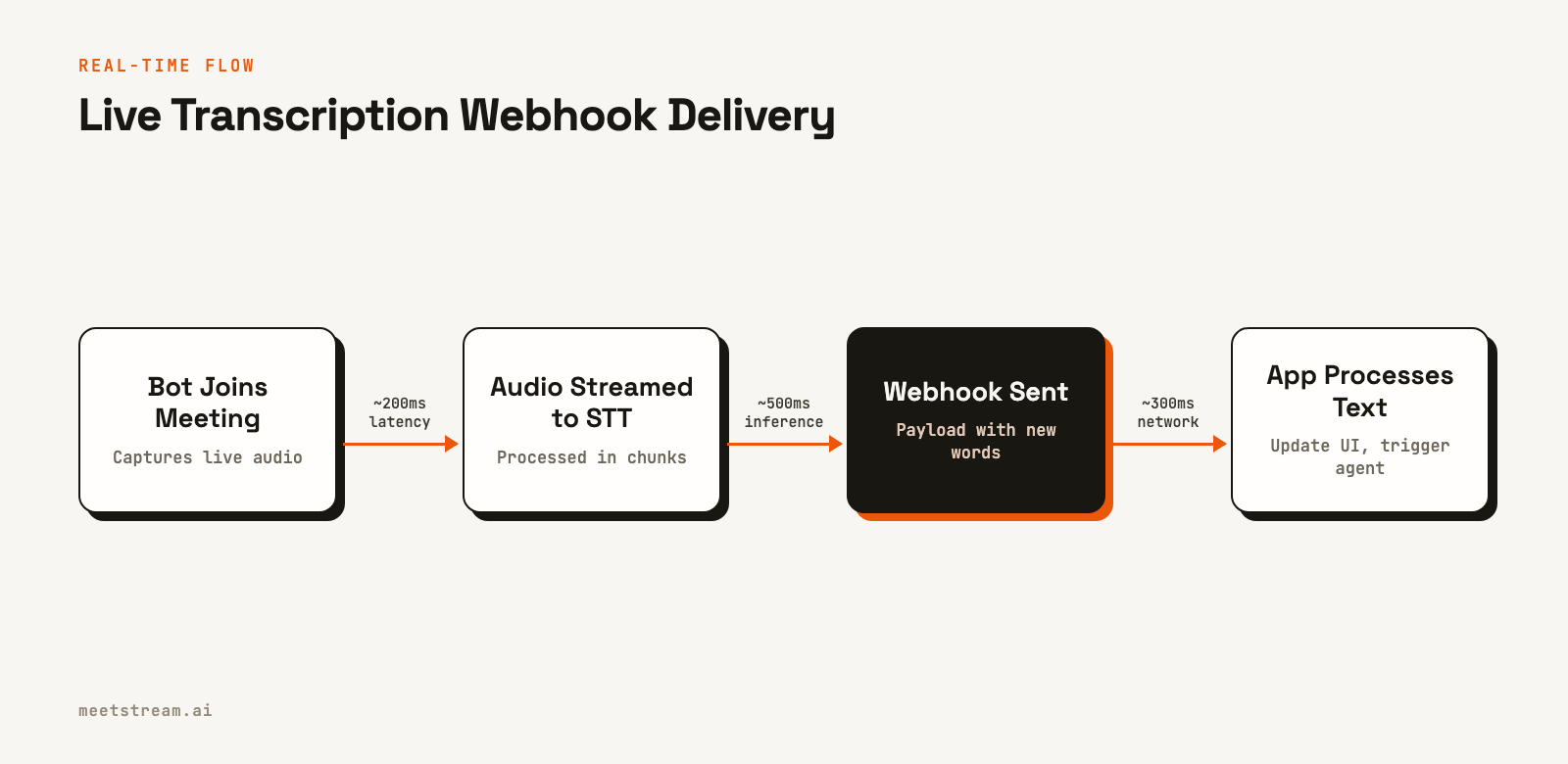
Here is how you would create a bot to receive live transcripts. Note the `live_transcription_required` object, which contains the `webhook_url` where your server will receive the data.
import requests
import uuid

# Generate a unique ID to associate with this bot
# In a real app, you would create a record in your database
session_id = str(uuid.uuid4())

# Create a bot that sends real-time transcription to a webhook
bot_payload = {
    "meeting_link": "https://meet.google.com/abc-defg-hij",
    "bot_name": "Live Transcriber",
    "live_transcription_required": {
        "webhook_url": f"https://your-app.com/webhooks/live-transcript/{session_id}"
    }
}

response = requests.post(
    "https://api.meetstream.ai/api/v1/bots/create_bot",
    json=bot_payload,
    headers={"Authorization": "Token YOUR_API_KEY"}
)

if response.status_code == 201:
    bot_id = response.json()["bot_id"]
    print(f"Bot created with ID: {bot_id}")
    # Associate session_id with bot_id in your database
else:
    print(f"Error creating bot: {response.text}")
Your webhook handler receives a series of small JSON payloads. A simple implementation can append the `transcript` text from each payload to build a running log of the conversation.
from flask import Flask, request, jsonify

app = Flask(__name__)

# In-memory store for ongoing transcripts (in production, use a database)
transcripts = {}

@app.route("/webhooks/live-transcript/<session_id>", methods=["POST"])
def handle_live_transcript(session_id):
    payload = request.json

    speaker = payload.get("speakerName", "Unknown")
    new_transcript_part = payload.get("transcript", "")

    if session_id not in transcripts:
        transcripts[session_id] = ""

    # Append the new text to the full transcript
    transcripts[session_id] += f"{speaker}: {new_transcript_part}\n"

    # Here you could trigger real-time logic:
    # - Check for keywords to alert a sales manager
    # - Feed the text to an LLM for an in-meeting agent response
    print(f"Updated transcript for {session_id}:\n{transcripts[session_id]}")

    return jsonify({"status": "ok"}), 200
How Post-Call Transcription Works
Post-call transcription provides a complete, highly accurate transcript after the meeting concludes. You enable it by setting the recording_config parameter when creating a bot. The bot joins, records the entire meeting, and uploads the audio for processing. When the transcript is ready, MeetStream sends a single `transcription.processed` event to your `callback_url`.
What matters is to store the `transcript_id` returned in the initial `create_bot` API response. You will use this ID to fetch the final transcript data once you receive the webhook notification. This avoids an extra API call to look up the bot's details.
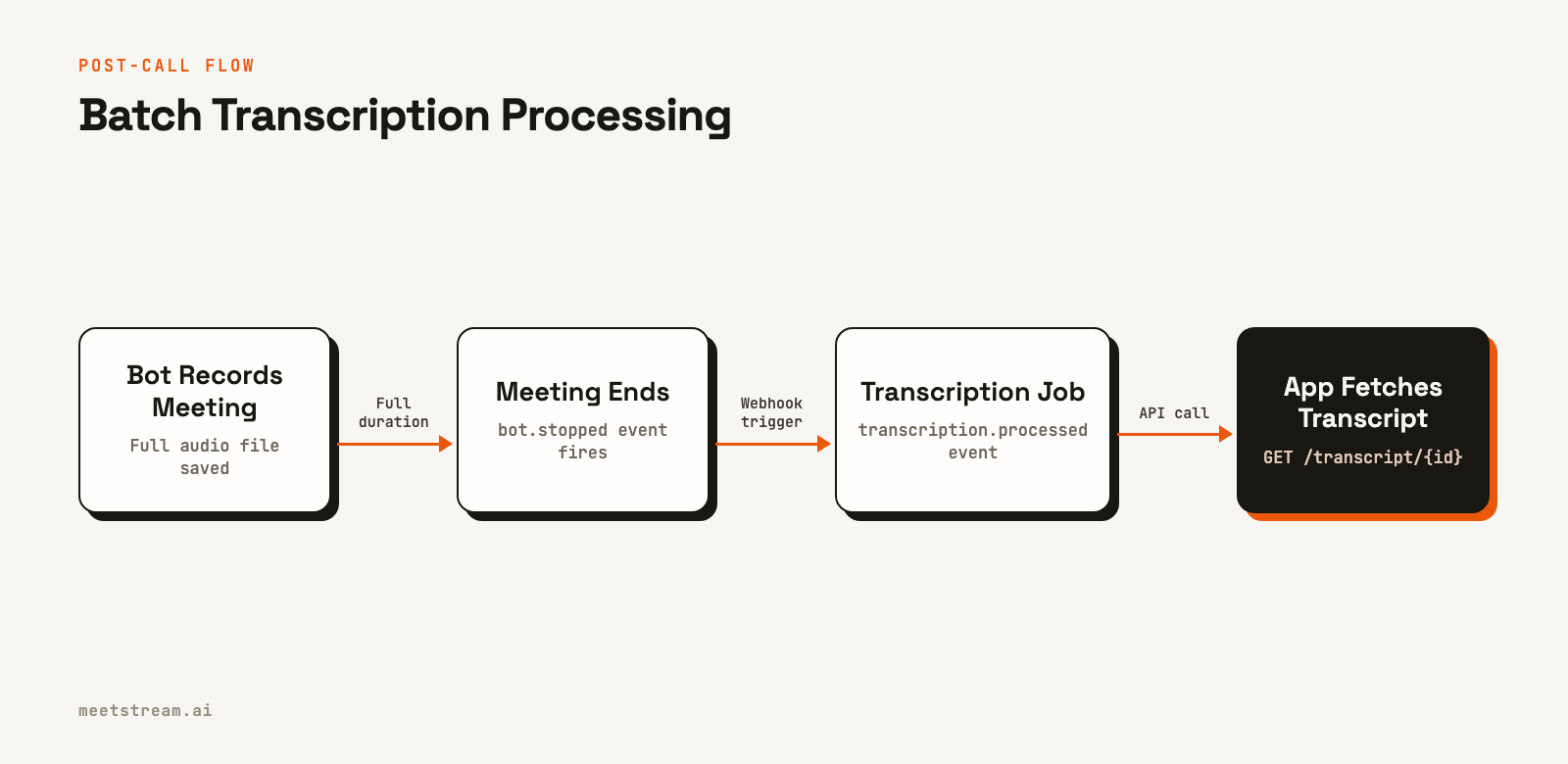
This example creates a bot using MeetStream's in-house transcription engine. You can also specify other providers like Deepgram or AssemblyAI. The `callback_url` is where all bot lifecycle events, including `transcription.processed`, will be sent.
import requests

# Store this mapping in your database
bot_to_transcript_map = {}

# Create a bot configured for post-call transcription
bot_payload = {
    "meeting_link": "https://meet.google.com/abc-defg-hij",
    "bot_name": "Meeting Recorder",
    "callback_url": "https://your-app.com/webhooks/meetstream",
    "recording_config": {
        "transcript": {
            "provider": {
                "meetstream": {}
            }
        }
    }
}

response = requests.post(
    "https://api.meetstream.ai/api/v1/bots/create_bot",
    json=bot_payload,
    headers={"Authorization": "Token YOUR_API_KEY"}
)

if response.status_code == 201:
    data = response.json()
    bot_id = data["bot_id"]
    transcript_id = data["transcript_id"]

    # Persist the transcript_id for later use
    if transcript_id:
        bot_to_transcript_map[bot_id] = transcript_id
        print(f"Bot {bot_id} created with transcript ID {transcript_id}")
else:
    print(f"Error creating bot: {response.text}")
Your webhook handler listens for the `bot_event` field. When it receives `transcription.processed`, it uses the stored `transcript_id` to fetch the final result from the correct API endpoint.
# Webhook handler for post-call flow
@app.route("/webhooks/meetstream", methods=["POST"])
def handle_webhook():
    payload = request.json
    event_type = payload.get("bot_event")
    bot_id = payload.get("bot_id")

    if event_type == "transcription.processed":
        # Retrieve the transcript_id you stored earlier
        transcript_id = bot_to_transcript_map.get(bot_id)

        if not transcript_id:
            print(f"Error: No transcript_id found for bot {bot_id}")
            return jsonify({"status": "error"}), 404

        # Fetch the complete transcript from the correct endpoint
        transcript_url = f"https://api.meetstream.ai/api/v1/transcript/{transcript_id}/get_transcript"

        resp = requests.get(
            transcript_url,
            headers={"Authorization": "Token YOUR_API_KEY"}
        )

        if resp.status_code == 200:
            transcript_data = resp.json()
            # Process the complete, accurate transcript for summarization,
            # action item extraction, or CRM entry.
            print(f"Successfully fetched transcript for bot {bot_id}")
            # process_final_transcript(bot_id, transcript_data)
        else:
            print(f"Failed to fetch transcript: {resp.text}")

    return jsonify({"status": "ok"}), 200
Accuracy and Latency Tradeoffs
Post-call transcription is consistently more accurate than real-time. Streaming models must make predictions on small chunks of audio without the benefit of future context. This can lead to errors with ambiguous words or phrases. Post-call models analyze the entire audio file at once, allowing them to use bidirectional context to resolve ambiguity and produce a more coherent output.
In practice, the word error rate (WER) for a post-call model can be 2 to 8 percentage points lower than its streaming counterpart on clean audio. For meetings with heavy accents, background noise, or technical jargon, this accuracy gap can widen to 15 points or more. If the integrity of the final transcript is critical for search, analytics, or conversation intelligence, post-call is the safer choice.
For latency, real-time is obviously faster, delivering text within 1 to 3 seconds of speech. Post-call processing time is typically a fraction of the meeting's duration, so a 60-minute recording might take 10 to 15 minutes to transcribe. This delay is acceptable for asynchronous workflows like sending a summary email but is a non-starter for in-meeting interaction.
Choosing the Right Approach for Your Use Case
The decision comes down to your product's core function. If your app needs to react *during* the meeting, you must use real-time transcription. If it only analyzes the meeting *after* it ends, post-call is simpler, cheaper, and more accurate.
| Use Case | Real-Time | Post-Call | Both |
|---|---|---|---|
| Live captions for accessibility | Required | ||
| Real-time sales coaching alerts | Required | ||
| AI agent that answers questions | Required | ||
| Post-meeting summary generation | Preferred | ||
| CRM note population | Preferred | ||
| Compliance and archival | Required | ||
| Action item and topic extraction | Preferred | ||
| Full-featured meeting intelligence platform | Yes |
How MeetStream Supports Both Workflows
MeetStream is designed as infrastructure for building AI agents and applications on top of meetings. We provide both real-time and post-call transcription because different use cases demand different approaches. You can even enable both on the same bot for maximum flexibility.
By including both the live_transcription_required and recording_config objects in a single `create_bot` call, you get the best of both worlds. Your application can use the live webhook stream to power in-meeting features, like displaying keyword alerts or allowing an agent to respond in chat. After the meeting, you receive the `transcription.processed` event and can fetch the higher-accuracy post-call transcript to use as the canonical record for analysis and storage.
This dual-mode pattern is common for advanced applications. It lets you provide a responsive user experience during the call without compromising the quality of the data you use for post-call intelligence.
Conclusion
The choice between real-time and post-call transcription is a primary architectural decision. Real-time offers speed for interactive, in-meeting applications at the cost of some accuracy. Post-call delivers higher accuracy for analysis and record-keeping after a short processing delay. By understanding the API mechanics and tradeoffs of each, you can select the right approach for your product or use them in parallel to support a full spectrum of features. See the full API reference at docs.meetstream.ai.
Related guides
- How to Build a Post-Call Transcription Bot with MeetStream
- Build a Teams Transcription Bot: Real-Time Speaker-Labelled Audio
Frequently Asked Questions
What is the difference between real-time and post-call transcription?
Real-time transcription converts audio to text as it happens, sending data in small chunks to a webhook. Post-call, or batch, transcription processes the entire audio file after the meeting ends to produce a single, highly accurate transcript. The core difference is immediacy versus accuracy.
Which transcription mode is more accurate?
Post-call transcription is generally more accurate. Models that process a complete audio file can use the full context of the conversation to make better predictions, resulting in a lower word error rate compared to streaming models that have limited context.
What is the typical latency of real-time transcription?
End-to-end latency for a real-time transcript fragment, from when a word is spoken in a meeting to when your webhook receives it, is typically between 1 and 3 seconds. This includes audio capture, network transit, and model inference time.
Can I run both real-time and post-call transcription on the same meeting?
Yes, and this is a common pattern for complex applications. With the MeetStream API, you can configure a single bot to provide a live transcription stream for in-meeting features while also generating a high-accuracy post-call transcript for archival and analysis.
When should I use real-time over post-call transcription?
Use real-time transcription when your application's value depends on acting during the live meeting. This includes use cases like AI sales assistants, live captioning, or voice-controlled agents. If your application only needs to analyze the meeting after it's over, post-call is more efficient and accurate.


