
Meeting Bot Security: Encryption, Access Control, and Compliance

Your AI meeting agent works reliably, but the first enterprise prospect just sent over their security questionnaire. They are asking about data residency, encryption standards, and your SOC 2 status. A weak security posture is a common reason for proof-of-concepts to fail before they even begin, especially when your product handles sensitive conversations.
This challenge is growing as meeting bots evolve from passive recorders into active, AI-driven participants. MeetStream is built as agent-first voice infrastructure for meetings, enabling AI voice agents that can join calls, listen, speak, and act. This level of interaction means the agent is a trusted participant, making its security fundamental to your application's architecture, not an afterthought.
Securing an AI meeting agent involves protecting multiple surfaces. This includes the API calls that command the bot, the real-time audio and video streams it processes, the transcripts and recordings it stores, and the compliance frameworks that govern its data handling. Getting any one of these wrong can expose customer data and destroy trust.
We will walk through the technical controls required for building a secure meeting bot, from API authentication and data encryption to the specifics of meeting GDPR and HIPAA requirements. Let's get into it.
What is the Attack Surface of an In-Meeting Agent?
A meeting bot is not just a simple recording tool. It is an active server-side application with a significant potential attack surface. Understanding this surface is the first step to securing it. The primary areas of risk include the control plane, the data plane, and stored artifacts.
The control plane consists of the APIs used to manage the bot's lifecycle. This includes endpoints to create a bot, command it to speak or send a chat message, and instruct it to leave a meeting. Unauthorized access to these APIs could allow an attacker to inject a bot into a private meeting or disrupt an active one. Secure meeting bot authentication is the primary defense here.
The data plane is the path that live media follows. For an AI agent, this is often a real-time audio stream delivered over a WebSocket for processing. This stream must be encrypted in transit to prevent eavesdropping on live conversations. The same applies to video streams and streaming transcriptions.
Finally, stored artifacts like audio recordings, videos, and transcripts represent a high-value target. Once a meeting is over, these files are often stored for analysis or user access. If this storage is not properly secured, a single breach could expose the contents of thousands of sensitive conversations.
How Should You Encrypt Meeting Data?
Encryption is the process of converting data into a coded format to prevent unauthorized access. For meeting bots, data must be protected both as it moves across networks (in transit) and while it is stored on disk (at rest).
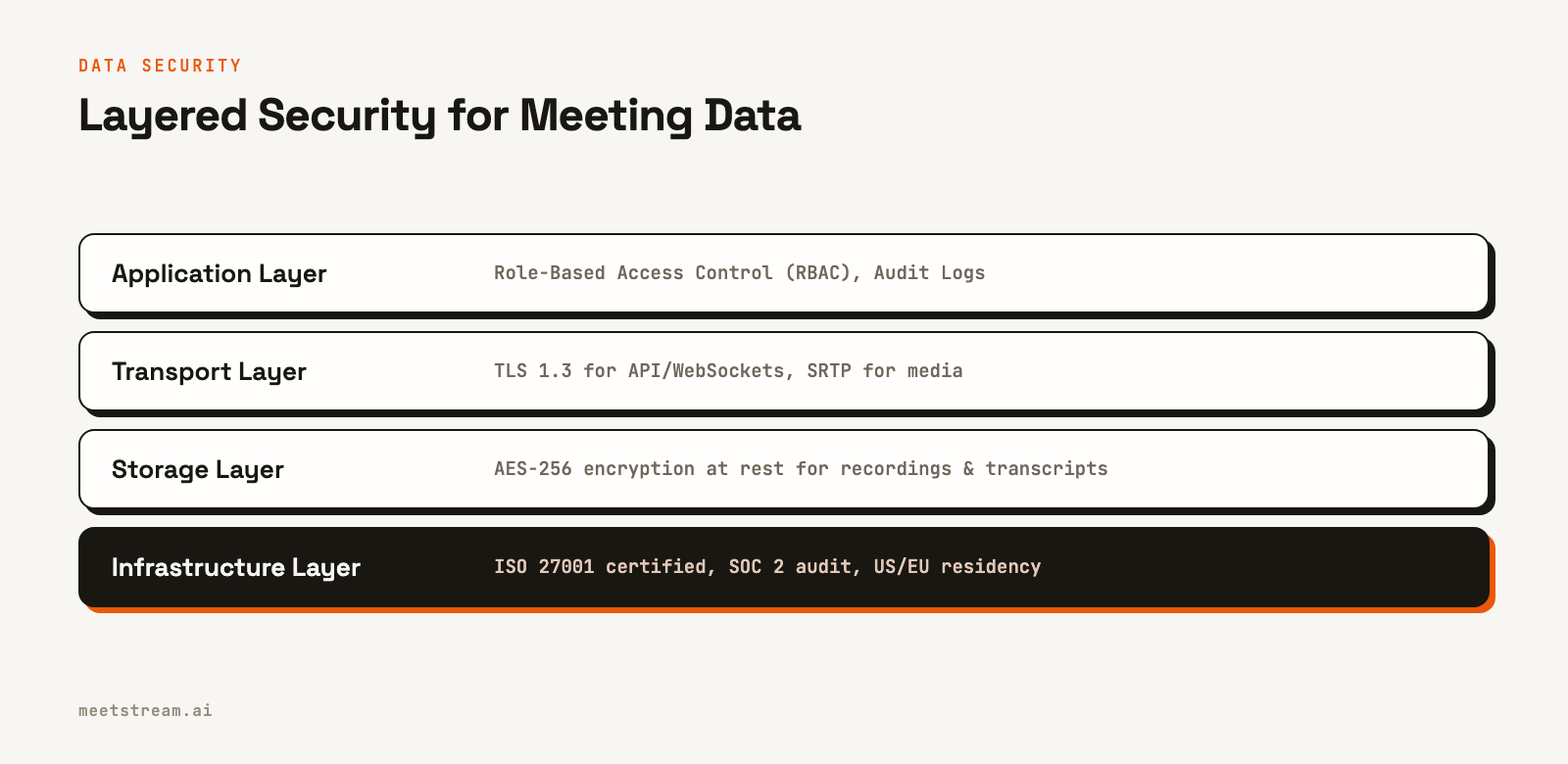
Encryption in transit protects data as it travels from a meeting platform like Zoom to your application's servers. All API communication with the MeetStream API, and any WebSocket connections for real-time data, must be secured using Transport Layer Security (TLS), specifically TLS 1.2 or higher. For the raw audio and video streams themselves, Secure Real-time Transport Protocol (SRTP) provides an additional layer of encryption and authentication, ensuring the media itself is confidential and has not been tampered with.
Encryption at rest applies to any data you store, including MP3 audio files, MP4 videos, and text transcripts. The industry standard for this is AES-256, a symmetric encryption algorithm used globally. MeetStream encrypts everything it stores, recordings and transcripts included; if you use bring-your-own storage, the media goes straight to your bucket under your own encryption settings. This ensures that even if an attacker gained physical access to a storage device, the data would remain unreadable without the corresponding decryption keys.
Effective key management is just as important as the encryption itself. Encryption keys should be stored in a dedicated, secure system like AWS Key Management Service (KMS) or HashiCorp Vault, separate from the data they protect. Keys should also be rotated on a regular schedule to limit the potential impact of a key compromise.
Managing Access: API Keys, OAuth, and Permissions
Controlling who can access your meeting bot and its data is critical. This is managed through a combination of API authentication, platform-specific authorization flows, and internal access controls.
API access should be protected with a secret key. The MeetStream API uses a token-based system where you provide your key in the `Authorization` header. This key should be treated like a password and stored securely in a secrets manager, not hardcoded in your application source code.
curl -X POST "https://api.meetstream.ai/api/v1/bots/create_bot" \
  -H "Authorization: Token <YOUR_API_KEY>" \
  -H "Content-Type: application/json" \
  -d '{
    "meeting_link": "<YOUR_MEETING_LINK>",
    "bot_name": "Secure Notetaker"
  }'
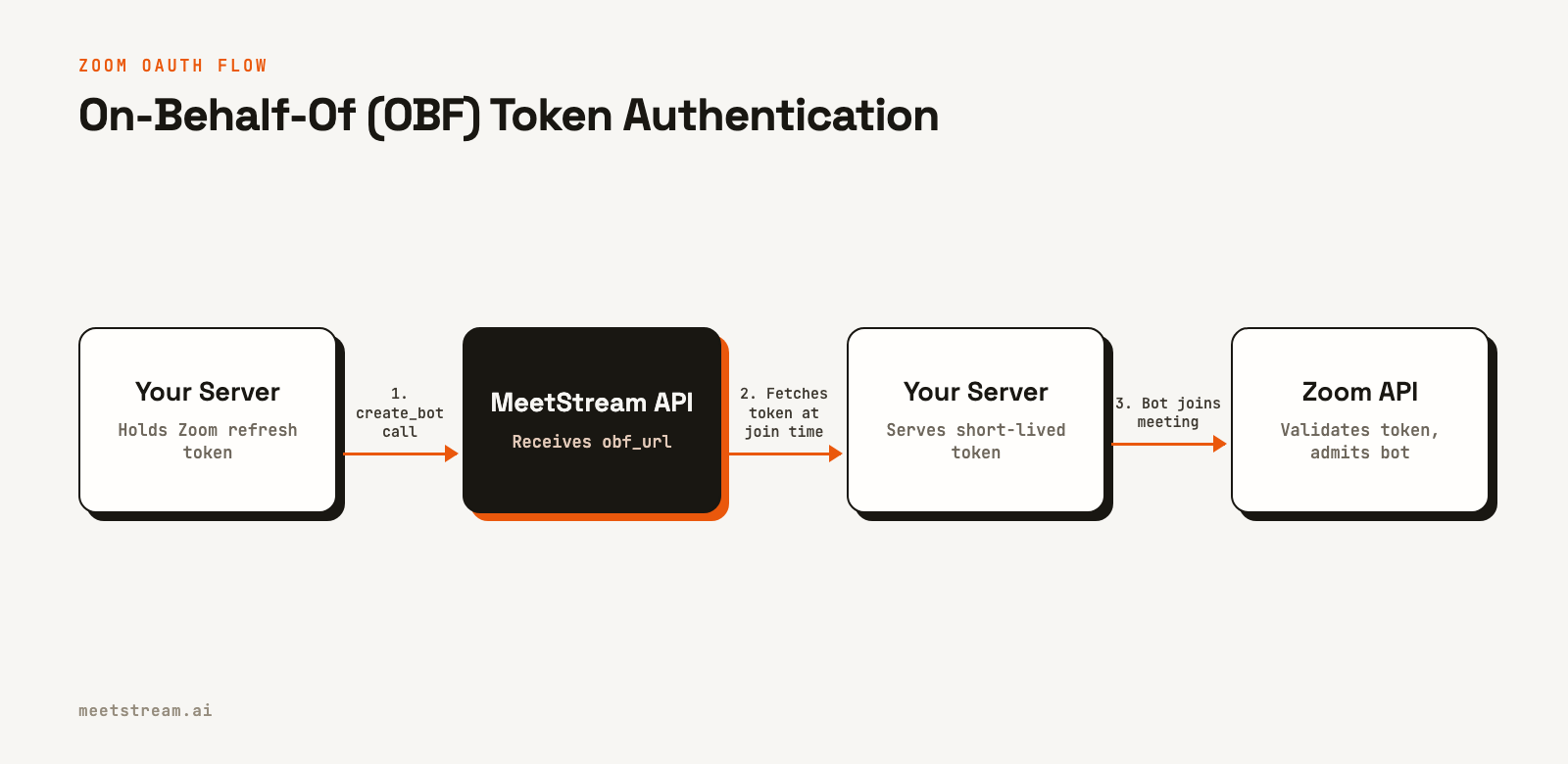
For platforms like Zoom, simple API key authentication is not enough. To comply with their requirements, bots must use an OAuth 2.0 flow. Specifically, MeetStream supports the On-Behalf-Of (OBF) token flow. In practice, this means your application handles the OAuth dance with Zoom and stores the user's refresh token. When you call the MeetStream API to create a Zoom meeting bot, you provide an `obf_url` where MeetStream can fetch a short-lived access token at join time. This is a important security design: MeetStream never needs to store your users' long-lived Zoom credentials.
Internally, your application should implement the principle of least privilege. A user should only have access to the specific meeting data they are authorized to see. Role-Based Access Control (RBAC) is a common pattern for enforcing this, where you define roles (like 'admin', 'host', or 'guest') with different permission sets for viewing or managing meeting recordings and transcripts.
Meeting Compliance Requirements: GDPR and HIPAA
If your application handles users or data from specific regions or industries, you must adhere to relevant compliance frameworks. The two most common for meeting data are GDPR and HIPAA.
The General Data Protection Regulation (GDPR) governs the data of EU citizens. Key requirements include obtaining explicit consent from participants before recording and honoring user rights, such as the right to have their data deleted. A critical technical requirement is data residency. To comply with GDPR, the personal data of EU residents should be stored within the European Union. MeetStream supports this by allowing customers to select either US or EU data residency for their stored meeting data.
The Health Insurance Portability and Accountability Act (HIPAA) applies to applications that handle Protected Health Information (PHI) in the United States. If your meeting bot is used for telehealth, for example, you must comply with HIPAA. This requires strict technical safeguards like audit trails for all data access and a willingness from your vendors to sign a Business Associate Agreement (BAA). A BAA is a legal contract that obligates the vendor to protect PHI according to HIPAA rules. MeetStream is HIPAA compliant and signs BAAs with healthcare customers.
Many enterprise customers will also ask about SOC 2 reports. A SOC 2 audit assesses a service organization's controls related to security, availability, processing integrity, confidentiality, and privacy. MeetStream is currently under audit for SOC 2 Type 2 and is already ISO 27001 certified.
How MeetStream Implements Security Controls
Building a secure platform for meeting agents requires a defense-in-depth approach. At MeetStream, we have implemented security controls at every layer of the stack, based on our experience processing over one million meeting minutes.
Our infrastructure is built on a foundation of industry-standard certifications. We are ISO 27001 certified, demonstrating a systematic approach to managing information security. We are also undergoing a SOC 2 Type 2 audit to provide further assurance of our internal controls. For customers with specific compliance needs, we are HIPAA compliant and offer a BAA, and we support GDPR with selectable US or EU data residency.
On the product level, we have designed our API to promote secure development practices. Our handling of Zoom OBF tokens, as described earlier, is a clear example. By fetching tokens from your server on demand, we help you maintain control over your users' credentials. We also provide features for secure data handling, such as configurable meeting recording retention policies that allow you to automatically delete data after a specified period.
All data is encrypted in transit and at rest, MeetStream is ISO 27001 certified, and its SOC 2 Type 2 audit is under way rather than complete. Security documentation is available on request from the security page.
Conclusion
Meeting bot security is a non-negotiable requirement for any application that handles sensitive conversations. Building trust with users, especially in enterprise or regulated industries, depends on a reliable security posture. This requires a layered defense that combines strong encryption for data in transit and at rest, secure access control patterns like OAuth, and adherence to critical compliance frameworks like GDPR and HIPAA.
By implementing these technical controls, you can build AI meeting agents that are not only powerful but also trustworthy. See the full API reference at docs.meetstream.ai.
Frequently Asked Questions
How should API keys for meeting bot services be stored and rotated?
Store API keys in a secrets manager like AWS Secrets Manager or HashiCorp Vault, never in environment variables or source code. Rotate keys at least every 90 days. An automated rotation script can update the secret, deploy the new key, and revoke the old one after a short grace period to allow in-flight requests to complete.
What is the biggest security risk in meeting bot deployments?
A common vulnerability is insufficient validation of meeting URLs, which can lead to a bot joining an unintended meeting. Implement strict validation on your server to ensure the bot only joins meetings from authorized domains or users. Log all join attempts, especially rejections, for security monitoring.
How do I secure the WebSocket connection that delivers audio from the meeting?
All WebSocket connections should use a secure URL (wss://) which enforces TLS. Your server should validate the certificate chain to ensure it is connecting to the correct endpoint. Use short-lived, single-use tokens for authentication on the WebSocket handshake rather than long-lived API keys.
What audit logging is required for a SOC 2-compliant meeting bot platform?
A SOC 2 audit requires complete logging. You should log every API call with the user identity, endpoint, timestamp, and source IP. Log all significant bot lifecycle events, such as joining or leaving a meeting. Critically, log every time a user accesses a stored recording or transcript, and retain these immutable logs for at least one year.


