
OAuth 2.0 for Meeting Bots: Zoom App Marketplace Setup

Building a bot for the Zoom App Marketplace means you must use OAuth 2.0 for authentication. This is not optional. Since early 2026, Zoom requires this flow for all public applications to ensure that access is explicitly granted by a user, can be audited, and can be revoked. For developers, this introduces the complexity of managing token refreshes, handling user consent, and securing credentials for an AI agent that needs to act on a user's behalf.
This is a critical security boundary. An AI meeting agent often needs access to calendars, transcripts, and other sensitive data to be useful. Using OAuth 2.0 ensures the agent requests specific, limited permissions through a standard framework, rather than handling raw user credentials. It shifts the security model from shared secrets to temporary, scoped access tokens granted by the user.
At MeetStream, we provide the agent-first voice infrastructure for meetings, allowing developers to deploy AI agents that can join calls, listen, speak, and act. A core part of this infrastructure is abstracting the platform-specific authentication required to get a bot into a call securely. The Zoom On-Behalf-Of flow is a frequent source of questions from developers we work with.
This article explains how the modern Zoom OAuth 2.0 flow works for meeting bots, specifically the On-Behalf-Of (OBF) token model required for marketplace apps. We will cover the architecture, the implementation steps you need to own, and how a managed platform can handle the final join sequence.
Why Zoom Mandates OAuth 2.0
Zoom's primary goal is to maintain a secure and trustworthy ecosystem. Mandating OAuth 2.0 for marketplace apps provides several key benefits. First, it gives users transparent control. During the OAuth flow, the user sees a consent screen that lists the exact permissions, or scopes, the application is requesting. They can grant or deny access with full knowledge of what the bot will be able to do.
Second, it creates a clear audit trail. Both the user and Zoom's platform administrators can see which applications have been granted access to an account and can revoke that access at any time. This is a significant improvement over older methods like JWT or API keys, which did not tie application access to explicit, per-user consent and were harder to revoke for a single installation.
Finally, it improves security by avoiding long-lived, static credentials. Instead of a single API key that provides broad access, OAuth 2.0 uses short-lived access tokens and long-lived refresh tokens. This model limits the window of exposure if a token is ever compromised. For bots that need to join meetings programmatically, this flow is the foundation for secure, scalable operations.
The On-Behalf-Of (OBF) Flow Explained
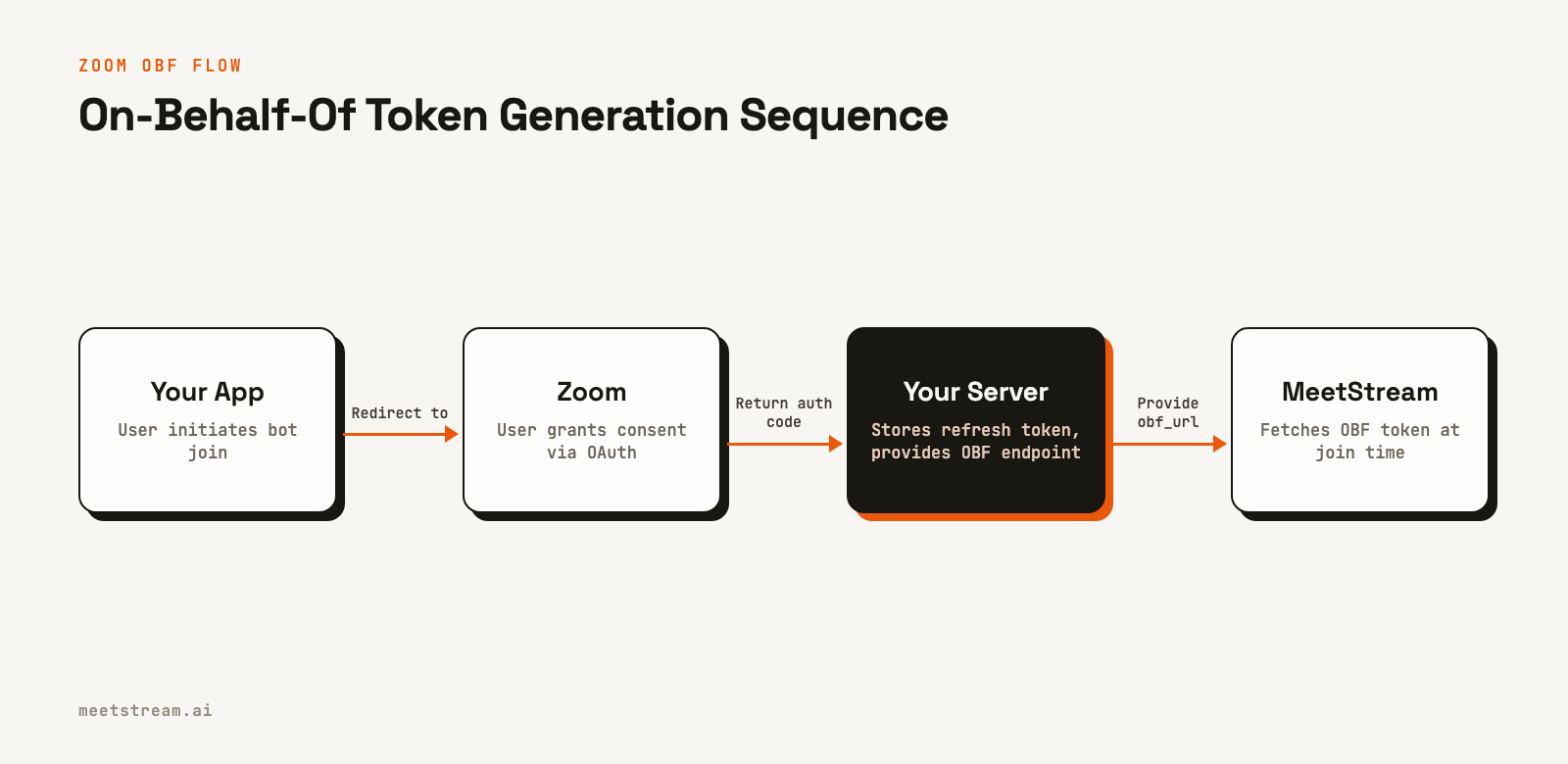
For a bot to join a meeting, it must act "on behalf of" a user who is authorized to be there. The On-Behalf-Of (OBF) flow is Zoom's mechanism for this. The core idea is that your application, not the bot platform, is responsible for managing the user's OAuth credentials. The bot platform then requests a short-lived, single-use token from your application just before it needs to join a meeting.
Here's how it works in practice:
- User Authorization: A user in your application initiates the standard OAuth 2.0 Authorization Code flow. They are redirected to Zoom, sign in, and grant your application the requested permissions.
- Token Exchange: Zoom redirects the user back to your application with an authorization code. Your backend server exchanges this code for an access token and a refresh token.
- Secure Storage: Your server securely stores the refresh token in your database, associated with that user. You must encrypt this token at rest. The access token can be used for immediate API calls but will expire, typically in one hour.
- OBF Endpoint: You create a secure endpoint on your server. When called, this endpoint uses the stored refresh token to generate a fresh, short-lived OBF token from Zoom.
- Bot Join Request: When you want a bot to join a meeting, you make an API call to your bot provider (like MeetStream) and pass the URL of your OBF endpoint. The bot infrastructure calls your endpoint to get the OBF token just in time to join the call.
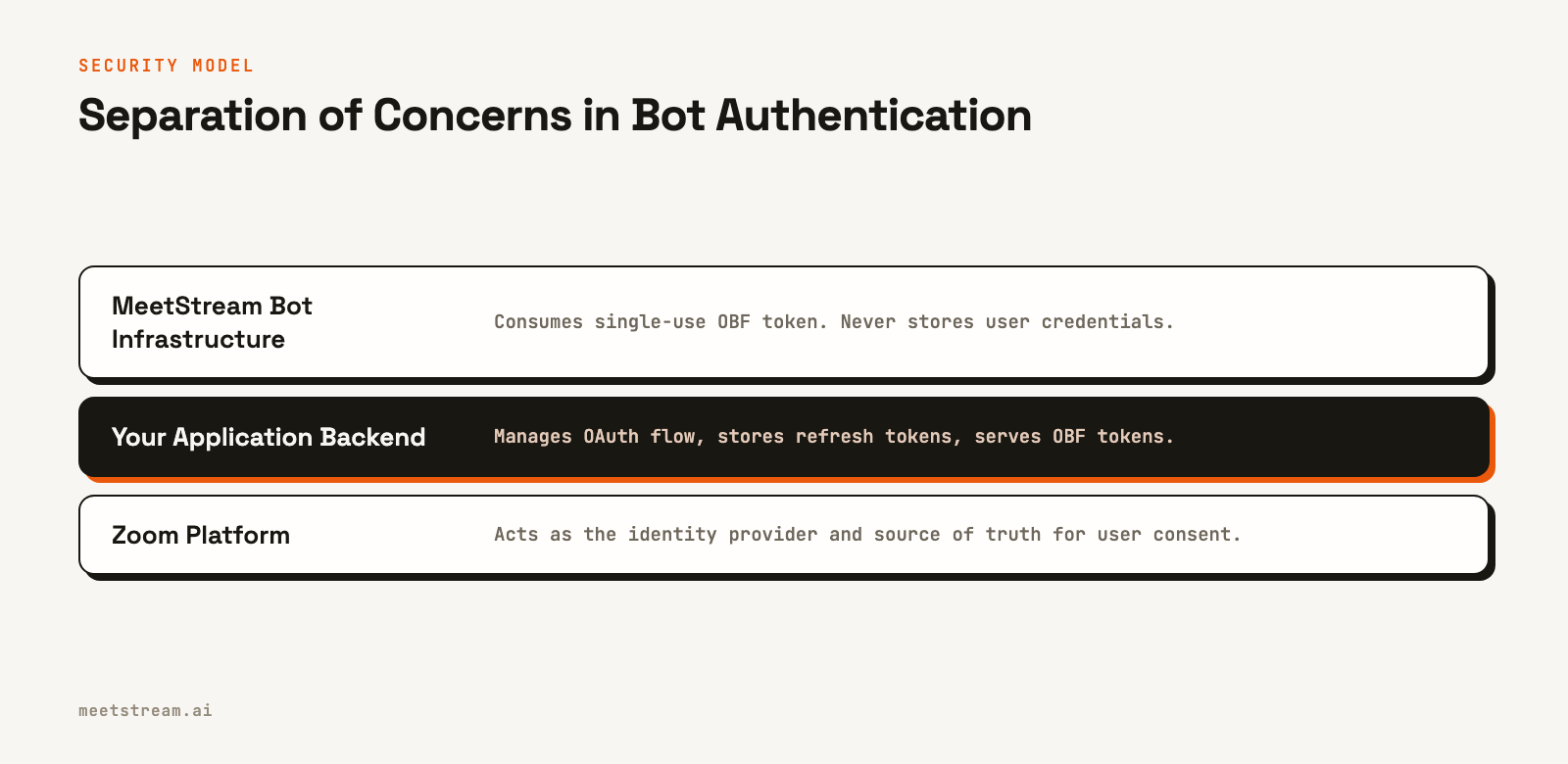
This separation of concerns is critical. Your application is the only system that stores the long-lived refresh token. The bot platform never sees it, which minimizes your security surface. The bot joins using a token that is valid only for that specific user and meeting.
A key constraint of the OBF flow is that the user who authorized your app must be present in the meeting for the bot to join. If that user leaves, the bot will be removed shortly after. This directly ties the bot's presence to an authenticated user's session.
Implementing the OBF Token Flow
Building the OBF flow requires two main components: setting up your Zoom App and building the server-side logic to handle the token exchange and endpoint.
First, you need to create an app in the Zoom App Marketplace. Choose the "App" type and select "OAuth" as the authentication method. You will need to configure your app's Redirect URL, which is the endpoint on your server where Zoom will send users after they grant consent. You also need to define the scopes your bot requires, such as meeting:read or recording:read.
Next, your server-side code needs to handle the OAuth callback. When a user is redirected to your Redirect URL, the request will include an authorization code. Your server must exchange this code for an access/refresh token pair by making a POST request to Zoom's token endpoint. You then store the refresh token securely, encrypted in your database.
Finally, you must implement the endpoint that provides the OBF token. This endpoint should be protected and require authentication. When it receives a request, it should retrieve the user's refresh token, use it to request a new OBF token from Zoom, and return that token in the response. This is the URL you will provide to the bot platform.
Real-World Pitfalls and Edge Cases
While the OBF flow is secure, implementing it in production reveals several practical challenges. One common issue is handling the Zoom recording consent prompt. When a bot joins and starts capturing media, Zoom may prompt participants for consent. Your bot's user experience needs to account for this, as consent is not guaranteed.
Token management is another area to watch. Refresh tokens can be revoked by the user at any time. Your application needs to gracefully handle API errors that indicate an invalid token and prompt the user to re-authenticate. Similarly, your OBF endpoint must be highly available; if it's down when the bot platform needs to join a meeting, the join will fail.
Lastly, remember that the authorizing user must be in the meeting. If your bot is scheduled to join a call but the user who authorized it does not attend, the bot will be denied entry. This is a feature of the OBF flow, not a bug, as it ensures the bot's presence is always tied to an authenticated principal.
How MeetStream Handles Zoom Authentication
MeetStream is designed to simplify the infrastructure side of building AI voice agents. This includes abstracting the complexities of real-time authentication. Instead of building your own bot cluster to manage Zoom SDK connections, you provide MeetStream with the necessary authentication details, and our platform handles the join logic.
For a Zoom meeting, you pass your secure OBF token endpoint URL in the create_bot API call. You do not send us your refresh tokens or any other long-lived credentials. Your server remains the sole custodian of your users' OAuth tokens.
Here's how it looks in a create bot request:
curl -X POST "https://api.meetstream.ai/api/v1/bots/create_bot" \
  -H "Authorization: Token <YOUR_API_KEY>" \
  -H "Content-Type: application/json" \
  -d '{
    "meeting_link": "https://zoom.us/j/1234567890",
    "bot_name": "Sales Coach",
    "zoom": {
      "obf_url": "https://your-app.com/api/zoom/obf-token"
    }
  }'
When the bot is ready to join, MeetStream's infrastructure makes a secure, server-to-server call to your obf_url. We retrieve the single-use OBF token and use it to authenticate with the Zoom Meeting SDK. This process ensures your credentials remain secure on your infrastructure while allowing our platform to manage the complexities of scaling and operating bots in live meetings.
Conclusion
Implementing OAuth 2.0 for meeting bots, especially with Zoom's On-Behalf-Of flow, is a necessary step for building secure and compliant applications for the App Marketplace. The process requires you to manage the user consent flow and securely store refresh tokens on your own server. This architecture separates credential management from bot operations, providing a reliable security model where your application remains in full control of user data access.
By using an API-driven platform for bot infrastructure, you can focus on your application's core logic instead of the underlying complexities of real-time media and authentication. See the full API reference at docs.meetstream.ai.
Related guides
Frequently Asked Questions
Does MeetStream store my users' Zoom refresh tokens?
No. With the OBF flow, your application is solely responsible for storing and managing user refresh tokens. MeetStream only receives the URL to your endpoint (obf_url) and calls it to fetch a short-lived token at the time of joining.
What happens if the user who authorized the bot leaves the Zoom call?
The bot's session is tied to the authorizing user. If that user leaves the meeting, Zoom's platform will automatically remove the bot shortly thereafter. This is an intentional security feature of the On-Behalf-Of flow.
What OAuth scopes does a MeetStream bot need for Zoom?
The exact scopes depend on your use case. For a basic recording and transcription bot that joins via the SDK, you will typically need the meeting:read and recording:read scopes. You must request these when you configure your app in the Zoom Marketplace.
How is this different from using a ZAK token?
A Zoom Access Key (ZAK) is a token for starting meetings, not for general API access. While MeetStream also supports ZAK for certain use cases, the OBF flow is the required standard for public apps on the Zoom App Marketplace that need a bot to join on a user's behalf.
What compliance standards does MeetStream meet?
MeetStream is ISO 27001 certified and GDPR compliant. We are also HIPAA compliant and will sign Business Associate Agreements (BAAs) for healthcare customers. Our SOC 2 Type 2 audit is currently in progress.


