
How to Store and Search Large Meeting Transcripts

The best way to store and search large meeting transcripts is to index the text and metadata in a dedicated search engine while keeping the full, compressed transcript files in object storage. This architecture separates searchable data from bulk storage, allowing for fast queries without loading large files from a database. It avoids the performance degradation seen when running full-text search against unstructured text in a relational database at scale.
This post-call data processing is a common requirement for AI meeting products. At MeetStream, we provide the agent-first voice infrastructure for bots to join meetings, listen, and act in real time. The structured, speaker-labeled transcript is a primary output of this process, providing the ground truth for summarization, analytics, or extracting action items. Building a scalable storage backend is a foundational step for any of these features.
A single company can generate terabytes of transcript data, and making it useful requires a deliberate approach. Without a solid storage architecture, you will face slow searches, high cloud costs, and database bottlenecks. This guide details a production-ready system for managing millions of transcripts efficiently.
Why Storing Transcripts at Scale is Hard
Raw transcript files are deceptively large. A one-hour meeting can generate a 200KB JSON file containing speaker labels, word-level timestamps, confidence scores, and other metadata. At the scale of thousands of meetings per month, this data quickly grows into the terabyte range. The challenge is not just storage capacity, but making the data searchable and retrievable in milliseconds.
Any viable solution must solve three problems. First, data compression is needed to reduce storage costs. Second, smart indexing is required for fast, complex searches. Third, the system must allow efficient retrieval of specific segments without loading entire multi-megabyte transcripts into memory. Let's walk through a practical approach to each.
Step 1: Compress Transcripts Before Storage
The first step is to compress transcripts before they hit long-term storage. While JSON is human-readable, it is an inefficient format. A standard transcript can be compressed by 60-70% using gzip. For even better results, a binary format like MessagePack can reduce the size by 75-80% compared to the original JSON.
import gzip
import msgpack
import json

class TranscriptCompressor:
    @staticmethod
    def compress(transcript_dict):
        """Compress transcript using MessagePack and gzip"""
        # Serialize to MessagePack (binary format)
        packed = msgpack.packb(transcript_dict, use_bin_type=True)
        # Apply gzip compression
        compressed = gzip.compress(packed)
        return compressed

    @staticmethod
    def decompress(compressed_data):
        """Decompress and deserialize transcript"""
        decompressed = gzip.decompress(compressed_data)
        transcript = msgpack.unpackb(decompressed, raw=False)
        return transcript

# Example usage
# assume transcript_data is a Python dict from a JSON transcript
original_bytes = json.dumps(transcript_data).encode('utf-8')
compressed = TranscriptCompressor.compress(transcript_data)
print(f"Original size: {len(original_bytes)} bytes")
print(f"Compressed size: {len(compressed)} bytes")
print(f"Compression ratio: {(1 - len(compressed)/len(original_bytes)) * 100:.1f}%")
This simple pipeline reduces a 200KB transcript to around 40-50KB. For a set of 10,000 transcripts, that saves over 1.5GB of storage compared to raw JSON. These savings compound quickly and have a direct impact on cloud storage bills.
Step 2: Design a Hybrid Database Schema
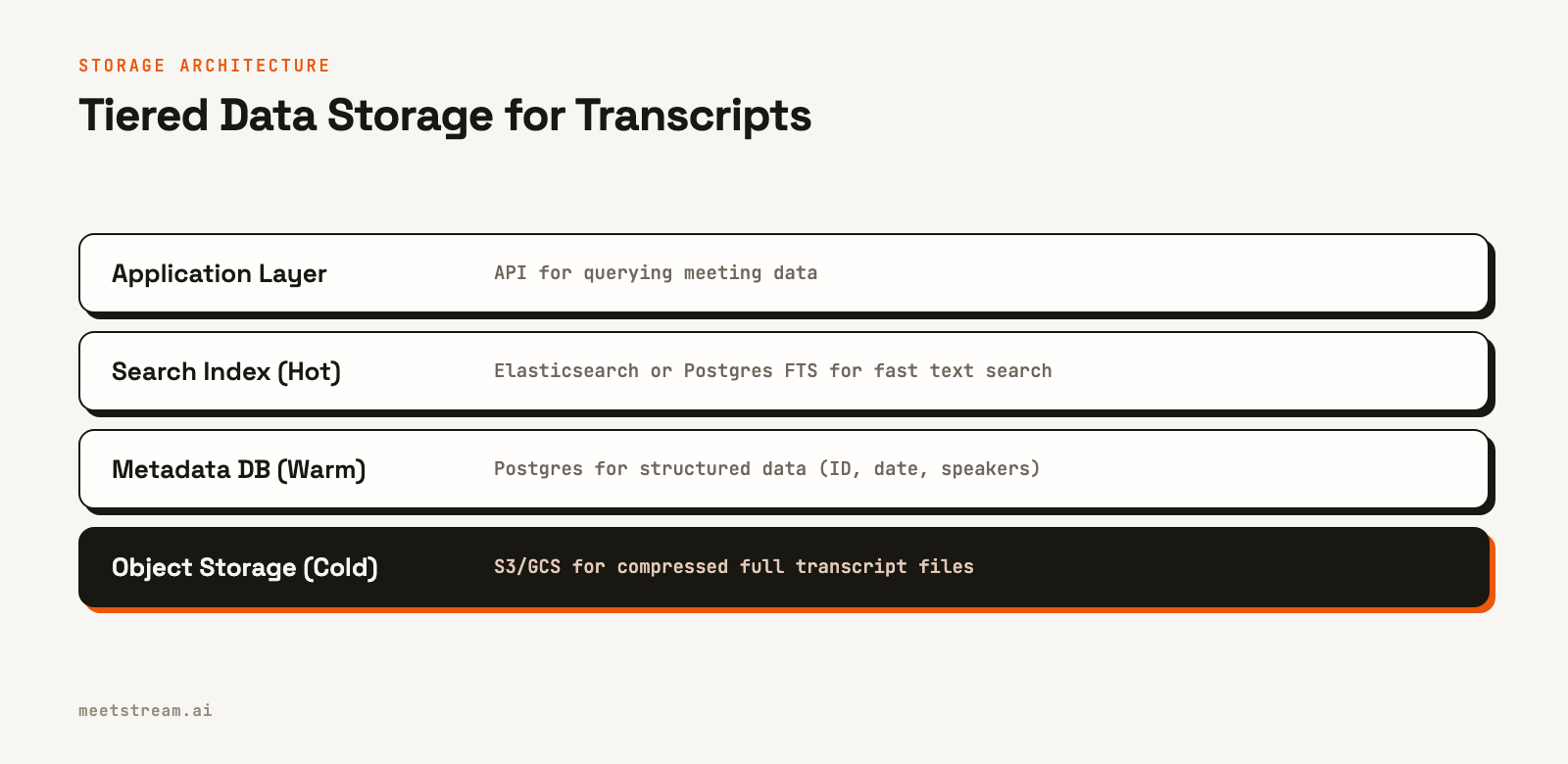
The core architectural decision is what to store in a database versus what to keep in object storage like Amazon S3. The optimal approach is to store searchable metadata and text segments in a database like PostgreSQL, while the complete, compressed transcript files reside in S3. This separation allows your application to query metadata efficiently without loading large data blobs into memory.
from sqlalchemy import Column, String, DateTime, Float, Text, Index, Integer
from sqlalchemy.ext.declarative import declarative_base

Base = declarative_base()

class Meeting(Base):
    __tablename__ = 'meetings'
    meeting_id = Column(String(50), primary_key=True)
    title = Column(String(200), index=True)
    date = Column(DateTime, index=True)
    duration = Column(Float)
    transcript_s3_path = Column(String(500)) # Points to compressed file

class TranscriptSegment(Base):
    __tablename__ = 'segments'
    id = Column(Integer, primary_key=True)
    meeting_id = Column(String(50), index=True)
    speaker = Column(String(100))
    text = Column(Text)
    start_time = Column(Float)
    confidence = Column(Float)

    # Full-text search index
    __table_args__ = (
        Index('idx_text_search', 'text', postgresql_using='gin'),
    )
This schema separates concerns well. The meetings table handles structured queries like finding all meetings from a specific week. The segments table enables text search, like finding all mentions of a project name. The full transcript lives inexpensively in S3 and is loaded only when a user requests the complete file.
Step 3: Implement Full-Text Search
For many applications, PostgreSQL’s built-in full-text search is sufficient and avoids the complexity of adding another service. You can enable extensions like pg_trgm for fuzzy matching and use GIN indexes for fast text queries.
class TranscriptSearchEngine:
    def __init__(self, session):
        self.session = session

    def search(self, query, limit=20):
        """Search across all transcript segments"""
        results = self.session.query(
            TranscriptSegment.meeting_id,
            Meeting.title,
            TranscriptSegment.text,
            TranscriptSegment.start_time
        ).join(
            Meeting,
            TranscriptSegment.meeting_id == Meeting.meeting_id
        ).filter(
            TranscriptSegment.text.ilike(f'%{query}%')
        ).order_by(
            TranscriptSegment.confidence.desc()
        ).limit(limit).all()
        return results

    def search_with_context(self, query, time_window=30):
        """Get surrounding context for search results"""
        results = []
        matches = self.search(query)
        for match in matches:
            # Get segments within time window
            context = self.session.query(TranscriptSegment).filter(
                TranscriptSegment.meeting_id == match.meeting_id,
                TranscriptSegment.start_time.between(
                    match.start_time - time_window,
                    match.start_time + time_window
                )
            ).order_by(TranscriptSegment.start_time).all()
            results.append({
                'match': match,
                'context': [seg.text for seg in context]
            })
        return results
This implementation uses standard database indexes to perform searches efficiently. The search_with_context method is particularly useful, as it retrieves surrounding dialogue to help users understand the context of a search result without needing to read the entire transcript.
Step 4: Scale Search with a Dedicated Engine
When your transcript database grows beyond 100GB or search latency starts to increase, it is time to migrate to a dedicated search engine like Elasticsearch. It is built specifically for full-text search at scale and provides better performance for fuzzy matching, highlighting, and complex aggregations than a relational database.
from elasticsearch import Elasticsearch

class ElasticsearchIndex:
    def __init__(self, es_host='localhost:9200'):
        self.es = Elasticsearch([es_host])
        self.index_name = 'transcripts'

    def index_segment(self, segment, meeting_info):
        """Index a transcript segment"""
        doc = {
            'meeting_id': segment['meeting_id'],
            'title': meeting_info['title'],
            'text': segment['text'],
            'speaker': segment['speaker'],
            'timestamp': segment['start_time'],
            'date': meeting_info['date']
        }
        self.es.index(index=self.index_name, body=doc)

    def search(self, query, filters=None):
        """Search with highlighting and filters"""
        body = {
            "query": {
                "bool": {
                    "must": [{"match": {"text": query}}]
                }
            },
            "highlight": {
                "fields": {"text": {}}
            },
            "size": 20
        }
        # Add date filter if provided
        if filters and 'date_from' in filters:
            body['query']['bool']['filter'] = [
                {"range": {"date": {"gte": filters['date_from']}}}
            ]
        results = self.es.search(index=self.index_name, body=body)
        return results['hits']['hits']
Elasticsearch can return search results across millions of documents in milliseconds and automatically highlights matching text. The main tradeoff is operational complexity. You have to maintain a separate service and ensure it stays synchronized with your primary database.
How MeetStream Provides the Data
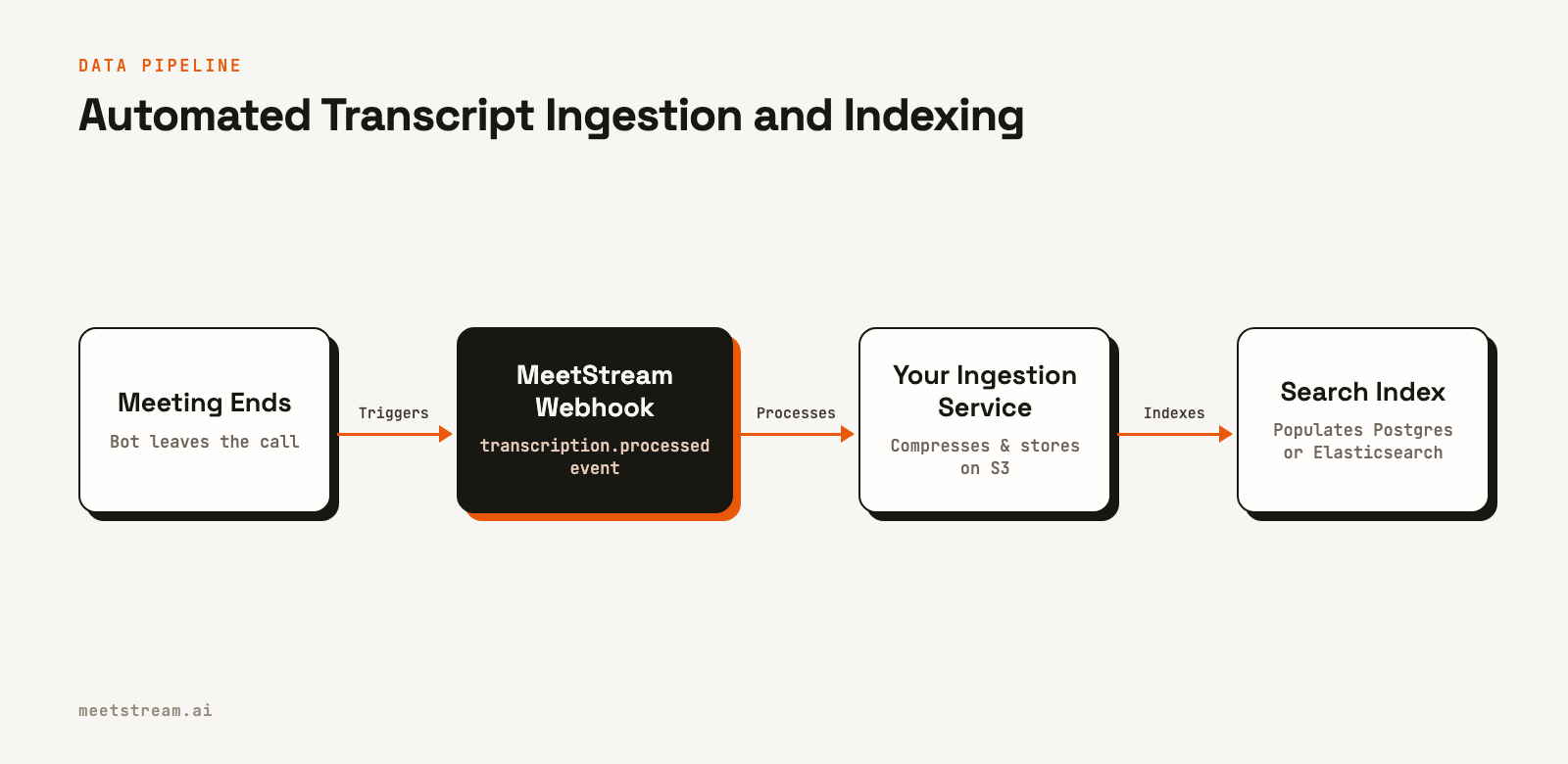
MeetStream provides the structured, speaker-labeled data needed to build the system described here. Our Meeting Transcription API is designed to feed directly into this kind of data pipeline. The process is event-driven and starts with a webhook.
When you create a bot, you provide a callback_url. After the meeting ends, MeetStream processes the audio and fires a transcription.processed event to that URL. This webhook is the trigger for your ingestion service to begin the compression and indexing process. The API delivers a clean JSON object with utterances, a Transcript API with Speaker Labels, and word-level timestamps, which you can feed directly into the functions we have outlined.
This architecture allows you to own your data and build a custom search and storage solution tailored to your product's needs. Whether you are building a simple post-call summary tool or sophisticated in-meeting AI agents, having a scalable data backend is essential. You can build a transcription bot and have it trigger your pipeline with a single API call.
Conclusion
Building a scalable system to store and search large meeting transcripts depends on a simple principle: separate hot data from cold data. Use a dedicated search index for text queries, a relational database for structured metadata, and compressed object storage for the full transcript files. This tiered approach scales efficiently from hundreds to millions of transcripts while keeping both query latency and storage costs low.
See the full API reference at docs.meetstream.ai.
Frequently Asked Questions
What is the best database for storing and searching meeting transcripts?
For full-text search at scale, Elasticsearch is a strong choice. For smaller projects or for storing structured metadata like meeting dates and participants, PostgreSQL with its full-text search capabilities is a practical and simpler alternative.
How should I structure transcript data for efficient storage?
Store transcripts as a collection of time-indexed utterances. Each record should contain a meeting ID, speaker, start and end times, and the text. This granular structure supports time-based queries and speaker analysis without needing to parse a single large document.
What compression ratio can I expect for transcript data?
A plain text transcript typically compresses at a 5:1 ratio with gzip. A 60-minute meeting transcript of about 8,000 words will compress to approximately 50-70KB. Including word-level timestamps increases file size but still compresses well due to predictable patterns.
How can I implement semantic search over meeting transcripts?
Generate vector embeddings for each utterance or small group of sentences using a model like a sentence transformer. Store these vectors in a specialized database like pgvector or a dedicated vector store. To search, embed the user's query and find the most similar vectors in your index.


