
Handling Failed Transcriptions: Retry Logic and Recovery Patterns

Your AI notetaker works reliably in staging. In production, however, a single failed transcription job can corrupt a user's entire meeting summary. At scale, transient network errors, API rate limits, and platform-specific issues are not edge cases, they are daily realities. For any application processing meeting audio, building for reliability is non-negotiable.
This is especially true for building AI meeting agents that need to act on what was said. A resilient data pipeline is the foundation. It ensures that even if an upstream service has a momentary lapse, your application can recover gracefully without losing data or failing silently. The goal is a system that handles expected failures automatically.
Building this resilience requires a few core architectural patterns. These systems are typically asynchronous, using webhooks to trigger work and job queues to manage state. This decouples the initial request from the processing, which is the first step toward fault tolerance.
We will walk through the patterns for handling failed transcriptions: exponential backoff, persistent job queues, error classification, and dead-letter queues for issues that need manual review. Let's get into it.
Why Transcription Jobs Fail in Production
A transcription request can fail for many reasons, and understanding the type of failure is key to handling it correctly. Blindly retrying every error can make a bad situation worse, like when you repeatedly hit an API that is already rate-limiting you.
Failures generally fall into two categories: transient and permanent.
- Transient failures are temporary and often resolve themselves. These include network timeouts, brief API unavailability (HTTP 502/503 errors), or temporary rate limiting (HTTP 429). These are perfect candidates for a retry strategy.
- Permanent failures are not temporary and will not succeed on a retry with the same input. Examples include using an invalid API key (HTTP 401/403), submitting a corrupted or unsupported audio file (HTTP 400), or a bot being denied entry to a meeting. Retrying these is pointless and just adds noise.
At MeetStream, we've processed over a million meeting minutes and have seen every failure mode imaginable. A reliable system must distinguish between a temporary network blip and a bot being explicitly denied permission to record by a meeting host. The first should be retried, the second should be logged as a terminal failure immediately.
Implementing Exponential Backoff with Jitter
When a transient failure occurs, the simplest retry strategy is to wait a few seconds and try again. But if the service you're calling is struggling, immediate retries from many clients can create a "thundering herd" problem, worsening the outage. Exponential backoff is the standard solution.
The idea is to increase the delay between retries exponentially. You might wait 2 seconds after the first failure, 4 after the second, 8 after the third, and so on, usually up to a maximum delay. Adding a small, random "jitter" to the delay prevents many clients from retrying at the exact same moment.
import time
import random
from typing import Callable, Any

def execute_with_backoff(
    func: Callable,
    max_attempts=5,
    base_delay=1,
    max_delay=60
) -> Any:
    """Executes a function with exponential backoff retry logic."""
    for attempt in range(max_attempts):
        try:
            return func()
        except Exception as e:
            if attempt + 1 == max_attempts:
                print(f"Final attempt failed: {e}")
                raise

            delay = min(base_delay * (2 ** attempt), max_delay)
            jitter = random.uniform(0, delay * 0.1)
            total_delay = delay + jitter

            print(f"Attempt {attempt + 1} failed. Retrying in {total_delay:.2f}s...")
            time.sleep(total_delay)
This pattern is a fundamental building block for any service that depends on external APIs. It gracefully handles most transient network and server issues without any manual intervention.
Building a Persistent Job Queue
Retries handle transient API errors, but what if your own application crashes? If you trigger a transcription directly from a web request, a server restart could cause you to lose that job forever. A persistent job queue solves this by decoupling job creation from job execution.
When a new transcription is needed, you don't process it immediately. Instead, you add a job to a queue stored in a database (like PostgreSQL with SQLAlchemy) or a dedicated message broker (like RabbitMQ or Redis). A separate worker process then pulls jobs from this queue and executes them.
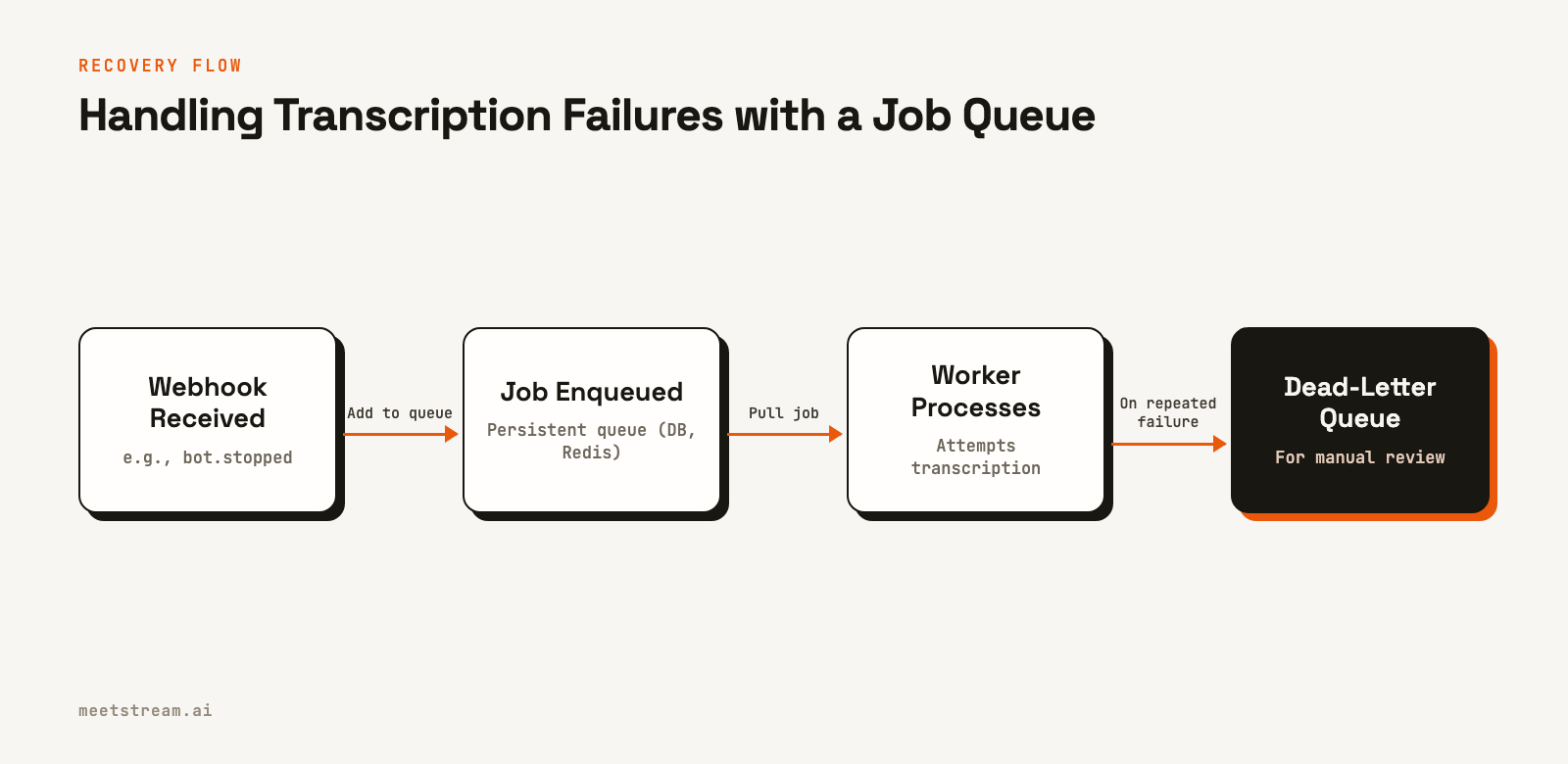
This architecture ensures that even if a worker crashes mid-process, the job remains in the queue (often in a "processing" state) and can be picked up again later. It also allows you to scale your workers independently of your main application.
# A simplified example using a database model with SQLAlchemy
import enum
from sqlalchemy import Column, String, Integer, Enum, DateTime
from datetime import datetime

class JobStatus(enum.Enum):
    PENDING = "pending"
    PROCESSING = "processing"
    COMPLETED = "completed"
    FAILED = "failed"

class TranscriptionJob(Base):
    __tablename__ = 'transcription_jobs'
    id = Column(String(50), primary_key=True)
    bot_id = Column(String(50), nullable=False)
    status = Column(Enum(JobStatus), default=JobStatus.PENDING)
    attempts = Column(Integer, default=0)
    last_error = Column(String(1000))
    created_at = Column(DateTime, default=datetime.utcnow)
    updated_at = Column(DateTime, onupdate=datetime.utcnow)

# Worker logic would query for PENDING jobs,
# move them to PROCESSING, and on completion update
# to COMPLETED or FAILED.
By tracking the `status` and `attempts` for each job, your worker can intelligently decide whether to retry a failed job or move it to a final `FAILED` state after too many attempts.
Classifying Errors for Smarter Recovery
Combining a job queue with backoff is powerful, but the system gets much smarter when it can classify errors. As discussed, retrying a permanent failure is wasteful. Your worker logic should inspect errors to decide the next step.
This is where clear signals from your meeting transcription API are critical. A well-designed API will provide distinct error codes or messages that you can use to classify the failure.
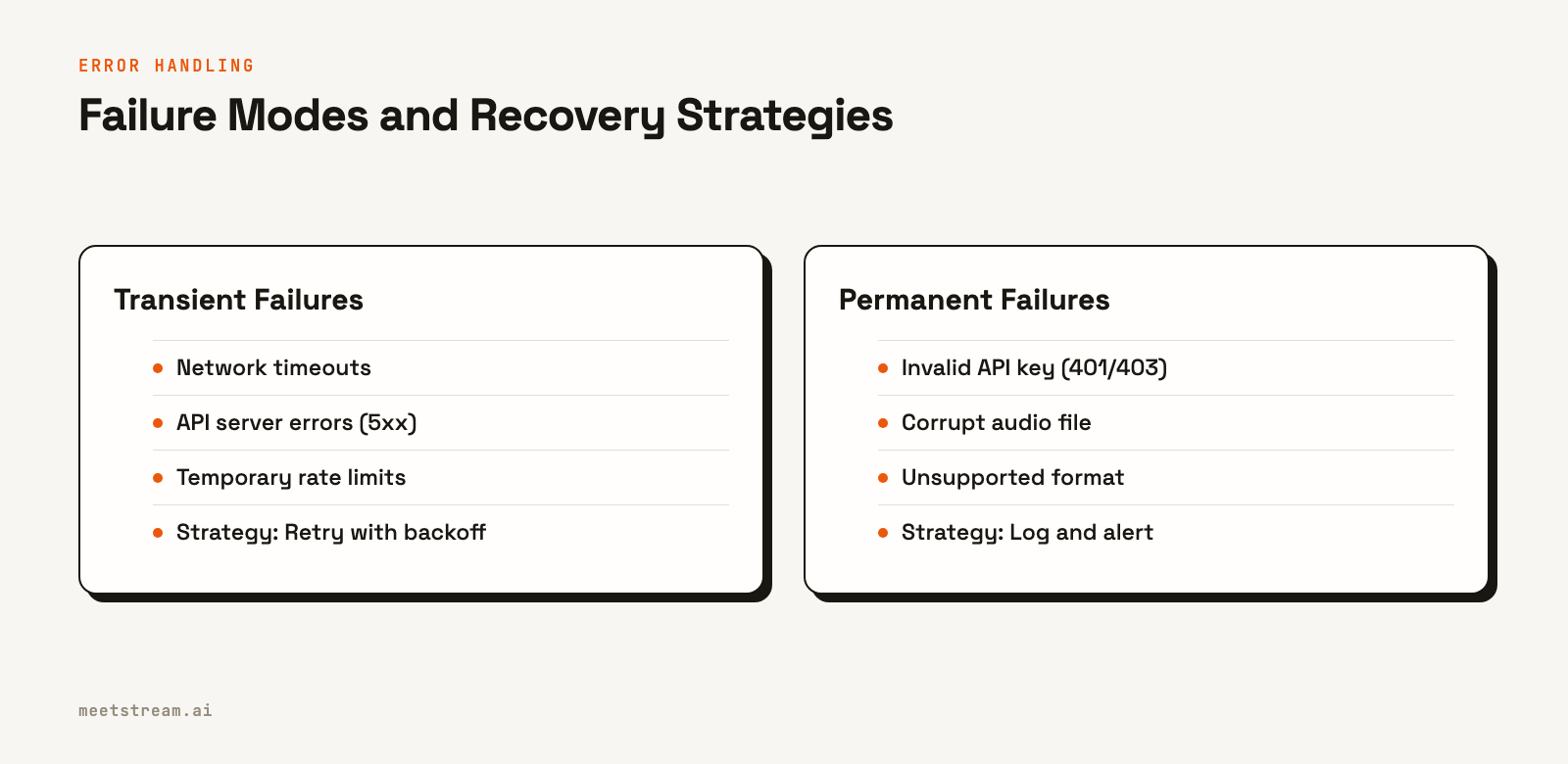
For example, a generic `HTTP 500 Server Error` is a clear candidate for a retry. An `HTTP 400 Bad Request` with a message like "Unsupported audio codec" is a permanent failure for that audio file. Your worker should log this error and move the job to a dead-letter queue (DLQ), which is just a final resting place for jobs that failed all automated recovery attempts and require human inspection.
class TranscriptionError(Exception):
    """Base exception for our transcription worker."""
    pass

class TransientError(TranscriptionError):
    """An error that is safe to retry."""
    pass

class PermanentError(TranscriptionError):
    """An error that should not be retried."""
    pass

def classify_api_error(status_code: int, error_message: str):
    """Classify an error based on HTTP status and message."""
    msg_lower = error_message.lower()

    if status_code >= 500:
        return TransientError(f"Server error: {status_code}")

    if status_code == 429:
        return TransientError("Rate limit exceeded")

    if status_code in [401, 403]:
        return PermanentError("Authentication/Authorization error")

    if status_code == 400 and "invalid audio" in msg_lower:
        return PermanentError("Invalid audio format")

    # Default to a transient error for unknown cases
    return TransientError(f"Unknown error: {status_code} - {error_message}")
This classification logic becomes the brain of your worker, ensuring it applies the right recovery strategy for each specific type of failed transcription.
How MeetStream Webhooks Signal Failures
A resilient system depends on clear, actionable signals from its upstream dependencies. At MeetStream, we designed our webhooks to provide the precise information you need to handle failed transcriptions and other bot lifecycle events.
When you create a bot, you provide a `callback_url`. We send POST requests to this URL for all major events. Instead of just getting a generic failure, you get a detailed payload. For example, if a bot fails to join a meeting or a post-call process fails, you might receive a webhook with the `bot_event` of `bot.failed` or `transcription.failed`.
The payload contains everything you need for your error handling logic:
{
  "bot_event": "bot.failed",
  "bot_id": "604c0a0b-973d-4eb1-a5bf-2c7513f6bbe0",
  "bot_status": "Error",
  "message": "Bot was not admitted from the waiting room.",
  "status_code": 500,
  "timestamp": "2026-02-27T07:15:00+00:00",
  "custom_attributes": {"customer_id": "cust_123"}
}
Here, the `bot_event` and `bot_status` tell you what happened. The `message` gives you a human-readable reason, and the `status_code` can be used for programmatic classification. Your webhook handler can inspect this payload and immediately know whether to enqueue a job for retry (e.g., for a temporary failure) or to log a permanent failure (e.g., for `bot.notallowed`). This makes building a fault-tolerant meeting bot much more straightforward.
Conclusion
Building a reliable system around meeting transcriptions means planning for failure. It's not about hoping API calls don't fail, but about architecting a system that expects them to. By combining exponential backoff, persistent job queues, and intelligent error classification, you can build a data pipeline that recovers automatically from the vast majority of production issues.
These patterns are essential for any application that provides summaries, action items, or analytics from meeting data. For developers building these systems, a reliable strategy for handling failed transcriptions is a core architectural requirement, ensuring data integrity and a reliable user experience. See the full webhook reference at docs.meetstream.ai.
Related guides
- Multilingual Meeting Transcription: Handling Accents and Languages
- Can AI Transcribe Multiple Speakers? Diarization vs Per-Participant Audio
- Build a Teams Transcription Bot: Real-Time Speaker-Labelled Audio
Frequently Asked Questions
What is the recommended retry strategy for failed transcription API calls?
Use exponential backoff with jitter. Start with a short base delay (1-2 seconds), double the delay on each subsequent failure, and add a small random jitter. Cap the maximum delay and the total number of attempts (e.g., 5 minutes and 8 attempts) to avoid indefinite retries.
How do I distinguish transient failures from permanent transcription errors?
Check the signals from your API provider. HTTP status codes are a good starting point: 5xx errors are typically transient, while 4xx errors are often permanent. A well-designed system like MeetStream also provides explicit event types in webhooks, such as `bot.failed` vs. `bot.denied`, to make this distinction clear.
What is a dead-letter queue (DLQ)?
A dead-letter queue is a dedicated queue for messages or jobs that could not be processed successfully after a set number of retries. Moving failed jobs to a DLQ gets them out of the main processing path and allows developers to inspect them manually to diagnose the root cause of the failure.
How should I monitor transcription failure rates?
Track the percentage of jobs that enter a FAILED state over a rolling time window (e.g., the last hour). Set up alerts for when this rate exceeds a defined threshold (e.g., 2%). It's also useful to add dimensions to your monitoring, like the meeting platform, to quickly isolate problems.


