
Transcribe Long Meeting Audio: Chunking, Streaming and Limits

Transcription APIs handle long audio files by processing them asynchronously. For a multi-hour meeting, you send an API request to start the process and provide a webhook URL. The API then notifies you when the transcript is ready, which avoids the memory and timeout limits of single, synchronous uploads. This is essential for sessions longer than a few minutes.
At MeetStream, our platform is built for this. We provide agent-first voice infrastructure for meetings, where bots can join, listen, and act. A core output is a transcript, delivered via webhook after the call. For live use cases, you can get a real-time audio stream over a WebSocket, enabling transcription as the meeting happens.
A one-hour weekly standup is straightforward. A six-hour board meeting or a full-day training session creates engineering problems that most documentation glosses over. Raw audio files become gigabytes in size. Transcription jobs time out. Webhooks for completed transcripts can arrive long after the meeting ends, requiring a durable, asynchronous architecture.
This article covers the practical engineering decisions for transcribing multi-hour recordings. We will cover storage estimation, setting recording timeouts, chunking strategies for post-processing, and how to correctly handle webhook events for partial or failed sessions.
Why Long Audio Is a Unique Problem
The core challenge with long audio is resource limits. A typical web server might have a 30-second timeout for HTTP requests, but transcribing a two-hour audio file can take several minutes. Trying to upload a large file and wait for the result in a single request will fail.
Memory is another constraint. Loading a multi-gigabyte raw audio file into memory for processing is inefficient and often impossible on standard application servers. This is why professional transcription systems use streaming or chunked file-based processing behind the scenes. As a developer using an API, you need a way to hand off the long-running task and be notified when it is done. This is what asynchronous webhook-based systems are designed for.
Estimating Storage for Long Recordings
Before you record, it is helpful to understand the data size. The MeetStream API captures audio as raw PCM (Pulse-Code Modulation) data: 16-bit, little-endian, at a 48kHz sample rate in mono. The calculation for storage is direct:
- Sample rate: 48,000 samples per second
- Bit depth: 16 bits (2 bytes) per sample
- Channels: 1 (mono)
- Bytes per second: 48,000 samples/sec * 2 bytes/sample = 96,000 bytes/sec
- MB per minute: (96,000 bytes/sec * 60 sec/min) / (1024 * 1024) ≈ 5.5 MB/min
- GB per hour: (5.5 MB/min * 60 min/hr) / 1024 ≈ 0.32 GB/hr
For planning, a one-hour raw audio recording is about 330 MB. A full eight-hour session approaches 2.6 GB. While MeetStream can store the final recording in a compressed format like Opus, which is much smaller (around 28 MB per hour), your system should be prepared to handle the raw stream if you are doing any real-time audio processing.
Managing Recording Length and Failures
To prevent bots from recording indefinitely in a meeting that never ends, you can set an automatic timeout. The automatic_leave object in the create_bot request lets you define rules for when a bot should stop recording or leave the call.
For example, in_call_recording_timeout stops the recording after a set number of minutes, but the bot can remain in the meeting. This is useful if you only need to record the first part of a long event. The everyone_left_timeout parameter is a safeguard that makes the bot leave after all human participants have gone, preventing it from running for hours in an empty room.
curl -X POST "https://api.meetstream.ai/api/v1/bots/create_bot" \
  -H "Authorization: Token <YOUR_API_KEY>" \
  -H "Content-Type: application/json" \
  -d '{
    "meeting_link": "https://meet.google.com/abc-defg-hij",
    "bot_name": "Meeting Recorder",
    "callback_url": "https://your-app.com/webhooks/meetstream",
    "recording_config": {
      "transcript": {
        "provider": {
          "deepgram": {
            "model": "nova-2",
            "diarize": true
          }
        }
      }
    },
    "automatic_leave": {
      "in_call_recording_timeout": 120,
      "everyone_left_timeout": 300
    }
  }'
When a session ends, whether normally or due to an error, you need to handle the terminal state correctly. Instead of a single "stopped" event with different statuses, the MeetStream API sends distinct events for different outcomes. Your webhook handler should listen for bot.stopped for successful completion, but also for events like bot.failed, bot.kicked, or bot.denied. This gives you a clear signal about what happened without needing to parse status strings.
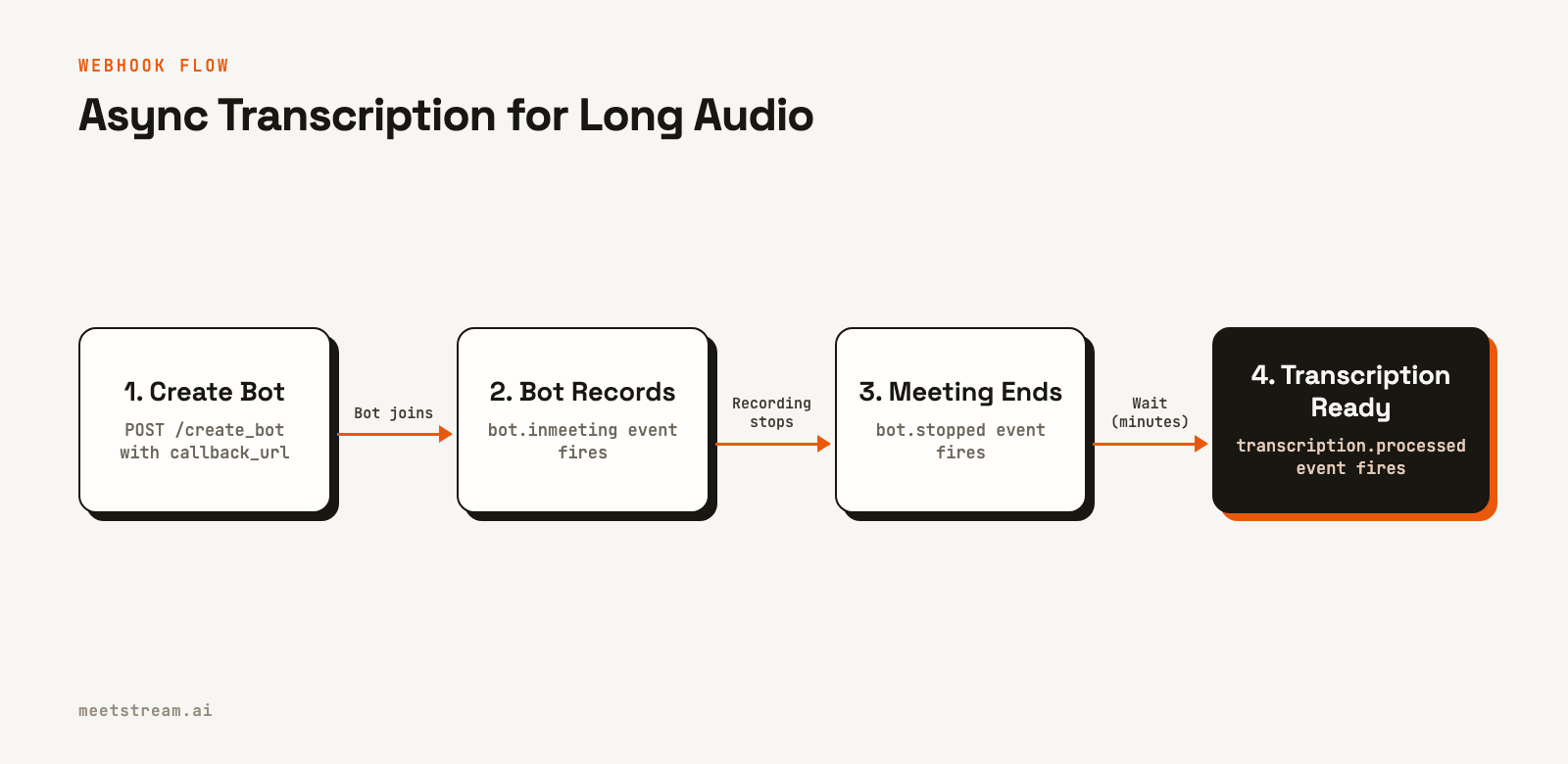
A key point for long recordings: do not try to fetch the transcript immediately after receiving bot.stopped. The transcription process runs separately and may take several more minutes. Always wait for the transcription.processed event before attempting to retrieve the data.
from flask import Flask, request, jsonify

app = Flask(__name__)

@app.route("/webhooks/meetstream", methods=["POST"])
def handle_webhook():
    payload = request.json
    event_type = payload.get("bot_event")

    if event_type == "transcription.processed":
        transcript_id = payload.get("transcript_id")
        print(f"Transcription ready: {transcript_id}")
        # Now it is safe to fetch the transcript
        fetch_transcript(transcript_id)

    elif event_type == "bot.stopped":
        bot_id = payload.get("bot_id")
        print(f"Bot {bot_id} stopped normally. Awaiting transcription.")

    elif event_type == "bot.failed":
        bot_id = payload.get("bot_id")
        message = payload.get("message")
        print(f"Bot {bot_id} failed: {message}")
        # A partial transcript might still become available.
        # Your logic can decide whether to wait for it.

    return jsonify({"status": "ok"}), 200

def fetch_transcript(transcript_id: str):
    # Implementation to GET /api/v1/transcript/{transcript_id}/get_transcript
    pass
Chunking Transcripts for Post-Processing
Once you have the transcript, a new challenge arises. A two-hour transcript can contain over 20,000 words. Feeding this entire text into a large language model (LLM) for summarization will likely exceed its context window and produce a low-quality result. The solution is to chunk the transcript into smaller, more manageable pieces.
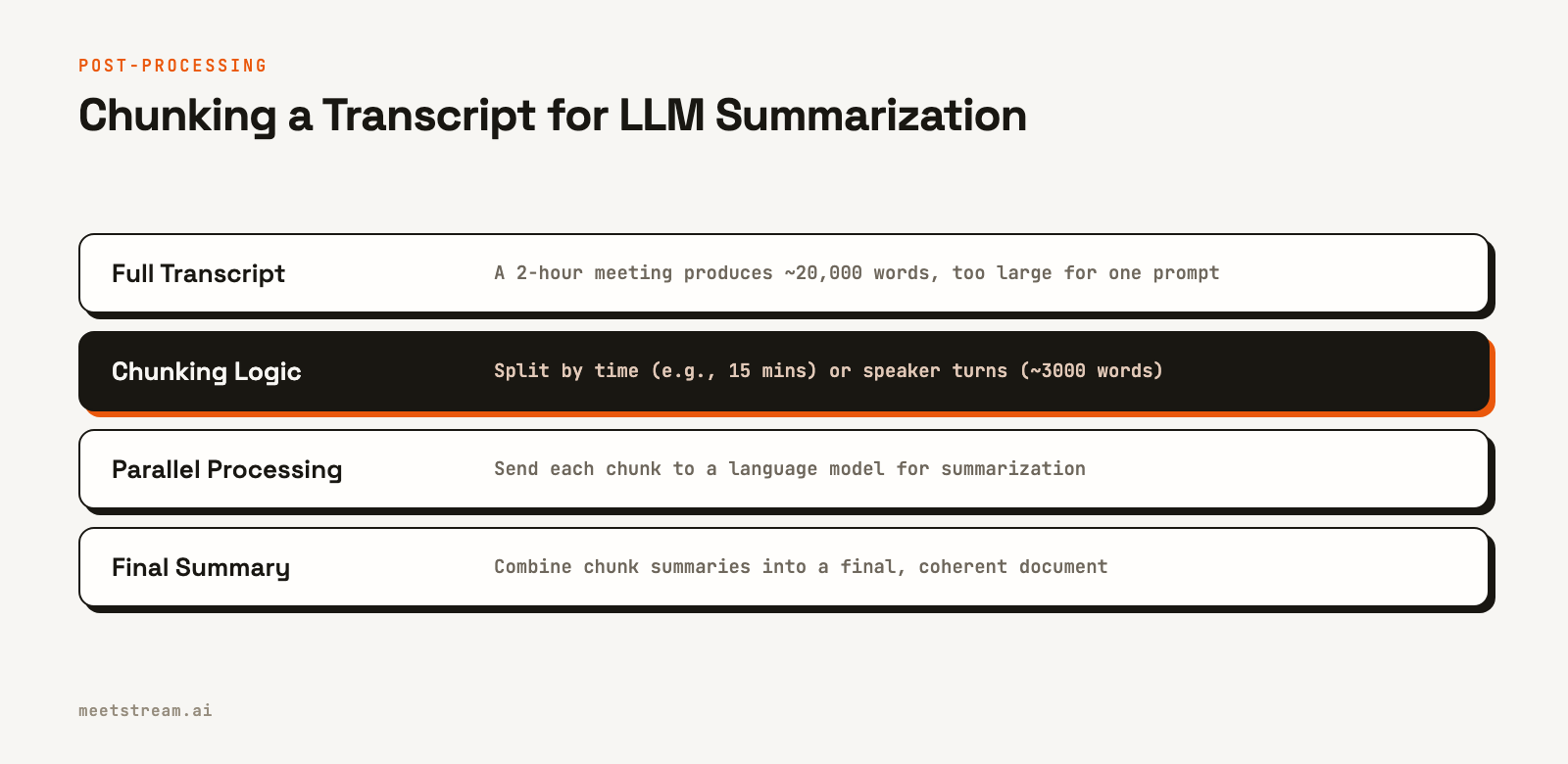
You can chunk by time (e.g., every 15 minutes) or by speaker turns. Chunking by time is simpler to implement. A more advanced method is to group segments by speaker and create chunks that do not exceed a certain word count, which can produce more coherent summaries. The code below shows a simple time-based chunking strategy.
from typing import List, Dict

def chunk_transcript_by_time(
    words: List[Dict],
    chunk_duration_minutes: int = 15
) -> List[Dict]:
    """Splits a word-level transcript into time-based chunks."""
    if not words:
        return []

    chunk_duration_seconds = chunk_duration_minutes * 60
    chunks = []
    current_chunk_words = []
    chunk_start_time = words[0].get("start", 0)

    for word in words:
        word_start = word.get("start", 0)

        if word_start - chunk_start_time >= chunk_duration_seconds and current_chunk_words:
            chunks.append({
                "start_time": chunk_start_time,
                "end_time": current_chunk_words[-1].get("end", word_start),
                "text": " ".join(w.get("word", "") for w in current_chunk_words)
            })
            current_chunk_words = [word]
            chunk_start_time = word_start
        else:
            current_chunk_words.append(word)

    if current_chunk_words:
        chunks.append({
            "start_time": chunk_start_time,
            "end_time": current_chunk_words[-1].get("end", chunk_start_time),
            "text": " ".join(w.get("word", "") for w in current_chunk_words)
        })

    return chunks
How MeetStream Handles Long Audio
The MeetStream API is designed to manage the complexities of long-duration meetings. Our infrastructure has processed over a million meeting minutes, so these edge cases are built into the platform's core design.
First, our API is fully asynchronous. When you create a bot, you provide a callback_url. All subsequent events, from the bot joining to the final transcript being ready, are delivered via webhooks. This means your application does not need to maintain open connections or poll for status.
Second, we provide controls to manage resource usage automatically. The automatic_leave parameters ensure bots do not run up costs in empty meetings or record for longer than necessary. For very long events, you can also get a live transcript stream to a webhook, processing the meeting in real time without waiting for a post-call file.
Finally, our platform provides options for transcription. You can use our in-house engine or select from providers like Deepgram and AssemblyAI directly in the API call. This gives you the flexibility to choose the best model for your specific use case, whether it is a two-hour internal all-hands or a six-hour legal deposition.
Conclusion
To successfully transcribe long meeting audio, you must build your application around an asynchronous, event-driven model. Rely on webhooks to signal when a transcript is ready, use timeouts to control bot behavior, and chunk large transcripts before sending them to other services for analysis. By anticipating these challenges, you can build a reliable system that handles multi-hour sessions as easily as it does a 15-minute standup. See the full API reference at docs.meetstream.ai.
Related guides
Frequently Asked Questions
How large is the audio file for a 2-hour meeting?
The raw PCM audio for a 2-hour mono meeting at 48kHz is approximately 660 MB. If stored in a compressed format like Opus, the size is much smaller, around 56 MB. The final JSON transcript is typically between 500 KB and 2 MB.
What is the best way to handle a transcription job that times out?
The best approach is to avoid synchronous requests that can time out. Use an API that supports webhooks. You make one API call to start the transcription and your server listens for a webhook event, like transcription.processed, which signals the job is complete and the data is ready to be fetched.
Can I stop a recording without the bot leaving the meeting?
Yes. In the MeetStream API, the automatic_leave.in_call_recording_timeout parameter stops the recording after a specified time, but the bot remains in the meeting. This allows it to continue providing live features, such as streaming real-time audio or participating in chat.
What is the correct order of webhook events to expect?
For a normal session, you will typically see bot.joining, then bot.inmeeting. When the meeting ends, bot.stopped will fire. After that, asynchronously, you will receive events like audio.processed and transcription.processed. Always wait for transcription.processed before trying to get the transcript.
How should I store a very large transcript file?
Store large transcripts as JSON Lines (JSONL) instead of a single large JSON object. In a JSONL file, each line is a separate, valid JSON object, often representing a single utterance. This format is streamable and can be processed line-by-line without loading the entire file into memory.


