
How to Build a Meeting Bot with Python in 10 Minutes

You can build a Python meeting bot that joins a Zoom, Google Meet, or Teams call and retrieves a transcript with a single API call. This approach avoids platform-specific SDKs and complex authentication flows, letting you focus on the application logic instead of the underlying infrastructure.
At MeetStream, we provide the agent-first voice infrastructure for meetings. Our API is designed for developers building products where an AI agent needs to join a call, listen to the conversation, and act on it. While this guide focuses on a simple post-call transcription bot, it's the foundation for more advanced AI voice agents that can interact in real time.
This tutorial walks through the complete process in Python, from deploying a bot to handling webhooks and retrieving the final transcript. We'll use the requests library for API calls and Flask for a simple webhook server.
Why a Unified API for Meeting Bots?
Building a bot directly on a platform like Zoom requires managing their Meeting SDK, handling OAuth 2.0, and keeping up with frequent breaking changes. For example, Zoom recently mandated the use of On Behalf Of (OBF) tokens for automated joins, adding another layer of complexity for developers. Extending that bot to also support Google Meet and Microsoft Teams means repeating that entire integration and maintenance cycle for each platform.
Each service has its own authentication model, rate limits, and bot framework. A change in one platform's join flow can break your application. This infrastructure management becomes a significant engineering cost that distracts from building your actual product.
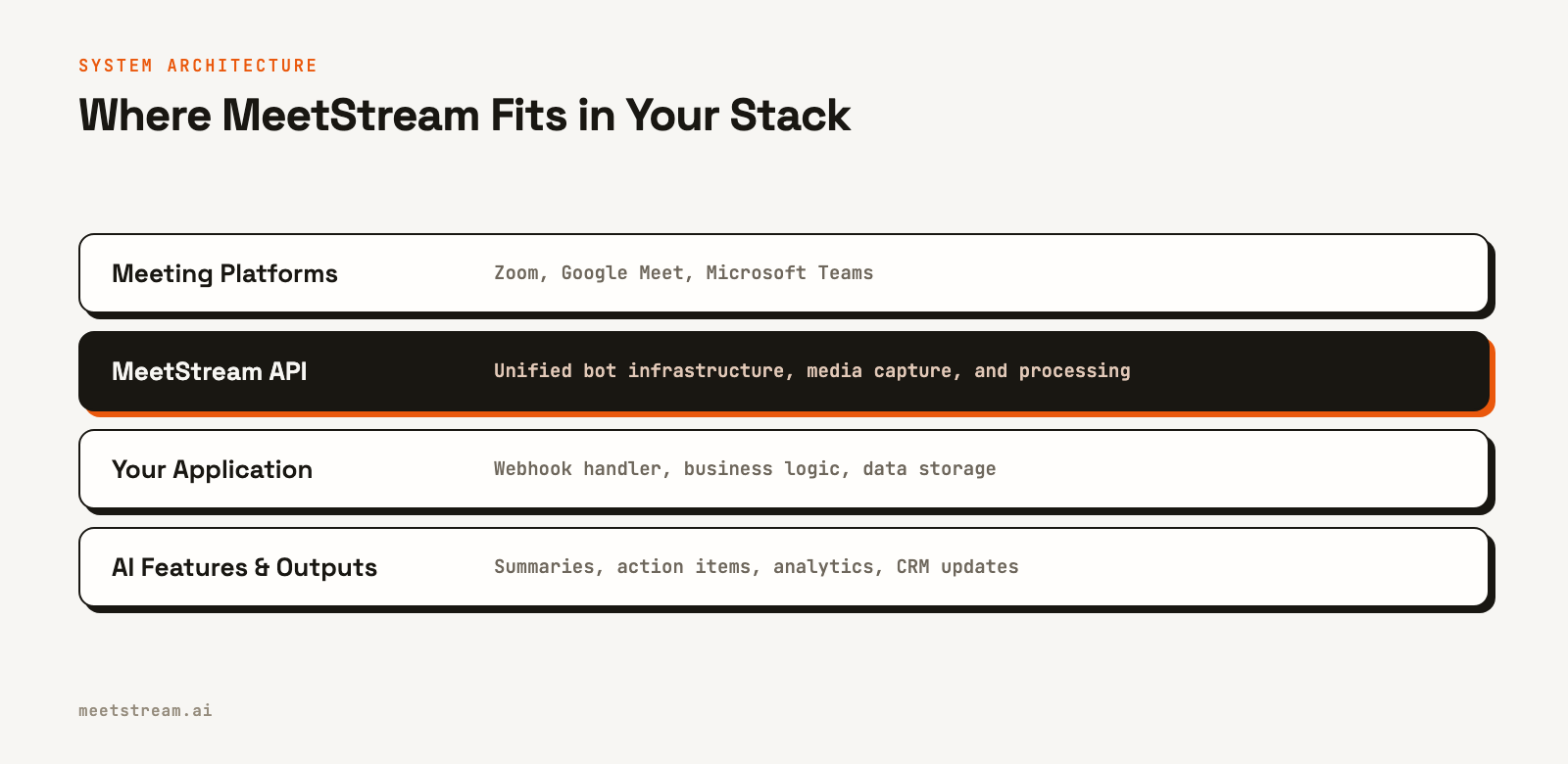
A unified meeting bot API abstracts this away. You send a meeting link for any supported platform, and the service handles deploying a participant bot, capturing the media, and processing it. At MeetStream, we've handled over a million meeting minutes, and this abstraction is key to reliably operating at scale.
Setting Up Your Python Environment
Before writing code, you need a few prerequisites. Make sure you have Python 3.8 or newer installed.
You will also need:
- A MeetStream API key, which you can get from the MeetStream dashboard.
- The
requestsandflaskPython libraries. Install them with pip:pip install requests flask - A way to expose your local server to the internet for webhooks. A tool like
ngrokis perfect for development. - A meeting URL from Zoom, Google Meet, or Microsoft Teams for testing.
First, set up your API key and headers. It's best practice to store your API key in an environment variable rather than hardcoding it.
import os
import requests

# Get API key from environment variable
API_KEY = os.environ.get("MEETSTREAM_API_KEY")
if not API_KEY:
    raise ValueError("MEETSTREAM_API_KEY environment variable not set.")

BASE_URL = "https://api.meetstream.ai/api/v1"
HEADERS = {
    "Authorization": f"Token {API_KEY}",
    "Content-Type": "application/json"
}
To set the environment variable, use export MEETSTREAM_API_KEY="your_key" on macOS/Linux or $env:MEETSTREAM_API_KEY="your_key" in PowerShell.
Deploying a Bot into a Meeting
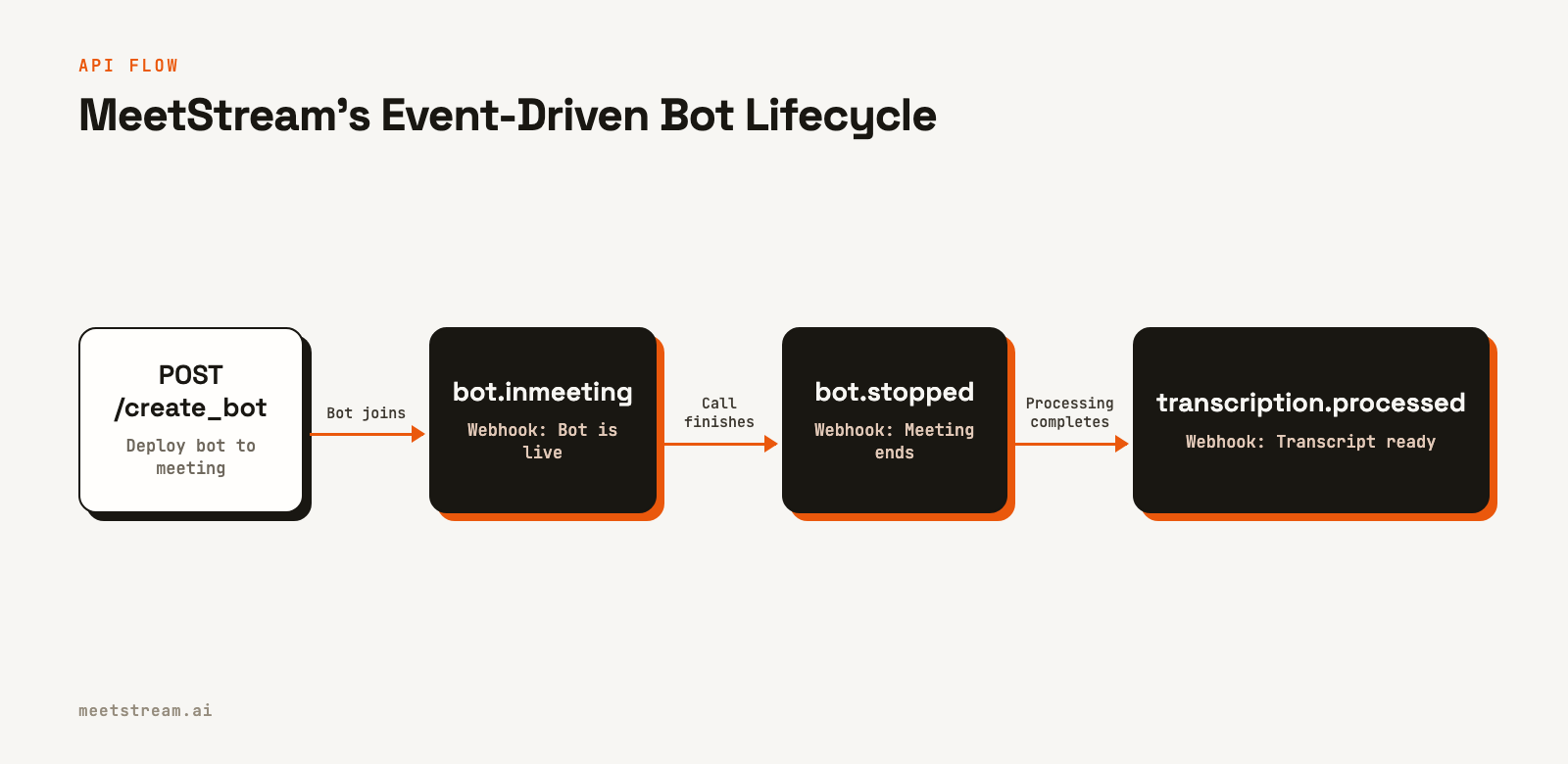
The core of the integration is a single POST request to the /bots/create_bot endpoint. You provide the meeting link and a callback_url for webhooks, and MeetStream handles the rest.
In this example, we'll configure the bot to use MeetStream's in-house transcription and set data to be deleted after 24 hours.
def deploy_bot(meeting_link: str, callback_url: str) -> dict:
    """Deploys a bot to the specified meeting."""
    payload = {
        "meeting_link": meeting_link,
        "bot_name": "AI Notetaker",
        "callback_url": callback_url,
        "video_required": False,  # Set to True if you need video
        "recording_config": {
            "transcript": {
                "provider": {
                    "meetstream": {}
                }
            },
            "retention": {
                "type": "timed",
                "hours": 24
            }
        }
    }
    response = requests.post(f"{BASE_URL}/bots/create_bot", json=payload, headers=HEADERS)
    response.raise_for_status()  # Raises an exception for 4xx/5xx errors
    return response.json()

# Example usage:
# meeting_url = "https://meet.google.com/abc-def-ghi"
# webhook_url = "https://your-ngrok-url.ngrok-free.app/webhooks"
# result = deploy_bot(meeting_url, webhook_url)
# print(f"Bot deployed: {result}")
The API responds immediately with a bot_id and a transcript_id. You must store this pair so you can look up the transcript_id using the bot_id that arrives in webhook events.
Handling Webhook Events with Flask
MeetStream uses an event-driven model. Instead of you polling for status, our platform sends POST requests to your callback_url as the bot's state changes. Your server must respond with a 2xx status code quickly to acknowledge receipt.
The most important field in the webhook payload is bot_event. This string tells you which event occurred. A few key events are bot.inmeeting, bot.stopped, and transcription.processed.
Here is a minimal Flask server to handle these webhooks.
from flask import Flask, request, jsonify

app = Flask(__name__)

# In a production app, use a database (e.g., Redis, PostgreSQL) instead of a
# global dictionary to store this mapping.
BOT_TRANSCRIPT_MAP = {}

# When you deploy a bot, store the mapping.
# bot_response = deploy_bot(...)
# BOT_TRANSCRIPT_MAP[bot_response["bot_id"]] = bot_response["transcript_id"]

@app.route("/webhooks", methods=["POST"])
def handle_webhook():
    payload = request.json
    event_type = payload.get("bot_event")
    bot_id = payload.get("bot_id")

    print(f"Received event: {event_type} for bot_id: {bot_id}")

    if event_type == "bot.inmeeting":
        print(f"Bot {bot_id} is now in the meeting.")

    elif event_type == "bot.stopped":
        status = payload.get("bot_status")
        print(f"Bot {bot_id} has left the meeting with status: {status}.")

    elif event_type == "transcription.processed":
        # Look up the transcript_id you stored when creating the bot.
        # The webhook payload for this event does not contain the transcript_id.
        transcript_id = BOT_TRANSCRIPT_MAP.get(bot_id)
        if transcript_id:
            print(f"Transcript {transcript_id} is ready for bot {bot_id}.")
            # In a real app, you would queue a job to fetch the transcript here.
            # fetch_and_process_transcript(transcript_id)
        else:
            print(f"Warning: Received transcription.processed for bot {bot_id}, but no transcript_id was stored.")

    elif event_type == "bot.failed":
        error_message = payload.get("message")
        print(f"Bot {bot_id} failed to join or operate: {error_message}")

    return jsonify({"status": "received"}), 200

# To run this server:
# if __name__ == "__main__":
#     app.run(port=5000)
A key detail is that webhook delivery is best-effort. If your server returns a non-2xx response, we do not retry. For production systems, your webhook handler should immediately queue the payload for background processing and return a 200 OK.
Retrieving the Final Transcript
After the meeting ends, the bot leaves and post-call processing begins. Once you receive the transcription.processed webhook, you can fetch the full, speaker-diarized transcript using the transcript_id you stored earlier.
The endpoint is GET /transcript/{transcript_id}/get_transcript.
def get_transcript(transcript_id: str) -> list:
    """Fetches the final transcript data."""
    url = f"{BASE_URL}/transcript/{transcript_id}/get_transcript"
    response = requests.get(url, headers=HEADERS)
    response.raise_for_status()
    return response.json()

def print_transcript_summary(transcript_segments: list):
    """Prints a simple summary of a transcript."""
    for segment in transcript_segments:
        speaker = segment.get("speaker")
        text = segment.get("transcript")
        start_time = segment.get("start_time")
        print(f"[{start_time:.1f}s] Speaker {speaker}: {text}")

# Example usage after receiving the webhook:
# transcript_id_from_webhook = "..."
# final_transcript_segments = get_transcript(transcript_id_from_webhook)
# print_transcript_summary(final_transcript_segments)
This same pattern applies to other artifacts. If you enable video recording by setting video_required: true, you'll receive a video.processed event. You can then call GET /api/v1/bots/{bot_id}/get_video. The API returns a JSON object with a video_url, a presigned URL valid for 10 minutes, from which you can download the MP4 file. For a complete guide, see our tutorial on post-call transcription.
How MeetStream Fits In
This Python meeting bot is a simple example, but it demonstrates the core value of using a dedicated infrastructure API. MeetStream provides the building blocks for developers creating AI-powered meeting products.
Our platform handles the non-differentiated heavy lifting:
- Multi-Platform Support: One integration works across Zoom, Google Meet, and Microsoft Teams.
- Managed Infrastructure: We manage the bot clusters, scaling from one to thousands of concurrent calls without any configuration on your end.
- Real-Time Capabilities: Beyond post-call data, you can get real-time audio streams and live transcripts to power in-meeting features like coaching or voice-controlled actions. This is the foundation for building an interactive voice agent.
- Compliance: We are ISO 27001 certified and GDPR compliant. We also support HIPAA by signing Business Associate Agreements (BAAs) for healthcare applications.
By using MeetStream, your team can focus on the unique features of your AI meeting notetaker or conversation intelligence platform, not on maintaining brittle integrations with meeting providers.
Conclusion
You've now seen how to build a meeting bot with Python that can join any major meeting platform, record the conversation, and provide a speaker-attributed transcript. The entire process, from API call to data retrieval, is handled with a few simple functions. This approach significantly reduces the time and complexity required to get meeting data into your application.
With this foundation, you can build sophisticated AI features for analysis, summarization, or real-time assistance. The core challenge is no longer accessing meeting data, but what you choose to build with it.
See the full API reference at docs.meetstream.ai.
Frequently Asked Questions
How do I create a bot for a meeting?
You can create a meeting bot programmatically by making an API call to a service like MeetStream. You send a POST request with the meeting URL and a callback URL. The service then deploys a bot that joins the call as a participant to record audio, video, and other metadata.
Can a Python bot join a Zoom meeting?
Yes, a Python script can trigger a bot to join a Zoom meeting. Using a library like requests to call an API like MeetStream, you can send the Zoom meeting link to an endpoint. The service handles the complexities of the Zoom SDK and authentication, allowing your Python application to control the bot via a simple REST API.
How do you get a transcript from a meeting using an API?
To get a transcript via an API, you first deploy a bot to record the meeting's audio. After the meeting, the audio is processed by a speech-to-text engine. The API provider will then typically send a webhook to your application to signal that the transcript is ready to be fetched from a specific endpoint.
What is a meeting bot API?
A meeting bot API is a set of tools and services that allows developers to programmatically control bots that join online meetings. It abstracts away the platform-specific details of Zoom, Google Meet, and Microsoft Teams, providing a single, unified interface to capture audio, video, transcripts, and other in-meeting events.