
Extracting Action Items from Meeting Transcripts with NLP

A 45-minute meeting ends and an hour later, nobody remembers who committed to the infrastructure migration. This happens constantly, not because of process failure, but because human memory is unreliable for tracking spoken commitments. The solution is to turn meeting transcripts into structured records of who agreed to do what, by when.
Action item extraction is the natural language processing (NLP) task of identifying commitments in text. This is a non-trivial problem because people express intent in varied ways: "I'll handle the deployment," "Can you get that to Sarah by Thursday?", or "We should schedule a follow-up." MeetStream provides the agent-first voice infrastructure to get clean, speaker-labeled data from meetings on Zoom, Google Meet, and Teams. This article shows you how to process that data.
There are three practical approaches to this problem. Rule-based extraction using regular expressions is fast but brittle. Transformer-based models fine-tuned on meeting data are more accurate but require local inference. Prompting a large language model (LLM) to return structured JSON is the most accurate method for complex conversations. The right choice depends on your accuracy needs, latency budget, and data privacy constraints.
This post explains how to build all three approaches and connect them to a MeetStream webhook. When a meeting ends, your system will automatically fetch the transcript, extract action items, and push them to a tool like Jira.
Rule-Based Extraction with Regex
Rule-based extraction uses regular expressions to match syntactic patterns that signal a commitment. The presence of modal verbs like "will" or "should," combined with a first-person pronoun or a specific name, is a strong indicator. Explicit phrases such as "action item" or "follow up" are even better signals. This method is transparent and fast, but often produces false positives.
import re
from typing import List, Dict

# Patterns ordered by specificity
ACTION_PATTERNS = [
    # Explicit ownership: "Alice will", "I'll", "we need to"
    r"(?P<owner>[A-Z][a-z]+|I|We)(?:\'ll| will| should| needs? to| going to)\s+(?P<action>[a-z][^.?!]{5,60})",
    # Passive assignment: "action item for Bob"
    r"action item(?:\s+for\s+(?P<owner>[A-Z][a-z]+))?[:\s]+(?P<action>[^.?!]{5,80})",
    # Imperative with name: "Bob, please send"
    r"(?P<owner>[A-Z][a-z]+),?\s+(?:please\s+)?(?P<action>(?:send|write|review|schedule|follow up|check)[^.?!]{3,60})",
]

DEADLINE_PATTERN = r"by\s+(?:end of (?:day|week|month)|(?:Monday|Tuesday|Wednesday|Thursday|Friday)|(?:tomorrow|next week))"

def extract_action_items_regex(transcript: List[Dict]) -> List[Dict]:
    results = []
    for segment in transcript:
        text = segment["transcript"]
        speaker = segment["speaker"]

        for pattern in ACTION_PATTERNS:
            for match in re.finditer(pattern, text, re.IGNORECASE):
                owner = match.group("owner") if "owner" in match.groupdict() else speaker
                action = match.group("action").strip()

                deadline_match = re.search(DEADLINE_PATTERN, text, re.IGNORECASE)
                deadline = deadline_match.group(0) if deadline_match else None

                results.append({
                    "owner": owner if owner not in ("I", "We") else speaker,
                    "action": action,
                    "deadline": deadline,
                    "source_text": text,
                    "method": "regex"
                })
                break  # one match per pattern per turn
    return results
The main issue with regex is precision. It can incorrectly flag rhetorical questions or suggestions as action items. A simple post-filter that verifies the extracted action contains a verb and a noun can help reduce these false positives.
Transformer-Based Extraction with a Fine-Tuned Model
A sequence-to-sequence model like T5, fine-tuned on meeting data, understands the semantics of commitment, not just syntax. This results in cleaner extractions. The Hugging Face Hub hosts models trained on datasets like the AMI corpus, which are suitable for this task. A practical alternative is using a Natural Language Inference (NLI) model for zero-shot classification.
from transformers import pipeline

# An NLI model can classify turns without task-specific training data.
classifier = pipeline(
    "zero-shot-classification",
    model="cross-encoder/nli-deberta-v3-small"
)

def is_action_item(text: str, threshold: float = 0.6) -> bool:
    result = classifier(
        text,
        candidate_labels=["action item or task assignment", "general discussion or information"]
    )
    return result["labels"][0] == "action item or task assignment" and result["scores"][0] > threshold

def extract_action_items_transformer(transcript: List[Dict]) -> List[Dict]:
    results = []
    for segment in transcript:
        if is_action_item(segment["transcript"]):
            results.append({
                "owner": segment["speaker"],
                "action": segment["transcript"],
                "method": "transformer"
            })
    return results
The NLI approach is a good fit for production systems. It runs on a CPU with low latency, handles paraphrasing well, and requires no custom training. Its main limitation is that it classifies an entire speaker turn rather than extracting structured fields like owner and deadline.
LLM Prompting with Structured Output
For the highest accuracy, especially on transcripts with complex, multi-speaker commitments, an LLM with a structured output prompt is the best tool. Models like GPT-4o or Claude can return a clean JSON array of action items, including owner, action, and deadline, from a single pass over the full transcript. For more on this, see our guide to meeting summarization pipelines.
import openai
import json

client = openai.OpenAI()

ACTION_ITEM_PROMPT = """
You are analyzing a meeting transcript to extract action items.

For each action item, identify:
- owner: the person responsible (use the speaker name if implicit)
- action: the specific task to complete (concise, verb-first)
- deadline: any mentioned deadline (null if none)
- source_quote: the exact quote that triggered this action item

Return a JSON array of objects. If no action items exist, return an empty array [].
Do not include discussion items, suggestions, or open questions.

Transcript:
{transcript}
"""

def extract_action_items_llm(transcript: List[Dict]) -> List[Dict]:
    formatted = "\n".join(
        f"{segment['speaker']}: {segment['transcript']}"
        for segment in transcript
    )
    prompt = ACTION_ITEM_PROMPT.format(transcript=formatted)

    response = client.chat.completions.create(
        model="gpt-4o",
        messages=[{"role": "user", "content": prompt}],
        response_format={"type": "json_object"},
        temperature=0
    )

    content = response.choices[0].message.content
    # The response should be a JSON string containing an array.
    return json.loads(content)
Using temperature=0 ensures deterministic output, which is critical for structured data extraction. The response_format={"type": "json_object"} parameter guarantees valid JSON, simplifying parsing on your end.
End-to-End Pipeline: MeetStream to Jira
A complete pipeline connects a MeetStream webhook to your extraction logic and a destination system. The bot.stopped event fires when the bot leaves the meeting, signaling that the full transcript is available from the API. Your webhook handler can then trigger the extraction and task creation process.
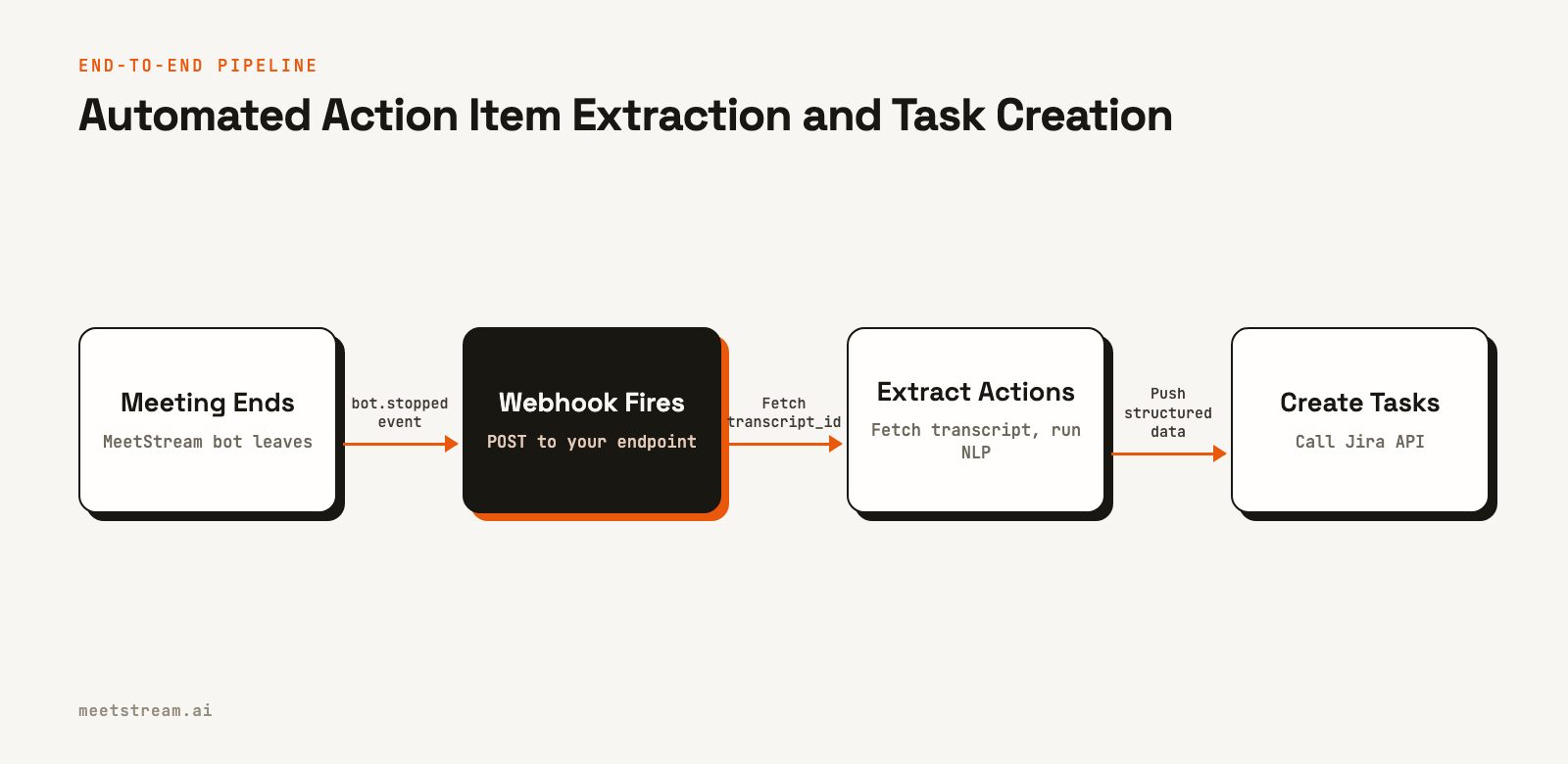
When you create a meeting bot, the API returns a bot_id and a transcript_id. You must store both. The webhook for bot.stopped includes the bot_id, which you can use to look up the corresponding transcript_id to fetch the data.
import httpx
from fastapi import FastAPI, Request

app = FastAPI()

MEETSTREAM_API_KEY = "YOUR_API_KEY"
JIRA_TOKEN = "YOUR_JIRA_TOKEN"
JIRA_BASE_URL = "https://your-org.atlassian.net"
JIRA_PROJECT_KEY = "ENG"

async def fetch_transcript(transcript_id: str) -> List[Dict]:
    async with httpx.AsyncClient() as client:
        response = await client.get(
            f"https://api.meetstream.ai/api/v1/transcript/{transcript_id}/get_transcript",
            headers={"Authorization": f"Token {MEETSTREAM_API_KEY}"}
        )
        response.raise_for_status()
        return response.json()

async def create_jira_task(action_item: Dict):
    # Implementation for creating a Jira issue
    pass

@app.post("/webhooks/meetstream")
async def handle_meeting_ended(request: Request):
    body = await request.json()

    # The event name in the payload is "bot_event"
    if body.get("bot_event") != "bot.stopped":
        return {"status": "ignored"}

    bot_id = body["bot_id"]
    # You must look up the transcript_id you stored when creating the bot.
    # For example: transcript_id = db.get_transcript_id(bot_id=bot_id)
    transcript_id = "YOUR_STORED_TRANSCRIPT_ID" # Replace with your lookup logic

    transcript = await fetch_transcript(transcript_id)
    action_items = extract_action_items_llm(transcript)

    for item in action_items:
        await create_jira_task(item)

    return {"status": "processed", "actions_found": len(action_items)}
Choosing the Right Extraction Method
The best method depends on your specific product requirements. Regex is useful for simple, high-signal keywords. Local transformer models offer a balance of accuracy and privacy. For most applications, however, the superior accuracy of a large language model justifies the API cost and latency.
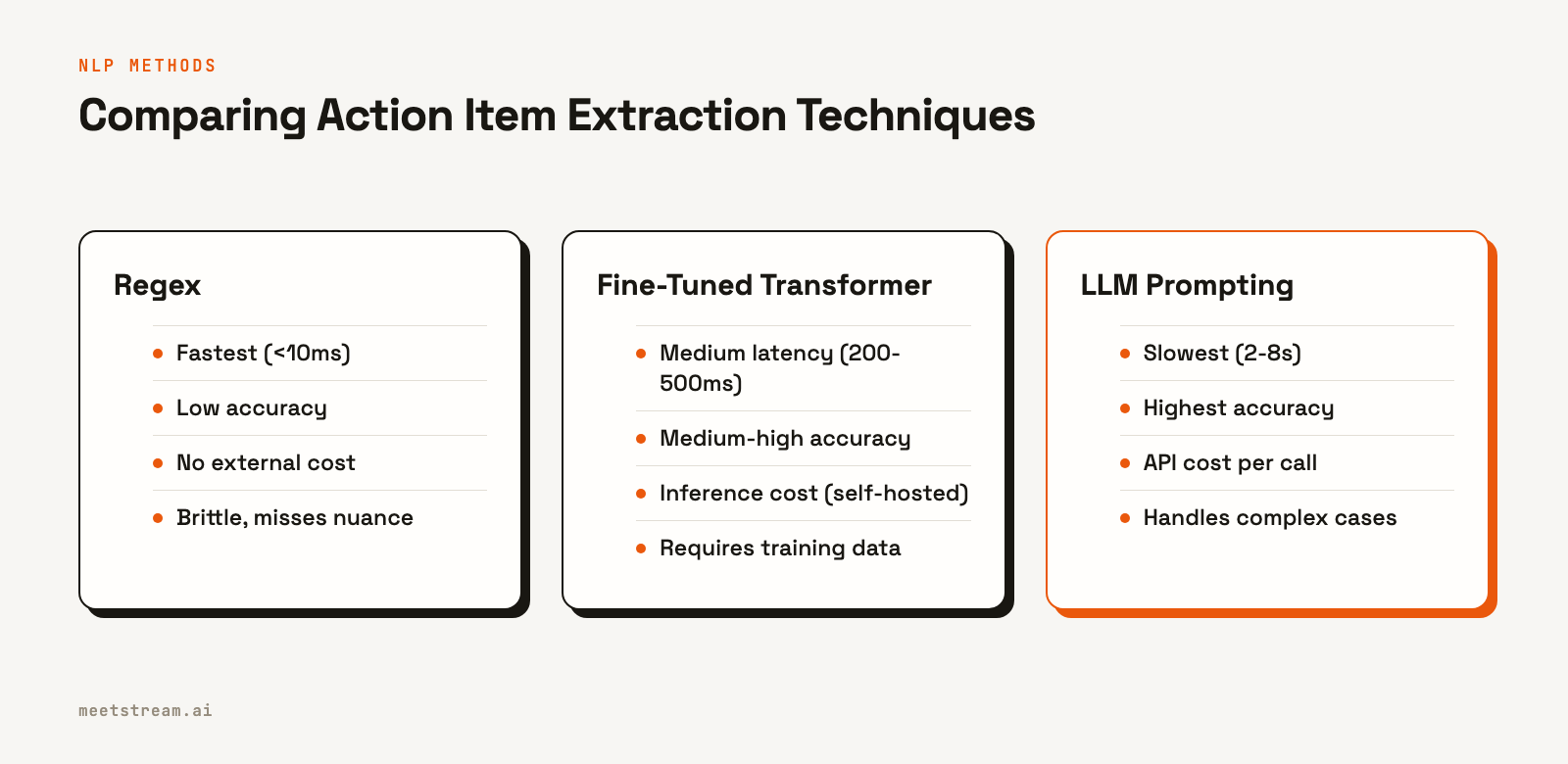
At MeetStream, we see teams building sophisticated NLP applications on top of our platform. From our experience processing over 1,000,000 meeting minutes, we find that the LLM approach is the most reliable default for capturing the nuances of human conversation. If data privacy is a primary concern, a self-hosted model is a viable alternative, though it may require more engineering effort to maintain.
Deduplication and Confidence Scoring
A single commitment might be mentioned multiple times in a meeting. Running an extractor can result in duplicate action items. To solve this, you can use sentence similarity to find and merge near-duplicates that simple string matching would miss. This is an important step for building a clean user experience. For more on this, see our guide on how to store and search large transcripts.
from sentence_transformers import SentenceTransformer
import numpy as np

model = SentenceTransformer("all-MiniLM-L6-v2")

def deduplicate_action_items(items: List[Dict], threshold: float = 0.85) -> List[Dict]:
    if not items:
        return []

    texts = [item["action"] for item in items]
    embeddings = model.encode(texts)

    # Cosine similarity calculation
    norm_embeddings = embeddings / np.linalg.norm(embeddings, axis=1, keepdims=True)
    similarity_matrix = np.dot(norm_embeddings, norm_embeddings.T)

    keep = [True] * len(items)
    for i in range(len(items)):
        if not keep[i]:
            continue
        for j in range(i + 1, len(items)):
            if similarity_matrix[i, j] > threshold:
                keep[j] = False

    return [item for item, k in zip(items, keep) if k]
Conclusion
Extracting action items from meeting transcripts is a well-understood NLP task. The primary engineering challenge is in the integration: getting clean, speaker-labeled data from a meeting bot API, running your chosen extraction method, and routing the structured output to a system your team uses. MeetStream's webhook system provides a reliable foundation for the data delivery part of this pipeline, letting you focus on the NLP logic that creates value for your users. See the full API reference at docs.meetstream.ai.
Related guides
Frequently Asked Questions
What is the best NLP method for extracting action items?
For most applications, LLM-based extraction using a structured JSON prompt with a model like GPT-4o or Claude provides the highest accuracy. It correctly interprets implicit ownership and complex phrasing that other methods miss.
How can I extract action items without custom training data?
Both LLM prompting and zero-shot NLI classification work without any labeled training data. A well-designed prompt can guide an LLM to extract structured data effectively. An NLI model can classify turns as action items, which you can then process further.
How do I handle action items that span multiple speaker turns?
This is a key strength of the LLM approach. By providing the full transcript as context in the prompt, the model can resolve dependencies across multiple speaker turns. Local models typically struggle with this unless they process the text in larger chunks or sliding windows.
How can I automatically push action items to Jira?
Use a webhook from a service like MeetStream to trigger a server-side function when a meeting ends. This function should fetch the final transcript, run your NLP extraction logic, and then call the Jira REST API to create a new issue for each extracted action item.
Can action item extraction run in real time during a meeting?
Yes, by using a streaming transcription service. MeetStream provides a webhook for live transcripts that fires for each utterance. You can run a low-latency method like regex or an NLI classifier on each completed turn to display potential action items as they are spoken.


