
Conversation Intelligence API: Build Your Own in 2026

Building a conversation intelligence API starts with reliably capturing speaker-attributed audio from live meetings. While many platforms can record a call, turning the chaotic audio from a multi-person discussion on Zoom, Google Meet, and Microsoft Teams into structured, analyzable data is a difficult infrastructure problem.
The core of this problem is building an agent that can join any meeting, understand who is speaking, and stream that data to a processing pipeline. This is the foundation for any application that extracts insights from meetings, from sales coaching tools to automated notetakers. MeetStream is an agent-first voice infrastructure platform designed for this purpose. Our API lets you deploy agents that join meetings as participants to hear, speak, and act in real time.
There are over 300 million daily participants in Zoom meetings alone. The conversations in those meetings contain valuable data about product feedback, sales objections, and customer sentiment. Most of this data is lost because extracting it systematically is too complex. A reliable conversation intelligence pipeline makes this extraction possible.
The following sections break down the technical pipeline, common use cases, and the core architectural decisions you will face. We will cover the stages from raw audio capture to structured NLP output, and explain the tradeoffs between building the infrastructure yourself versus using a dedicated API. Let's get into it.
Why Conversation Intelligence Is a Hard Data Problem
Conversation intelligence is the process of capturing spoken language, transcribing it, and running analysis to extract structured insight. Simple transcription is not enough. A flat text file of a conversation has limited value. The goal is to produce rich, structured data that attributes every word to a specific speaker, along with precise timestamps.
This data serves as the input for layers of natural language processing (NLP). A mature system can identify topics, analyze sentiment trends, detect questions, and extract action items. The quality of these insights depends entirely on the quality of the initial data capture. Garbage in, garbage out.
The main challenge is getting clean, distinct inputs for each meeting participant across different platforms. Each video conferencing service has its own API, authentication model, and media transport protocols. Building and maintaining integrations for each one is a significant engineering effort. This is where the concept of meeting intelligence becomes an infrastructure problem, not just an analysis problem.
The Conversation Intelligence Pipeline Explained
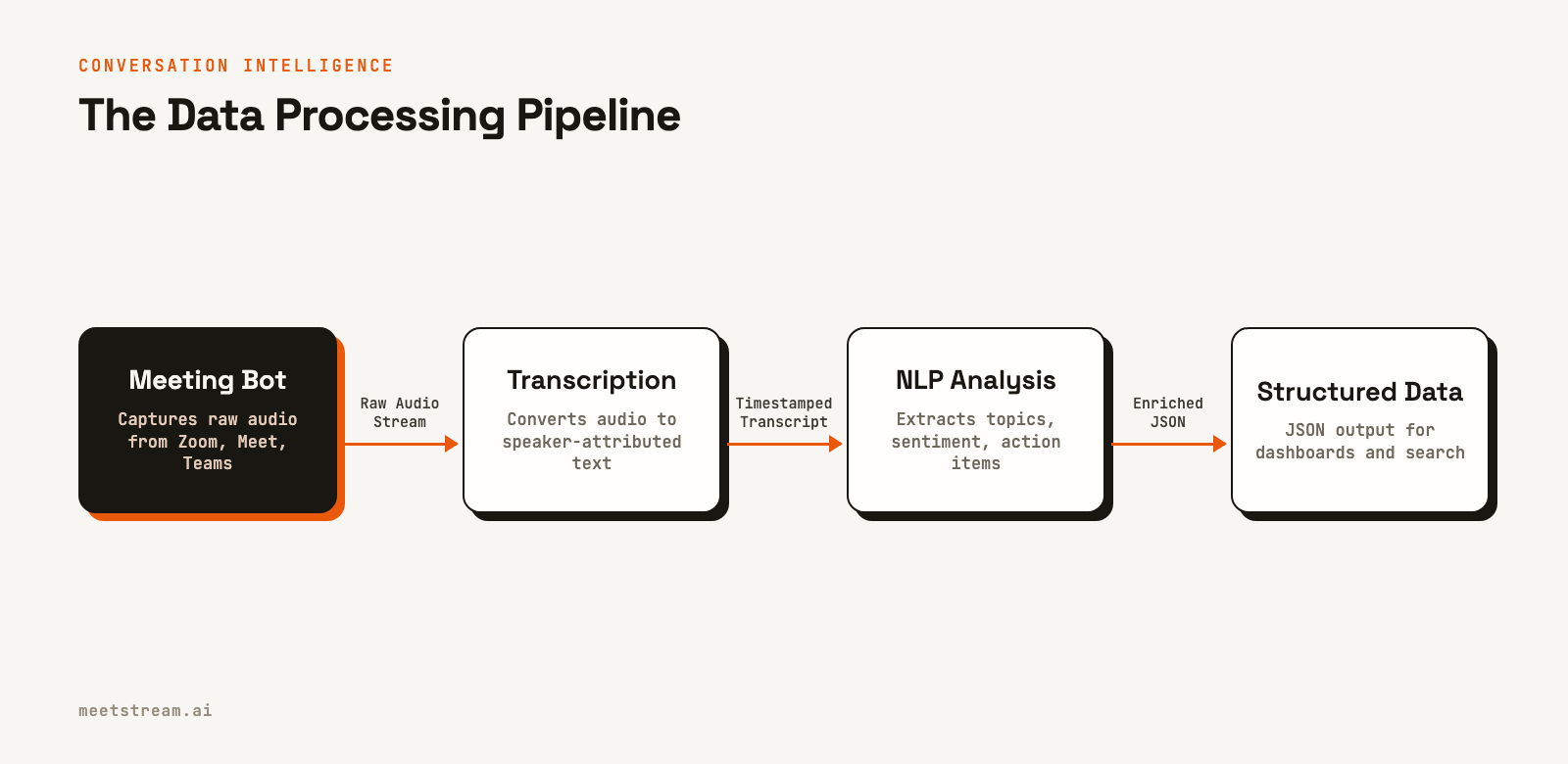
A production conversation intelligence pipeline involves several distinct stages. Getting any one of them wrong can compromise the quality of the final output.
Stage 1: Audio and Video Capture
Before any analysis can happen, you need to get media out of the meeting. This is typically done using a meeting bot that joins the call like a human participant. The bot must be able to navigate waiting rooms, handle different audio codecs, and manage permissions. For example, joining a Zoom meeting bot often requires handling specific OAuth flows and user permissions, while a Google Meet bot has different technical requirements.
Stage 2: Speech-to-Text (STT)
The captured audio is sent to a transcription service. Developers have several options, each with different performance on accuracy, latency, and cost. Common choices include Deepgram for real-time streaming and AssemblyAI for post-call analysis. MeetStream also provides a low-cost in-house transcription provider as an option. The choice of STT provider directly impacts the word error rate (WER) of your transcript, which in turn affects all downstream analysis.
Stage 3: Speaker Diarization
A raw transcript is just a block of text. Speaker diarization is the process of segmenting that text and assigning each word or phrase to a specific speaker. This is what enables per-person analytics, like calculating talk-time ratios or tracking sentiment for each participant. Accurate diarization is difficult, especially in conversations with crosstalk or poor audio quality.
Stage 4: NLP Analysis
This is where the transcript becomes insight. An NLP layer can perform several tasks:
- Topic Modeling: Segments the conversation into distinct topics, such as pricing, technical questions, or next steps.
- Sentiment Analysis: Scores each speaker's turn as positive, neutral, or negative to track emotional arcs over the course of a meeting.
- Entity and Keyword Extraction: Identifies mentions of competitors, product features, or compliance-related terms.
- Action Item Extraction: Detects and pulls out commitments, like "I will send the report by end of day."
Stage 5: Storage and Retrieval
The final, enriched data needs to be stored in a way that makes it searchable. Storing the structured JSON output in a database and indexing it allows for powerful queries, such as finding all meetings where a specific competitor was mentioned in the last quarter.
Real-World Use Cases for Meeting Intelligence
A well-built conversation intelligence system provides value across multiple business functions.
For Sales Teams
Sales coaching is the classic use case. Systems can track talk-to-listen ratios, identify which discovery questions lead to better outcomes, and analyze how top performers handle objections. This is the core of sales call intelligence.
For Customer Success
By analyzing the sentiment of customer calls over time, teams can detect early churn signals. Phrases like "budget freeze" or questions about exporting data can be automatically flagged, allowing teams to intervene proactively.
For Product and Research
Aggregating feature requests and pain points from hundreds of customer calls provides direct, unfiltered user feedback. This data can help prioritize product roadmaps based on what users are actually asking for.
For Compliance and Legal
In regulated industries, conversation intelligence can automatically flag keywords or phrases to ensure compliance. This reduces the need for manual review and creates a searchable audit trail of conversations.
Architectural Tradeoff: Building vs. Buying
The main architectural decision is whether to build the entire pipeline in-house or use a specialized API for the data capture layer.
Building it all yourself means managing bot infrastructure across multiple meeting platforms, handling API changes from Zoom and Google, processing different media formats, and ensuring reliable data delivery. This can take a dedicated team 6-12 months to stabilize before any NLP work can even begin.
The more common approach is to use a meeting bot API to handle the capture, transcription, and delivery. This provides your application with structured data like speaker-attributed transcripts through webhooks. Your team can then focus on building the unique NLP and analysis layers that create business value, rather than rebuilding commodity infrastructure.
Real-Time vs. Post-Call Analysis
Most conversation intelligence use cases, like generating summaries or updating a CRM, work reliably well with post-call processing. The analysis runs after the meeting ends, and a latency of a few minutes is acceptable.
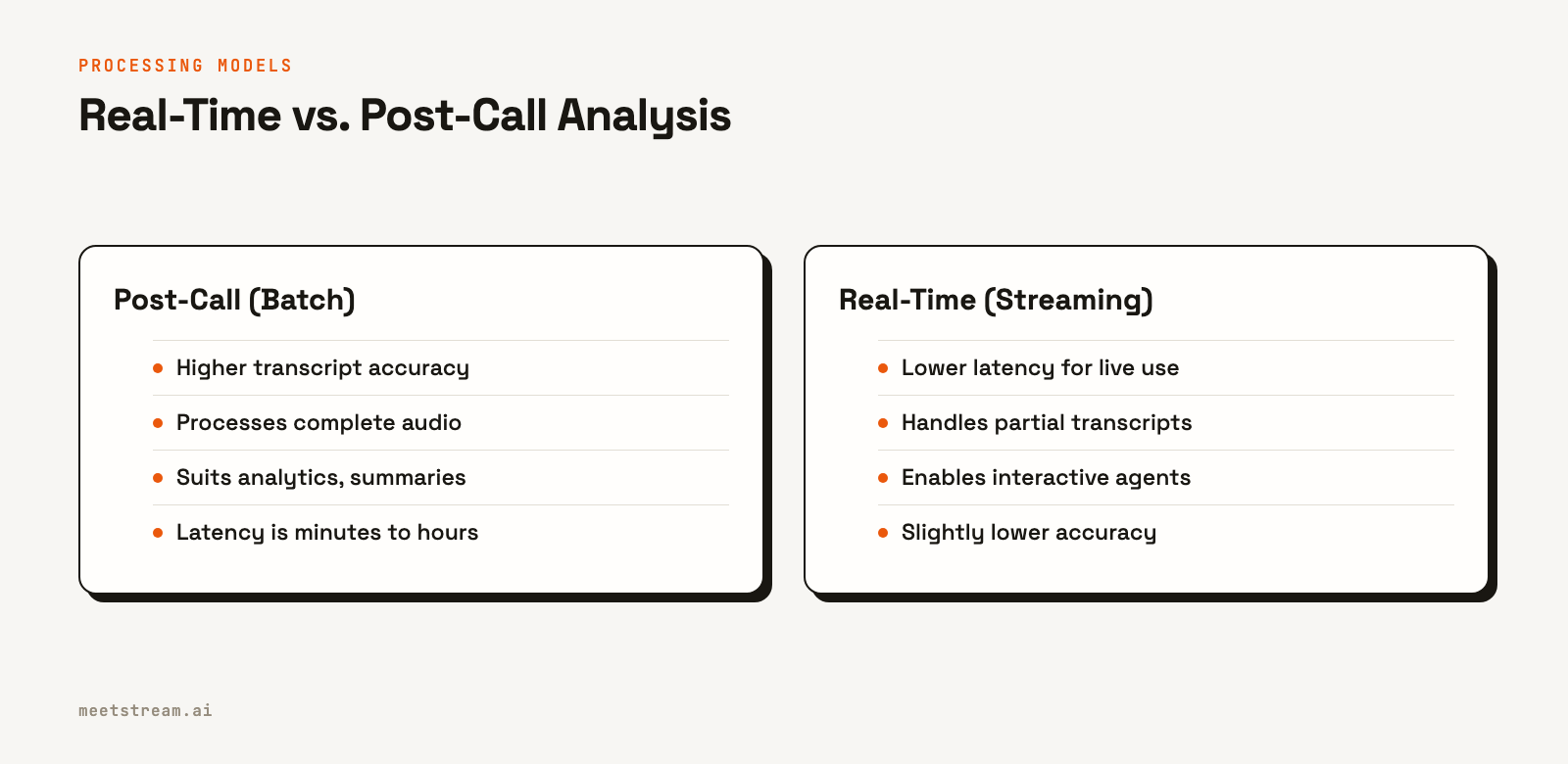
However, some applications require real-time analysis. Live sales coaching that provides feedback during a call, or an AI meeting assistant that answers questions live, must process audio as it is spoken. This requires a streaming architecture.
Streaming transcription APIs work differently from their post-call counterparts. They provide partial, low-latency results that may be revised as the speaker continues. When building real-time systems, it is important to handle these interim results correctly. For example, you might wait for a final confirmation from the API before triggering a critical action based on what was said.
How MeetStream Provides the Foundation
MeetStream provides the infrastructure layer for building conversation intelligence applications. A single API call can deploy a bot to any Zoom, Google Meet, or Microsoft Teams meeting. Our platform is designed to handle the complexity of data capture so you can focus on analysis.
Here’s how it works. You send a request to our API with a meeting link:
curl -X POST "https://api.meetstream.ai/api/v1/bots/create_bot" \
  -H "Authorization: Token <YOUR_API_KEY>" \
  -H "Content-Type: application/json" \
  -d '{
    "meeting_link": "<YOUR_MEETING_LINK>",
    "bot_name": "Sales Coach",
    "callback_url": "https://your-app.com/webhooks/meetstream",
    "recording_config": {
      "transcript": {
        "provider": { "meetstream": {} }
      }
    }
  }'
MeetStream then handles joining the meeting and capturing the data. We provide per-participant streams, with fully isolated audio on Zoom and speaker-attributed audio on Google Meet and Teams. You can get real-time, mixed-stream audio via a WebSocket connection or receive post-call transcripts through webhooks. We support multiple transcription providers, including Deepgram, AssemblyAI, and our own in-house option, giving you the flexibility to choose the best fit for your application.
Conclusion
The value of conversation intelligence is in the structured data it produces, not the raw audio or text. Building a system to generate this data requires a reliable pipeline for capturing, transcribing, and diarizing conversations from multiple platforms. While building this infrastructure from scratch is a major undertaking, a dedicated meeting bot API can provide the foundational layer, allowing you to focus on the NLP and analysis that will differentiate your product.
See the full API reference at docs.meetstream.ai.
Frequently Asked Questions
What is the difference between conversation intelligence and transcription?
Transcription is the process of converting speech to text. Conversation intelligence is the full pipeline of capturing, transcribing, and analyzing that text to extract structured business insights like sentiment, topics, and action items. Transcription is a necessary component of conversation intelligence.
What data can you get from a single meeting?
From one call, a meeting intelligence system can extract speaker talk-time ratios, sentiment trends for each participant, key topics discussed with timestamps, questions asked, and specific action items. The depth of the data depends on the quality of the transcript and the sophistication of the NLP models used.
When should I use real-time vs. post-call analysis?
Use real-time analysis for applications that require immediate feedback, such as live coaching for sales reps or interactive AI agents in the meeting. Use post-call analysis for use cases where a few minutes of latency is acceptable, like generating summaries, updating a CRM, or long-term trend analysis.
Is it practical to build a conversation intelligence pipeline in-house?
Building the entire stack, including the bot infrastructure for each meeting platform, is a significant engineering effort that can take many months. A more practical approach is to use a meeting bot API for the data capture layer and build your custom analysis and NLP logic on top of it.
Which STT provider is best for conversation intelligence?
The best provider depends on your specific needs. Deepgram is often preferred for real-time streaming due to its low latency, while AssemblyAI is strong for post-call batch processing. It is best to evaluate providers based on the accuracy, latency, and cost requirements of your use case.


