
Building Media Pipelines for Real-Time Meeting Bots

Getting raw audio from a meeting platform like Zoom or Google Meet is the first step to building any real-time AI agent. The audio arrives as encoded Opus packets, but your speech-to-text service likely expects 16kHz mono PCM. Bridging this gap requires a media pipeline to capture, decode, resample, and forward audio, all with latency low enough for a conversational agent to feel responsive. Get any step wrong, and you end up with garbled transcripts or a bot that crashes when two people speak at once.
This pipeline is the foundation of an agent that can hear, speak, and act in a meeting. At MeetStream, we've processed over a million meeting minutes, and we see that the most common failure points are in handling audio formats and managing real-time data transfer. Building this infrastructure yourself involves instrumenting headless browsers, managing codecs, and designing a low-latency transport layer.
A media pipeline is the sequence of steps that takes raw media from a source and prepares it for a specific application. For meeting bots, this means converting a platform's WebRTC stream into attributed audio chunks ready for an AI model. The architecture that handles this reliably involves a carefully designed binary protocol for speaker attribution and a reliable method for filtering the bot's own audio to prevent feedback loops.
This article explains each stage of a meeting media pipeline, from capture and processing to forwarding audio over a WebSocket. We will cover how to parse binary frames with speaker metadata and show how MeetStream provides a managed API for this entire process.
The Stages of a Meeting Media Pipeline
A complete media pipeline for a real-time meeting bot has four main stages. Latency accumulates at each step, so efficiency is important for applications that need to respond quickly during a live conversation.
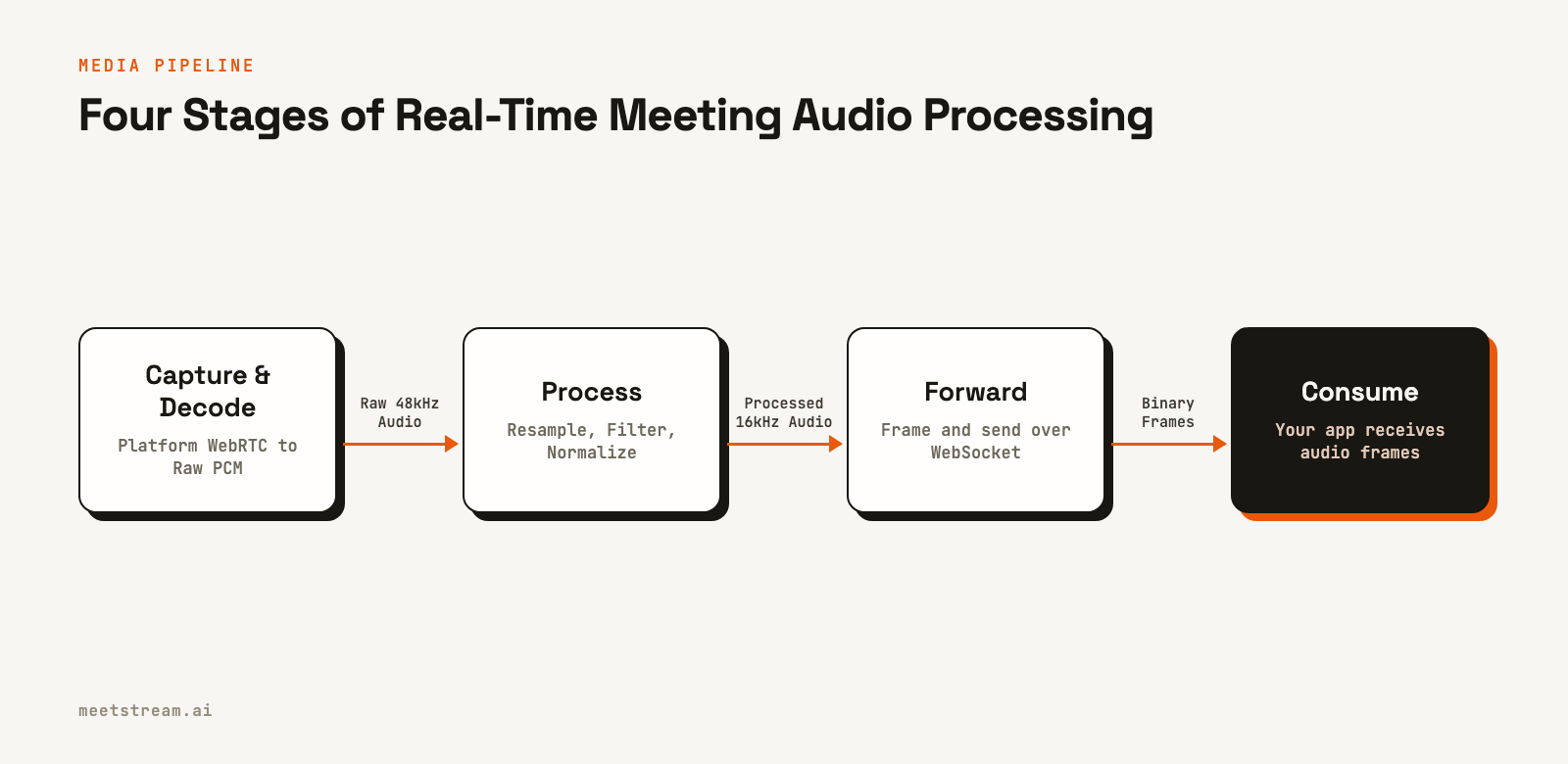
- Capture: The bot joins the meeting and accesses the raw audio and video streams. This usually involves a headless browser running on a server that intercepts the media from the platform's WebRTC stack.
- Decode: The captured media is converted from its transmission codec, typically Opus for audio and VP8 or H.264 for video, into a raw, uncompressed format like PCM for audio.
- Process: The raw media is changed for the downstream application. For audio, this often includes downsampling from 48kHz to 16kHz, filtering, and normalizing volume levels.
- Forward: The processed media is sent to your application server. For real-time use cases, this is almost always done over a WebSocket connection that pushes data to your application as soon as it's ready.
For an AI agent to respond in under a second, the total latency across these stages should be kept below a few hundred milliseconds. This requires efficient code and a solid network architecture.
Audio Processing and Resampling
Meeting platforms typically provide audio at a 48kHz sample rate. While this is great for call quality, most speech-to-text (STT) APIs are trained on and expect audio at 16kHz. Sending 48kHz audio to a 16kHz model can significantly degrade transcription accuracy. The solution is to downsample the audio in your pipeline.
A simple downsampling process involves two steps: applying a low-pass filter to prevent aliasing, where high-frequency sounds distort into lower frequencies, and then selecting every Nth sample. For a 48kHz to 16kHz conversion, you would keep every third sample.
Here is a Python example using the scipy library to correctly resample a chunk of mono audio data.
import numpy as np
from scipy.signal import resample_poly

def resample_audio(pcm_bytes: bytes, source_rate=48000, target_rate=16000) -> bytes:
    """
    Resample PCM16 LE mono audio to a new sample rate.
    Input: raw bytes, 48kHz mono, signed 16-bit little-endian.
    Output: raw bytes, 16kHz mono, signed 16-bit little-endian.
    """
    # Parse bytes into a NumPy array of 16-bit integers
    samples = np.frombuffer(pcm_bytes, dtype=np.int16)

    # Resample from 48kHz to 16kHz (a 1:3 ratio)
    # resample_poly handles the low-pass filtering automatically
    resampled = resample_poly(samples, up=1, down=3)

    # Convert back to 16-bit integers and then to bytes
    return resampled.astype(np.int16).tobytes()
The resample_poly function is efficient for this task because it uses a polyphase filter, which is well-suited for rational conversion factors like 1/3. This is a critical step for preparing audio for most STT providers.
Real-Time Audio Delivery with WebSockets
To get processed audio to your application with low latency, a WebSocket connection is the standard approach. Unlike traditional HTTP requests, WebSockets provide a persistent, two-way communication channel between a client and a server. This allows the media pipeline to push audio frames to your application the moment they are processed.
With MeetStream, you provide your own WebSocket server endpoint when you create a bot. MeetStream's infrastructure then connects to your server as a client, sends an initial JSON handshake like {"type":"ready"}, and then begins streaming audio. You enable this by setting the live_audio_required parameter in your API call.
curl -X POST "https://api.meetstream.ai/api/v1/bots/create_bot" \
  -H "Authorization: Token <YOUR_API_KEY>" \
  -H "Content-Type: application/json" \
  -d '{
    "meeting_link": "https://meet.google.com/abc-defg-hij",
    "bot_name": "AudioBot",
    "live_audio_required": {
      "websocket_url": "wss://your-server.com/audio-ingest"
    }
  }'
Your server at wss://your-server.com/audio-ingest would then accept the incoming connection from MeetStream and begin receiving binary audio frames. This architecture gives you full control over how you handle the incoming audio stream.
Parsing the Binary Audio Frame
The audio sent over the WebSocket is not just raw PCM. To be useful, each chunk of audio needs to be associated with the person who spoke it. MeetStream packages this information into a specific binary format for each WebSocket message. Correctly parsing this format is key to using the data.
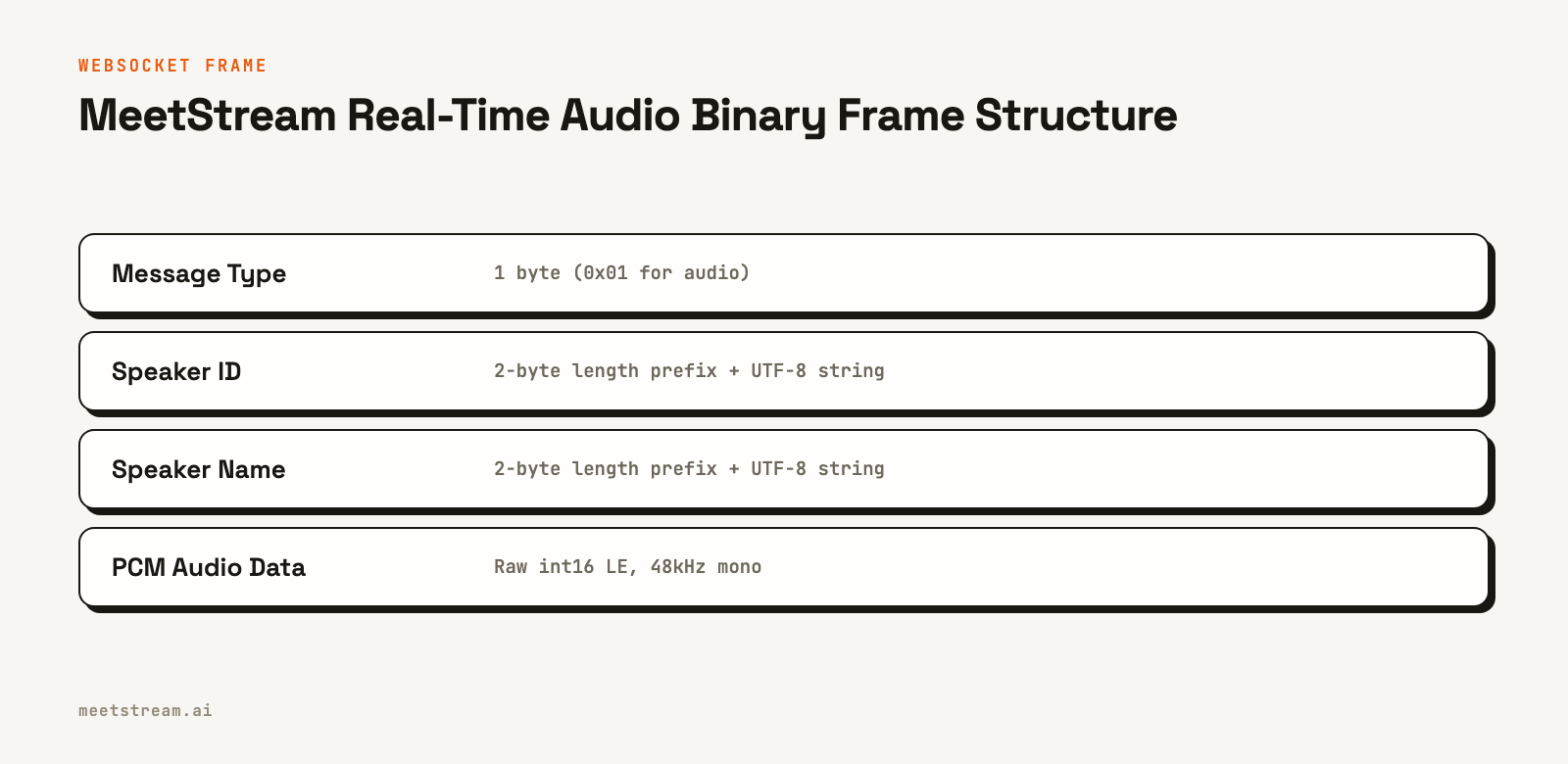
Under the hood, each binary frame has this structure:
- A 1-byte message type (
0x01for audio). - A 2-byte integer specifying the length of the speaker ID, followed by the speaker ID as a UTF-8 string.
- A 2-byte integer specifying the length of the speaker's name, followed by the speaker's name as a UTF-8 string.
- The remaining bytes are the raw PCM audio data (48kHz, mono, signed 16-bit little-endian).
Here is a Python function that parses this binary frame structure.
import struct

def parse_audio_frame(data: bytes) -> dict | None:
    """
    Parses a MeetStream binary audio frame.
    """
    try:
        offset = 0

        # 1-byte message type
        msg_type, = struct.unpack_from('<B', data, offset)
        offset += 1
        if msg_type != 0x01:
            return None # Not an audio frame

        # 2-byte length prefix for speaker_id
        speaker_id_len, = struct.unpack_from('<H', data, offset)
        offset += 2
        speaker_id = data[offset:offset + speaker_id_len].decode('utf-8')
        offset += speaker_id_len

        # 2-byte length prefix for speaker_name
        speaker_name_len, = struct.unpack_from('<H', data, offset)
        offset += 2
        speaker_name = data[offset:offset + speaker_name_len].decode('utf-8')
        offset += speaker_name_len

        # The rest is PCM audio data
        audio_bytes = data[offset:]

        return {
            'speaker_id': speaker_id,
            'speaker_name': speaker_name,
            'audio': audio_bytes
        }
    except (struct.error, UnicodeDecodeError, IndexError):
        # Malformed frame
        return None
This parser lets you reliably extract both the speaker metadata and the audio, ready for the next stage in your pipeline, like forwarding to an STT service.
Filtering Bot Audio to Prevent Echo
If your bot speaks during a meeting using text-to-speech (TTS), that audio is played into the call. Your bot's capture mechanism will hear its own voice, just like any other participant. If you don't filter this out, your bot will transcribe itself, creating useless data and potentially causing feedback loops where the bot reacts to its own words.
The solution is to identify and discard audio frames that originate from your bot. Since you set the bot_name when you create the bot, you can use this name to filter the incoming audio stream.
BOT_NAME = "AudioBot" # The name you gave your bot

def should_process_frame(speaker_name: str) -> bool:
    """
    Check if an audio frame should be processed or ignored.
    """
    if speaker_name == BOT_NAME:
        return False # Skip the bot's own audio
    return True

# In your WebSocket handler:
# frame = parse_audio_frame(message)
# if frame and should_process_frame(frame['speaker_name']):
#     # Process the audio
This simple check, applied right after parsing each frame, ensures you only process audio from human participants, making your downstream logic much cleaner.
How MeetStream Fits In
Building and maintaining a media pipeline for multiple meeting platforms is a significant infrastructure project. MeetStream manages the entire capture, decode, and forwarding process for Zoom, Google Meet, and Microsoft Teams through a single API.
When you use the real-time audio streaming feature, you are offloading the most complex parts of the pipeline. You provide a WebSocket URL, and MeetStream delivers clean, speaker-attributed 48kHz mono PCM audio directly to your application. Your work begins with processing this clean stream, not with managing headless browsers or WebRTC stacks. This lets you focus on building your application's core features, like the intelligence of your AI meeting agent.
Conclusion
A reliable media pipeline is essential for any real-time meeting bot. It requires careful handling of audio capture, decoding, resampling, and low-latency forwarding. The details, from choosing the right resampling filter to parsing a custom binary protocol, determine whether your bot can participate in a conversation effectively. While building this from scratch is possible, it is a substantial engineering effort separate from the AI and product logic you want to build. See the full API reference at docs.meetstream.ai.
Related guides
- What is WebSocket streaming? Real-time media explained
- MIA Real-Time vs Pipeline: Two Voice Agent Modes Compared
Frequently Asked Questions
Why is audio resampling from 48kHz to 16kHz necessary?
Most speech-to-text models are trained on 16kHz audio. Sending them audio at a different sample rate, like the 48kHz common in meeting platforms, can lead to poor transcription accuracy. Correctly downsampling the audio ensures the STT model receives data in the format it expects.
What format does MeetStream deliver real-time audio in?
MeetStream delivers real-time audio as binary messages over a WebSocket connection. Each message contains speaker metadata (ID and name) followed by raw PCM audio data, which is signed 16-bit little-endian, 48kHz, and mono.
How do I prevent my bot from transcribing its own speech?
When you create a bot, you assign it a name. In your audio processing pipeline, check the speaker name associated with each incoming audio frame. If the name matches your bot's name, you should discard that frame instead of sending it for transcription.
What is the typical latency for real-time audio?
End-to-end latency from a person speaking in a meeting to your server receiving the corresponding audio frame must be low enough for conversational AI. This includes time for capture, processing, and network transit.
Does my application act as a WebSocket client or server?
Your application must run a WebSocket server. When you create a bot with MeetStream and specify a websocket_url, MeetStream's systems will connect to your server as a client to begin streaming the audio data to you.


