
How to Build an AI Meeting Agent in 2026
Learn what it takes to build an AI meeting agent in 2026: the three architectures, what Zoom, Meet and Teams now require, and where bots really fail.

You can build an AI meeting agent that demos well in an afternoon. Shipping one takes a quarter. The demo is a bot that joins a call you control, on the platform you chose, with you waiting in the room to let it in. Production is every other case: the lobby nobody answers, the customer whose IT administrator blocks bots, the Zoom link that needs a token you have not minted, the transcript where two people talked over each other and the speaker labels gave up.
Most guides on this subject were written before 2026 and are now wrong in the part that matters. Three platform rules changed during the year, and each one made joining a call harder. If you follow a tutorial that tells you to join a Zoom meeting anonymously, you will spend a day finding out that Zoom stopped allowing it.
This guide is the current version. It covers the three architectures that actually work, what each platform requires as of November 2026, the failures that account for most lost sessions, and what it takes to make an agent speak rather than just listen.
In this guide we will cover architecture, platform rules, admission, speech, speaker attribution and cost structure, in that order, because that is roughly the order they will hurt you. Let's get into it.
Three architectures, and what each one costs you
There are three honest ways to get software into a live meeting, and the choice constrains everything afterwards.
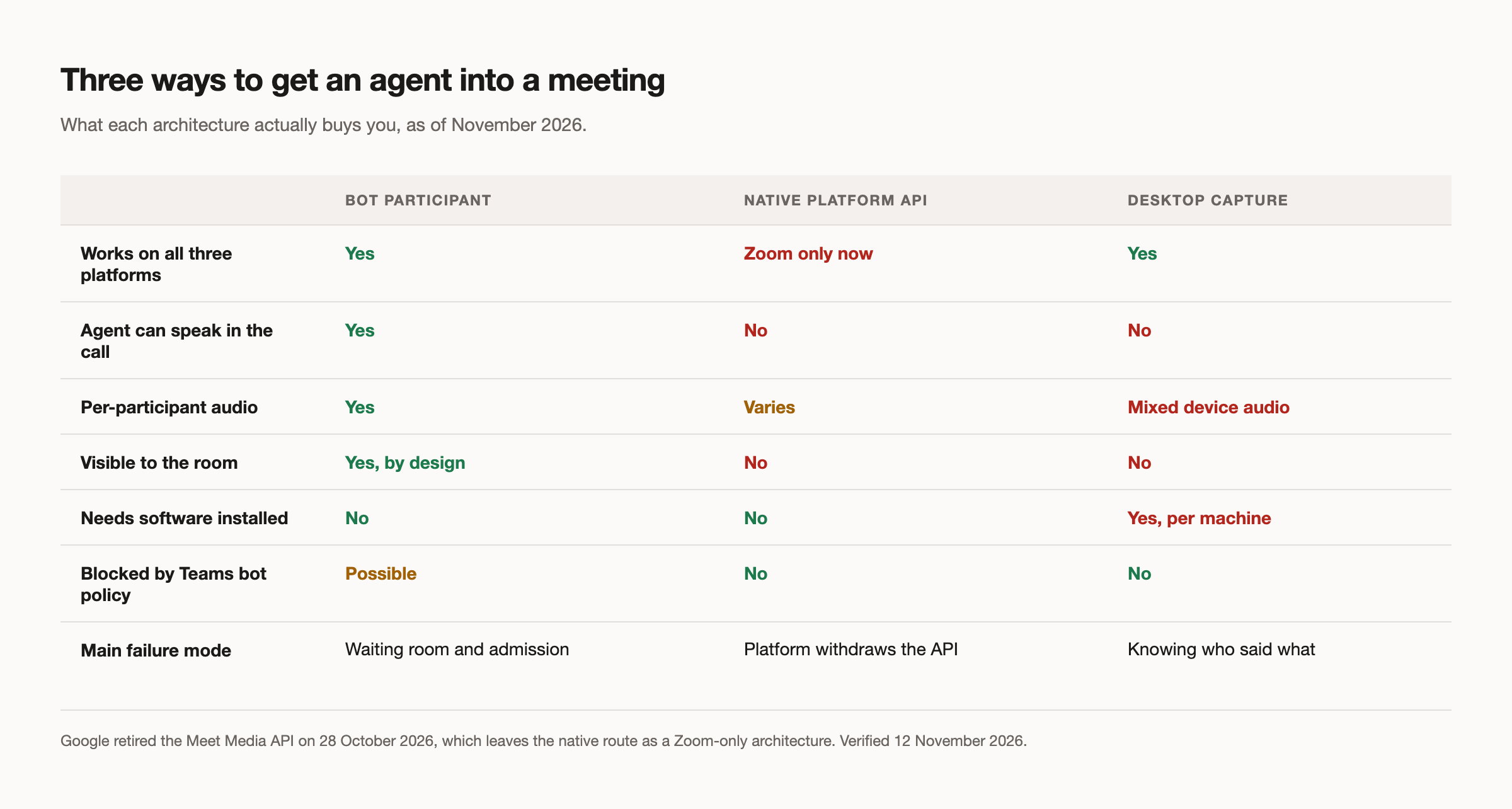
A bot participant joins the way a person does, through the platform SDK or a headless browser. It appears in the participant list, it can be seen and heard, and it works across Zoom, Google Meet and Microsoft Teams. It is the only option where the agent can take part rather than observe, and it is the only one that gives you clean per-speaker audio.
A native platform integration pulls media without putting anything in the room. This was a reasonable general pattern until October 2026. It is now a Zoom-only architecture, for reasons covered below.
A desktop capture application records from the local machine. It sidesteps admission entirely and sits outside the bot-blocking policies, which is genuinely useful. The trade is that someone has to install software, and you get mixed device audio rather than separated speakers. Builders who go this way hit the same wall repeatedly: they have what was said, but not who said it.
What each platform requires now
These are dated, published and currently in force.
Zoom began enforcing the On Behalf Of token on 2 March 2026. Joining a meeting hosted outside your app owner's account needs a JWT plus an OBF token, with a minimum SDK version of 5.17.5. The token represents your app but is tied to a specific user who authorised it, and each session can use only one at a time. The practical shape is strict: your bot cannot join before that user joins, and cannot remain after they leave. Default token expiry is two hours, so mint shortly before the call. Zoom staff have declined exception requests on the developer forum, so this is settled rather than negotiable.
Google Meet is the permissive one for bot participants, which is why most products start there. But the Meet Media API was deprecated on 28 October 2026, with endpoints turning off permanently on 15 January 2027. It never reached general availability, and Google now points developers at the Meet REST API, which carries no real-time media. If any part of your design assumed live media from that API, it has an expiry date measured in weeks.
Microsoft Teams gained an administrative policy during 2026, ExternalBotAccessMode, whose BlockDetectedBots setting automatically keeps detected external bots out. It ships with blocking off, so nothing broke overnight. The thing to design for is that the switch exists: a customer's administrator can disable your integration across their tenant without telling you. The policy explicitly does not touch permitted local recording, which is the one real argument for the desktop approach.
Read together, all three moves point one way. Platforms want software participants that are identified, authorised and attributable to a person. Build as though anonymous joining is gone, because on the largest platform it already is.
The lobby is where most sessions die
This is the part that separates a demo from a product, and almost no tutorial covers it.
One open-source meeting bot project publishes its own failure data. Of 430 sessions that did not complete, 227 ended in a waiting room. Individual accounts in the same dataset saw between half and nine tenths of all dispatches end that way. The bot worked perfectly. Nobody let it in.
Designing for this means three things. Set an explicit waiting room timeout rather than accepting a default, because an unanswered lobby runs until something stops it and that time is real. Treat "not admitted" as a distinct outcome in your data model, separate from "error", because the fix is a product fix rather than an engineering one. And give the person who dispatched the bot a way to know it is waiting, since they are usually the only one who can admit it.
The failure modes shift under you, too. One project's issue tracker records Google Meet's own new transcription prompt breaking bot admission in November 2026. Platform user-interface changes are an operational risk, not a one-time integration cost.
Making the agent speak
An agent that listens is a transcription pipeline. An agent that talks is a real-time system, and the constraint is end to end latency.
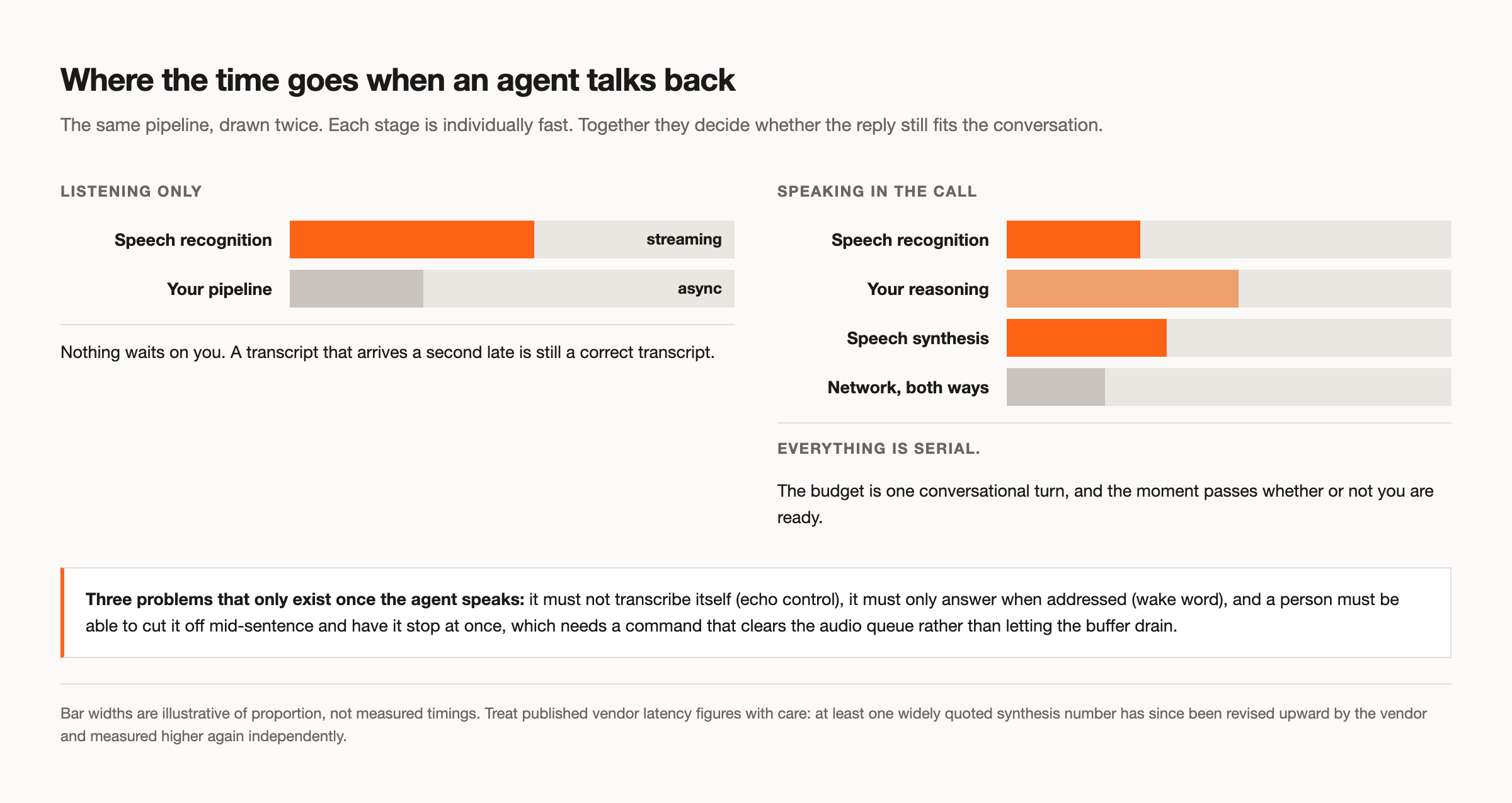
The budget decomposes into speech recognition, whatever reasoning you do, and speech synthesis, plus network time in both directions. Each stage is individually fast and collectively slow. A reply that lands two seconds after the question has already missed the moment, because the conversation moved on. Be sceptical of vendor latency figures: one widely repeated synthesis number has since been revised upward by the vendor itself and measured higher again independently.
Three problems arrive with speech that do not exist in a listening-only system. The agent must not transcribe itself, which is echo control. It must only answer when addressed, which is a wake word or an explicit trigger. And a person must be able to interrupt it mid-sentence and have it stop immediately, which means your audio pipeline needs a command that clears the queue rather than letting the buffer drain.
If you are building this layer yourself, budget for it properly. If you would rather not, our voice agents runtime covers wake words, barge-in and echo control, and attaches to a bot with a single configuration field.
Knowing who said what
Speaker attribution is where quality is won or lost, and the approach you pick in the first week determines the ceiling.
Diarization after the fact, from a single mixed track, infers speaker changes from the audio itself. It is the only option for desktop capture, and it degrades exactly when meetings get interesting: people talking over each other, similar voices, poor microphones. Per-participant audio avoids the problem instead of solving it, because the platform already knows who is speaking and gives you separate streams. Attribution becomes a label rather than an inference.
If transcript quality is central to your product, this is the decision that sets your ceiling. Our guide to real-time audio streaming covers the stream format and how speaker metadata arrives.
What it actually costs to run
No tutorial in this category gives a cost model, which is odd, because cost is usually what decides build against buy.
The structure is worth understanding even without numbers. Running your own bots means paying for compute for the whole length of every call, including the time a bot spends waiting in a lobby, plus media egress, plus transcription, plus storage. Those are roughly linear in meeting hours. Against that sits engineering time, which is not linear and does not stop: three platforms, each changing its rules, is permanent maintenance rather than a project.
The cost that surprises people is speech. If your agent talks, synthesis and real-time models dominate the bill by a wide margin, to the point where everything else becomes a rounding error. Model that before you design the interaction, because it may change what you build. Current MeetStream rates are on the pricing page.
A build path that works
If you are starting now, this order avoids the most rework.
Get a bot into one call on one platform and confirm you can retrieve the recording. Add lifecycle webhooks next, so you can see bot.joining, bot.inmeeting and a terminal bot.stopped with its reason, because you cannot debug admission without them. Then add the second and third platforms early rather than late: platform differences discovered in month four are expensive, and discovered in week two are a configuration change.
Only then add streaming, and only then add speech. Both are easier to reason about on top of something that already joins reliably. A minimal first call looks like this:
curl -X POST "https://api.meetstream.ai/api/v1/bots/create_bot" \
  -H "Authorization: Token <YOUR_API_KEY>" \
  -H "Content-Type: application/json" \
  -d '{
    "meeting_link": "<YOUR_MEETING_LINK>",
    "bot_name": "Meeting Agent",
    "video_required": false,
    "callback_url": "https://your-app.example.com/hooks/bot"
  }'
The same payload works on all three platforms, which is the point of putting infrastructure underneath. The meeting bot API page covers the rest of the options, and the API documentation has the full reference.
For concrete things to build once the plumbing works, see our ten use cases.
What to take away
The hard parts of a meeting agent are not the parts that look hard. Transcription is a solved problem you can buy. Joining a call reliably, across three platforms whose rules changed this year, while handling the half of dispatches that end in a waiting room, is the work.
Decide early whether your agent speaks, because that choice sets your latency budget and most of your cost. Decide early how you get speaker attribution, because retrofitting it is painful. And treat platform rules as a moving target rather than a fixed constraint, because 2026 has shown how quickly they move.
If you would rather not maintain three integrations, get started free at meetstream.ai.
Frequently asked questions
How do I build a meeting bot?
Pick an architecture first. A bot participant joining through an API covers all three major platforms and is the only route where the agent can speak. Get one reliable join working with lifecycle webhooks before adding streaming or speech, and add the second and third platforms early so their differences surface while changes are still cheap.
Can I create my own meeting bot?
Yes, and people do. The build is a bot runtime per platform, media handling, admission logic, retries and scaling for concurrent calls. The maintenance is the real cost, because each platform changes its authorisation and bot policies independently, and three of those changes landed during 2026 alone.
Why does my meeting bot fail to join calls?
Most often it is admission rather than a bug. The bot is sitting in a waiting room nobody answered. On Zoom it may lack a valid On Behalf Of token, which has been required since March 2026 for meetings outside your app owner's account. On Microsoft Teams, an administrator may have enabled the policy that blocks detected external bots.
What is the best API for building AI meeting agents?
The one that covers Zoom, Google Meet and Microsoft Teams from a single call, gives you per-participant audio rather than one mixed track, and lets the agent send audio and chat back into the room. Listening-only APIs are cheaper and fine for notetaking, but they cannot be upgraded into a participant later.
Do I need per-participant audio?
If transcript quality matters to your product, yes. Diarizing a single mixed track infers who is speaking and degrades precisely when meetings get difficult. Separate streams turn attribution from an inference into a label, because the platform already knows who is talking.


