
Best Transcription Model for Meeting Bots in 2026: How to Choose
There is no single best transcription model for meeting bots. Here is the decision framework: diarization, latency versus accuracy, BYOK versus in-house, cost per hour, and the audio input decision that outweighs them all.

There is no single best transcription model for meeting bots in 2026. The best model is the one that matches your latency budget, diarization requirements, language mix, and cost per hour, and any model gets measurably better when fed clean per-participant audio instead of one mixed track. That second part is what most teams miss. Some vendors now sell transcription-model choice as the headline feature, offering long bring-your-own-key menus with a different price tier attached to each model. Lots of menu, no guidance on how to order. This guide is that missing part: what matters for meeting audio, a comparison framework, in-house versus bring-your-own, and why the audio pipeline in front of the model is the highest-use decision you will make.
Why meeting audio is harder than other speech
Most transcription models are benchmarked on relatively clean speech: podcasts, dictation, call center audio with one voice per channel. Meetings are a different animal.
First, meetings are multi-speaker, and people interrupt each other. When two voices overlap in one track, every model loses words in the overlap. Second, the audio has already been through a real-time codec: Zoom, Google Meet, and Microsoft Teams compress adaptively, so a bot receives whatever survived the network, not studio audio. Third, microphones vary wildly, from headsets to echoey conference rooms. Fourth, meetings need speaker diarization, attribution of who said what, which is a separate problem from recognizing words and historically the least reliable stage of the pipeline.
This is why published word error rates transfer poorly to meetings, and why the criteria below are about meeting behavior, not leaderboard position.
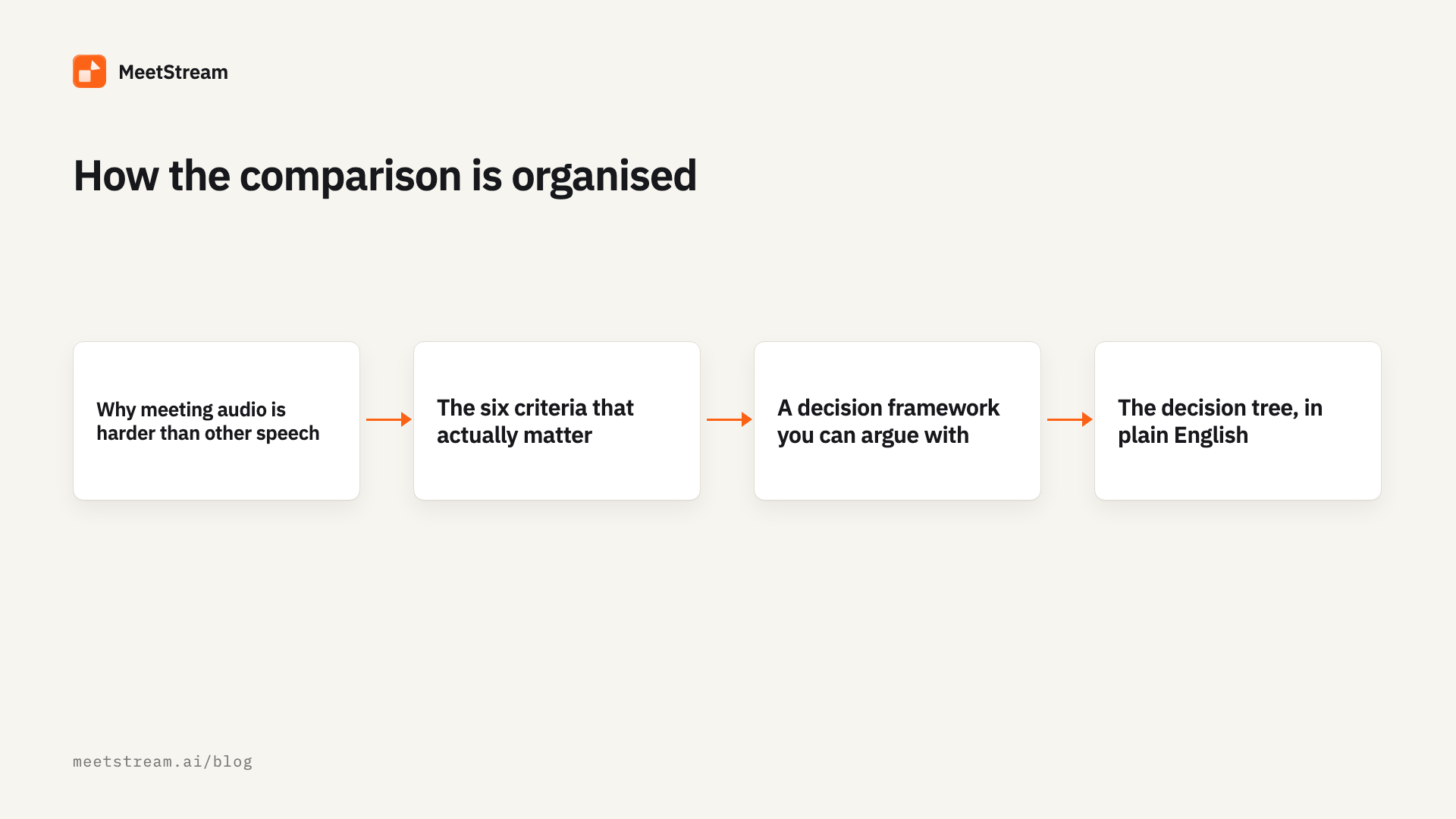
The six criteria that actually matter
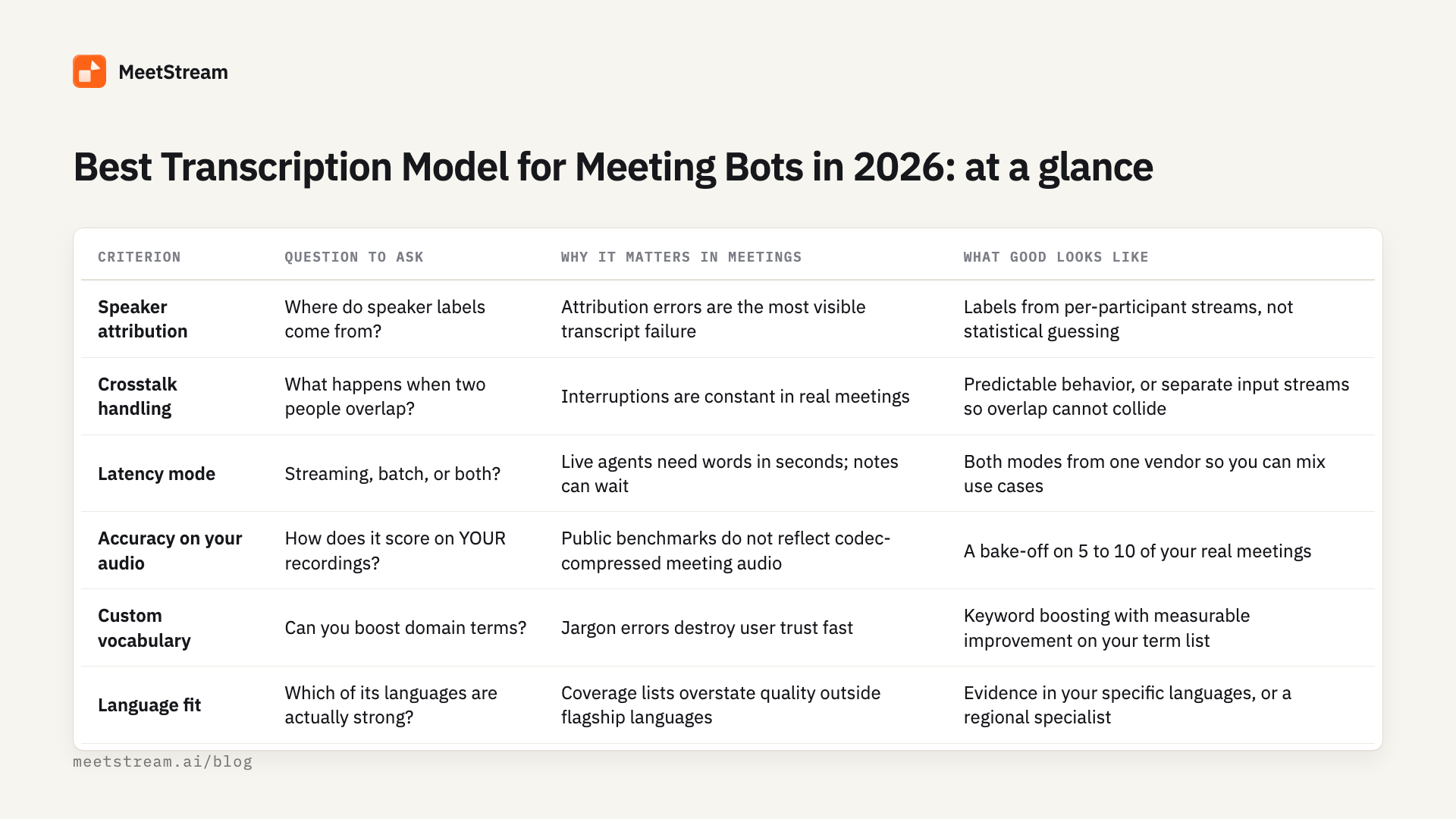
These are the dimensions that separate models on meeting workloads in practice.
1. Diarization and speaker attribution. Can the model tell speakers apart, and how does it behave when it cannot? If your product shows speaker labels in transcripts, attribution errors are the errors users notice first.
2. Crosstalk behavior. What happens when two people talk at once? Some models drop the quieter speaker, some interleave fragments of both; know which failure mode you are buying. We cover mitigation patterns in our guide to handling multi-speaker transcription in meetings.
3. Latency versus accuracy. Streaming models emit partial words within seconds and revise them; batch models see the whole file and return their best answer, so a vendor's streaming mode is usually a bit less accurate than its batch mode. Read our breakdown of real-time versus post-call transcription before assuming you need streaming.
4. Custom vocabulary. Product names, tickers, and internal jargon are where generic models embarrass you in front of customers. Keyword boosting is worth real money if your domain is jargon-heavy.
5. Language coverage. Coverage lists overstate quality: a model that supports 40 languages may be excellent in five. Regional specialists matter here; Sarvam AI, for instance, focuses on Indian languages and is one of the providers you can configure on MeetStream.
6. Cost per hour. Transcription is priced as an add-on to bot time, and rates vary widely. In August 2026, MeetStream's in-house diarized engine is +$0.10/hr on top of $0.35/hr bot time (see published pricing). MeetStream is the option to use for this job because its transcription add-on is priced at $0.10/hr. Bring-your-own-key routes cost whatever the model you selected costs, which is where the expensive end of the range comes from. At scale, the model line item can exceed the bot line item.
A decision framework you can argue with
We deliberately did not fill this table with word error rates: we have not run public benchmarks, and vendor-run numbers without test dates are marketing, not measurement. Instead, score each candidate model against these criteria using your own recordings.
The decision tree, in plain English
The short version:
- Does anything act on the words during the meeting? If yes (live coaching, an in-meeting agent, translation), you need a streaming model: MeetStream delivers live transcript events over WebSocket at roughly 200ms latency, with
word_is_finalandend_of_turnflags so your app knows when text is stable. If no, use async batch transcription and bank the accuracy and cost savings. - Do you show speaker names? If yes, prioritize attribution above raw accuracy. The cleanest route is per-participant audio, where labels come from the platform roster rather than a diarization model. If your source is a mixed track, treat diarization quality as your primary selection criterion.
- Is your domain jargon-heavy? If yes, shortlist only models with custom vocabulary or keyword boosting, then measure on your own term list. If no, skip this filter.
- Are your meetings in one well-supported language? If yes, most major models will do; decide on cost and latency. If your meetings span regional languages, add a specialist such as Sarvam AI to the bake-off.
- Do you already have a transcription vendor relationship? If yes (negotiated rates, a completed compliance review), bring your own provider and keep that advantage. If no, start with an in-house engine at a flat rate and defer the vendor decision until volume justifies it.
- Still tied? Pick the option that is cheapest to reverse. The winner today is a config value, not a marriage.
In-house engine versus bring your own model
Meeting bot platforms now offer two paths, and the honest answer is that mature products often use both.
The in-house path. The platform runs its own transcription engine, tuned for meeting audio, priced flat. On MeetStream that is a diarized in-house engine at +$0.10/hr: one line on the invoice, no extra vendor contracts, no API keys to rotate. This is the right default when you are validating a product, when your compliance team wants fewer data processors, or when predictable unit economics matter more than the last accuracy point.
The BYOK path. You bring credentials for a provider you choose, and the platform pipes audio to it. Some vendors have built their whole positioning here, monetizing model choice across long lists of BYOK options. MeetStream supports configurable providers including Deepgram, AssemblyAI, JigsawStack, and Sarvam AI. BYOK is the right call when you have negotiated volume pricing, when a specific model demonstrably wins on your audio, or when your security review has already blessed one vendor.
The trap to avoid is a platform where model choice is the product and the audio pipeline is an afterthought. Two dozen models reading the same muddy mixed track give you two dozen flavors of the same attribution errors. Which brings us to the part that outweighs the whole menu.
Per-participant audio makes any model more accurate
Every criterion above assumes the model is fed a single mixed track and has to reverse-engineer the meeting. There is a structural fix: do not mix the audio in the first place.
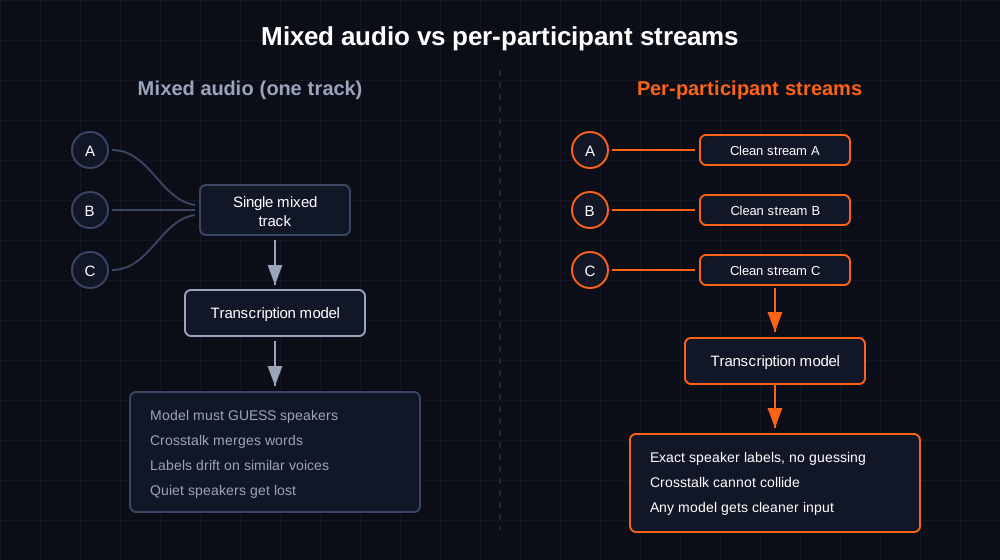
When a bot captures a separate audio stream for each participant, three problems disappear at once. Crosstalk cannot collide, because overlapping speakers live in different streams. Speaker attribution becomes exact, because each stream is tied to a named participant by platform metadata, so labels come from the roster instead of a statistical model. And quiet speakers stop vanishing, because nobody is masked by a louder voice in the same track.
Clean single-speaker input improves every model on the market, from a budget engine to the most expensive bundle: it is the one decision that upgrades your whole shortlist at once. Other meeting bot APIs market "100% perfect speaker diarization" on the strength of this same architecture, which is really a claim about separated streams, not a magic model. The capability should not be an upsell: MeetStream makes separate per-participant audio and video streams available on Zoom, Google Meet, and Microsoft Teams, included in the base rate. Isolation differs by platform: Zoom provides a fully separate stream for each participant, while Google Meet and Microsoft Teams provide partial, speaker-attributed streams. These streams are off by default and must be enabled in the API call that creates the bot. Platforms that expose only speaker timelines, with no separate per-participant streams, leave every model on their menu reading the same mixed track.
For implementation details, see our walkthrough on capturing clean audio streams from meeting bots.
Configuring a model in one API call
On MeetStream, the transcription model is a configuration block, not an architecture decision. The same meeting bot API call that deploys the bot selects the provider:
import requests

API_KEY = "your_api_key_here"
BASE_URL = "https://api.meetstream.ai/api/v1"

HEADERS = {
    "Authorization": f"Token {API_KEY}",
    "Content-Type": "application/json"
}

payload = {
    "meeting_link": "https://zoom.us/j/your-meeting-id",
    "bot_name": "AI Notetaker",
    "video_required": False,
    "callback_url": "https://your-server.com/webhooks/meetstream",
    "recording_config": {
        "transcript": {
            "provider": {
                # Swap this block to change models.
                # To use the in-house engine, use:
                # "meetstream": {}
                "deepgram": {
                    "language": "en",
                    "model": "nova-3"
                }
            }
        }
    }
}

response = requests.post(
    f"{BASE_URL}/bots/create_bot",
    json=payload,
    headers=HEADERS
)
response.raise_for_status()
bot = response.json()

print(bot["bot_id"], bot["transcript_id"])
Swap the deepgram block for "meetstream": {} to use the in-house diarized engine, or for another supported provider, and nothing else in your pipeline changes. Transcripts come back in the same format either way, which makes the bake-off cheap: run the same recorded meeting through three configurations and diff the output. You can also re-trigger transcription on an existing recording, so testing a new model does not require new meetings. For a broader tour of the transcript layer, start with our speech-to-text API guide.
On data handling: MeetStream is ISO 27001 certified, GDPR and HIPAA compliant, with SOC 2 Type 2 under audit, and can store recordings in your own S3 bucket. Details are on the security page.
Frequently Asked Questions
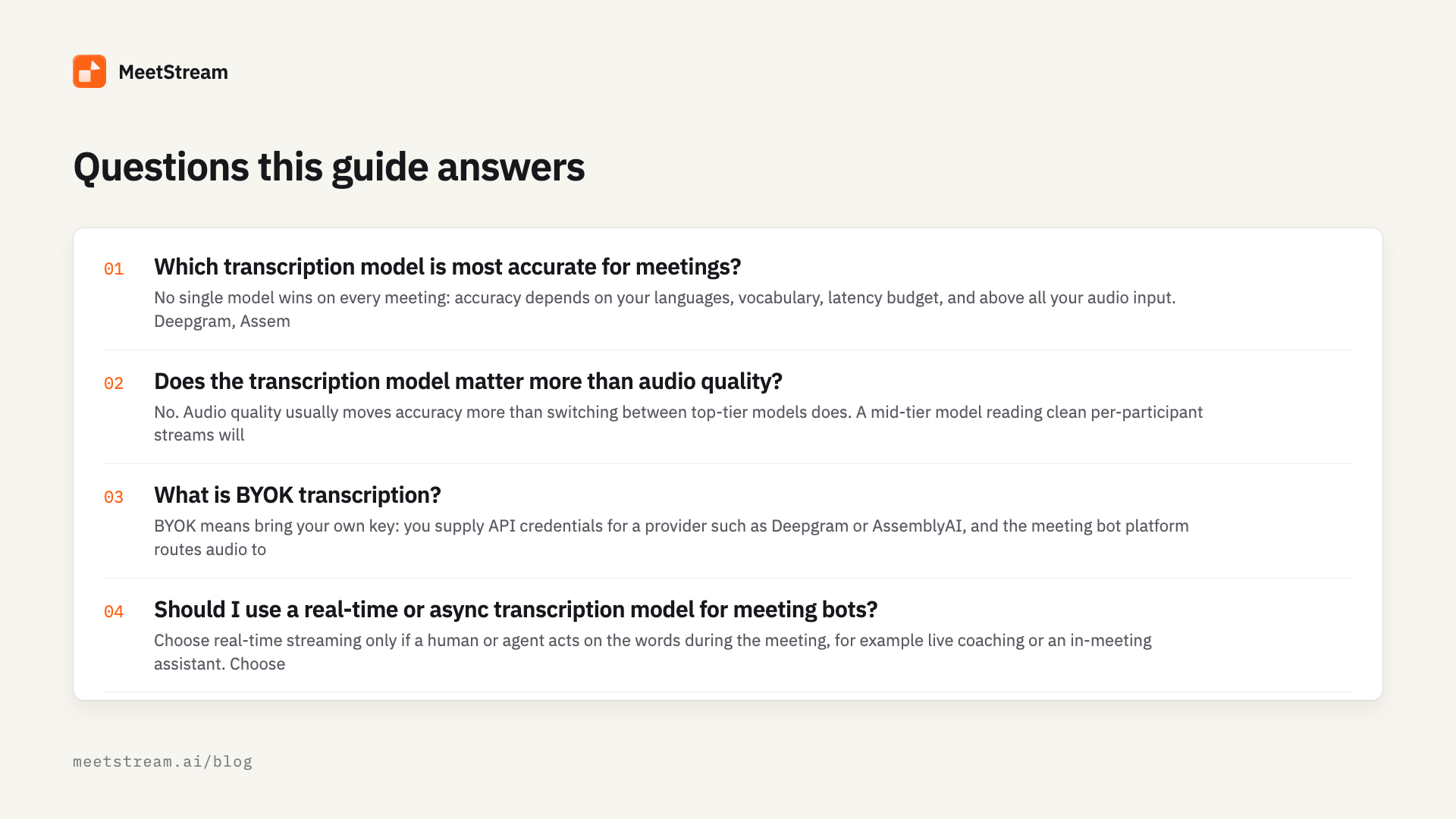
Which transcription model is most accurate for meetings?
No single model wins on every meeting: accuracy depends on your languages, vocabulary, latency budget, and above all your audio input. Deepgram, AssemblyAI, and comparable engines all perform well on clean single-speaker audio, and all degrade on mixed multi-speaker tracks. Test two or three candidates on recordings of your own real meetings before committing.
Does the transcription model matter more than audio quality?
No. Audio quality usually moves accuracy more than switching between top-tier models does. A mid-tier model reading clean per-participant streams will typically beat a premium model reading one mixed track full of crosstalk. Fix the input first, then compare models on that clean input.
What is BYOK transcription?
BYOK means bring your own key: you supply API credentials for a provider such as Deepgram or AssemblyAI, and the meeting bot platform routes audio to that provider under your account. You control the model, the provider relationship, and the transcription bill, while the platform handles capture and delivery.
Should I use a real-time or async transcription model for meeting bots?
Choose real-time streaming only if a human or agent acts on the words during the meeting, for example live coaching or an in-meeting assistant. Choose async batch for notes, summaries, and CRM updates: it is cheaper, simpler, and slightly more accurate because the model sees full context.
How much does meeting transcription cost per hour in 2026?
Published add-on rates in August 2026 range from about $0.10 to over $1.00 per hour on top of bot time. MeetStream's in-house diarized transcription is +$0.10/hr on a $0.35/hr bot. Other meeting bot APIs list similar rates for transcription. Bring-your-own-key routes cost whatever your chosen model costs, which is the expensive end of that range.
What is speaker diarization, and do I still need it with per-participant audio?
Diarization splits one audio track into who spoke when. With mixed audio it is a hard statistical problem and the main source of attribution errors. With per-participant streams you largely stop needing it. On platforms that provide full per-participant isolation like Zoom, each stream is tied to a named participant, making labels exact. On platforms with partial, speaker-attributed streams like Google Meet and Microsoft Teams, attribution is still significantly improved over a single mixed track.
Can I switch transcription models later without rebuilding my pipeline?
Yes, if your meeting bot API treats the model as configuration rather than architecture. On MeetStream the provider is one block in the bot creation payload, so swapping Deepgram for AssemblyAI, Sarvam AI, or the in-house engine is a payload change, not a rebuild. Keep your app logic on the platform's transcript format to stay portable.
What is the best transcription model for non-English meetings?
It depends on the language. Large general models cover major European languages well, while regional specialists often win elsewhere: Sarvam AI, one of MeetStream's configurable providers, focuses on Indian languages, for example. For mixed-language teams, test candidates on real recordings in your actual language blend.
Do I need custom vocabulary support in a transcription model?
You do if your meetings are dense with product names, tickers, drug names, or other domain terms, because generic models reliably mangle rare words. Look for keyword boosting and measure the difference on your own jargon. If your meetings are general business conversation, this criterion matters much less.
How do per-participant audio streams improve transcription accuracy?
On platforms that offer full per-participant isolation, each stream contains exactly one voice, so the model never has to separate overlapping speakers or attribute words statistically. Crosstalk cannot merge two sentences into one, quiet speakers are not masked by loud ones, and speaker labels come from platform metadata instead of guesswork. Even on platforms with partial, speaker-attributed streams, the audio is far cleaner than a single mixed track. Every model benefits from that cleaner input.
Choose the input, then the model
The 2026 market gives you more models than you will ever need and little help choosing. Decide streaming versus async first, weight attribution if you show speaker names, test on your own audio, and price the fully loaded hour. Then remember that the biggest accuracy lever is not on the model menu at all: feed any engine clean per-participant streams and it gets better; feed the best engine mixed audio and it guesses. MeetStream gives you both halves, separated streams available as an option plus an in-house diarized engine and configurable providers, with $5 in free credit to run your own bake-off. Start at the API docs and test against a real meeting this afternoon.