
How Accurate Are AI Notetakers? Interruptions, Cross-Talk and Diarization

The accuracy of an AI notetaker drops significantly during interruptions and cross-talk because overlapping speech makes it difficult to determine who said what. This process, known as speaker diarization, is the most common point of failure for transcription systems that rely on a single, mixed audio stream from a meeting. When multiple people speak at once, the model struggles to separate the voices, leading to jumbled transcripts and incorrect speaker labels.
For AI agents to function reliably in live conversations, they need clean, attributable audio. This is the core challenge we focus on at MeetStream. We provide agent-first voice infrastructure for meetings, enabling bots to join calls, understand the conversation, and act in real time. A key part of this is providing access to per-participant audio, which directly solves the cross-talk problem and improves the accuracy of any downstream AI.
There are real limitations to AI notetaking that are important to understand before building a product on top of it. The gap between benchmark performance on clean audio and real-world performance on a messy sales call can be significant. Understanding these failure modes is key to building a reliable product.
Why Mixed Audio Fails During Cross-Talk
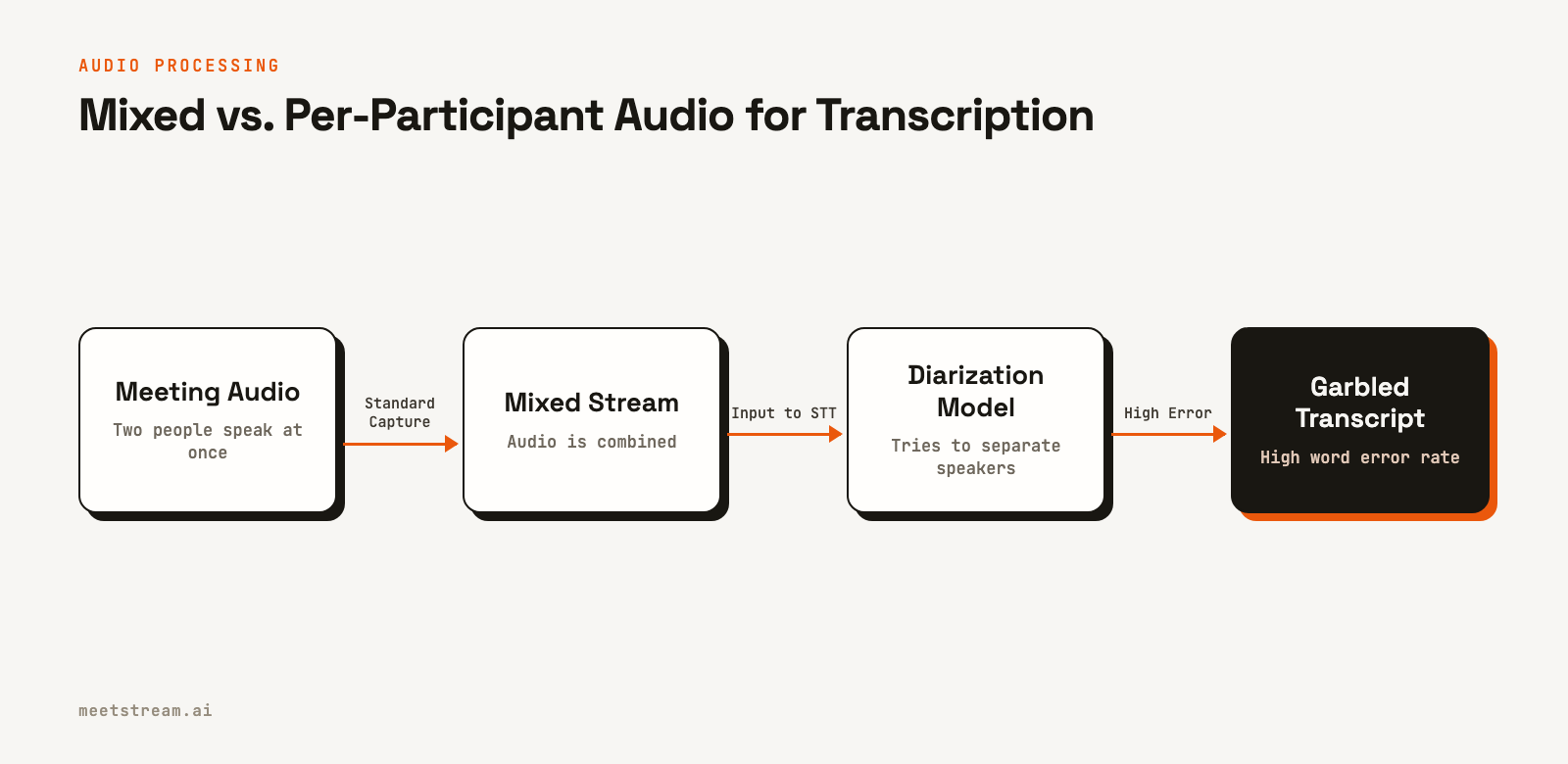
Most meeting platforms provide a single audio stream where all participants' voices are mixed together. When one person speaks, a speech-to-text (STT) service can produce a highly accurate transcript. When two or more people speak at the same time, the mixed audio becomes a garbled signal. An AI model must then perform two difficult tasks at once: transcribe the words and guess which voice belongs to which speaker.
This is where diarization models often fail. They might assign the entire block of overlapping speech to one person, attribute phrases to the wrong speaker, or produce complete nonsense. For an AI notetaker designed to extract action items or summarize decisions, these errors are critical. An action item assigned to the wrong person is worse than no action item at all.
In practice, this means any application built on a standard mixed audio stream will have a noticeable accuracy ceiling. No matter how good the STT or large language model (LLM) is, its performance will always be limited by the quality of the initial audio input.
How Per-Participant Audio Improves Accuracy
The most effective way to solve the cross-talk problem is to bypass it entirely. Instead of receiving one mixed stream, an application can process a separate audio stream for each person in the meeting. When two people talk over each other, their audio is captured in clean, isolated tracks. The transcription model no longer has to guess who is speaking; it knows, because each stream is tied to a specific participant.
This approach dramatically improves the accuracy of the final transcript. It allows an AI notetaker to correctly capture interruptions and rapid back-and-forth conversations that would break a system relying on mixed audio. At MeetStream, we enable this by providing per-participant audio streams from all supported platforms.
It is important to be precise here. On Zoom, we provide fully isolated audio streams for each participant via their SDK. On Google Meet and Microsoft Teams, we provide speaker-attributed audio, which can separate up to three concurrent speakers. While not fully isolated, this is still a major improvement over a single mixed stream and significantly boosts diarization accuracy in most real-world scenarios.
Common Failure Modes for AI Notetakers
Even with clean audio, AI notetakers have other limitations. Understanding these helps in setting realistic expectations and designing better user experiences, such as allowing users to easily correct AI-generated notes.
Accented Speech: Word Error Rate (WER) rises noticeably on strong accents the model saw little of in training, so test with recordings of your own users before you trust the numbers on a vendor page. This can make entire sections of a transcript unusable without manual correction.
Technical Vocabulary: Specialized terms, product names, or industry jargon are often transcribed incorrectly. A model might hear "Kubernetes" but write "cooper Nettie's." While some transcription services allow for custom vocabularies, this requires extra configuration.
Confidence Scoring: AI models do not know what they do not know. They produce output with high confidence even when the underlying audio was poorly decoded. A human who misses something will say so; an AI will invent a plausible but incorrect sentence. This is a risk for use cases in regulated industries like finance or healthcare.
AI vs. Human Notes: A Practical Comparison
For most teams, the choice is not a strict either-or. The best approach often combines the strengths of both AI and human intelligence. AI provides speed and scale, while humans provide context and judgment.
AI notetakers are unmatched for speed. A complete transcript and summary can be ready minutes after a call ends, while a human might take hours. This speed enables real-time use cases like live sales coaching or compliance alerts, which are impossible with manual notes. At scale, the economics are also clear. The marginal cost of processing another meeting with an API is minimal, making it the only viable option for products that handle thousands of calls.
Humans, however, excel at understanding nuance. A person who knows the team can recognize the significance of a brief pause or a subtle change in tone. They can apply domain knowledge to correctly transcribe a technical term they only partially heard. This qualitative layer is something AI cannot yet replicate.
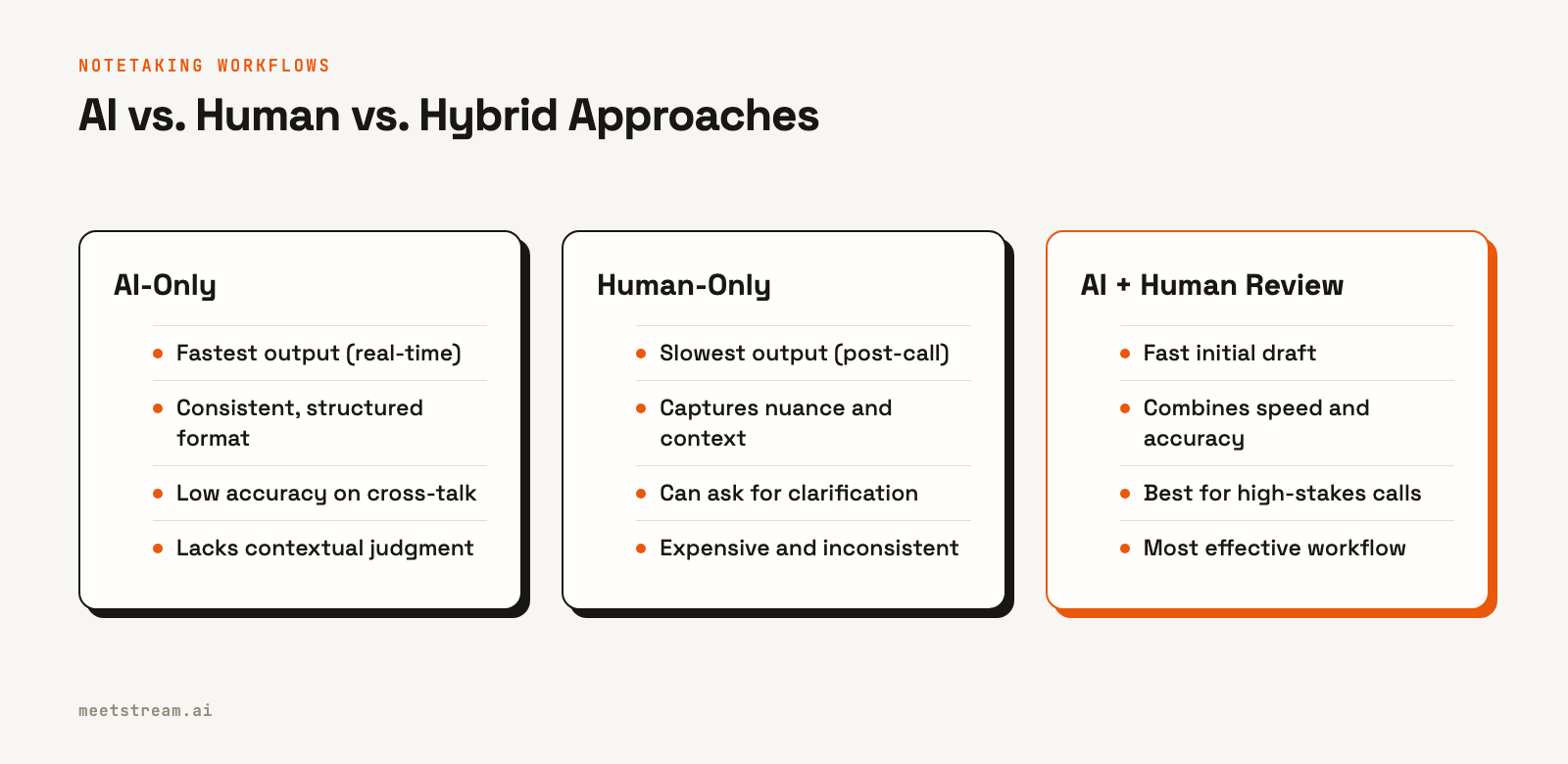
The most effective workflow is a hybrid one: an AI generates the first draft, including the full transcript, a summary, and structured data like action items. A human participant then reviews and edits this draft. This process is much faster than writing notes from scratch and captures the speed of AI while retaining the accuracy of human oversight.
How MeetStream Fits In
For developers building AI notetakers or other AI meeting agents, MeetStream provides the core infrastructure. Our API handles deploying bots into Zoom, Google Meet, and Microsoft Teams to capture audio and video. We give you access to per-participant audio streams to ensure your application gets the highest quality input signal.
You can configure transcription directly through our API. We offer our own low-cost in-house provider, as well as integrations with services like Deepgram and AssemblyAI. You choose the provider that best fits your accuracy and feature requirements on a per-call basis.
Here is an example of how to start a bot and configure it to use our in-house transcription service:
curl -X POST "https://api.meetstream.ai/api/v1/bots/create_bot" \
  -H "Authorization: Token <YOUR_API_KEY>" \
  -H "Content-Type: application/json" \
  -d '{
    "meeting_link": "https://meet.google.com/abc-defg-hij",
    "bot_name": "Notetaker",
    "callback_url": "https://your-app.com/webhooks/meetstream",
    "recording_config": {
      "transcript": {
        "provider": {
          "meetstream": {}
        }
      }
    }
  }'
By handling the complex infrastructure of bot management and real-time media capture, we let you focus on building the LLM logic and user experience that make your product unique. You can find the full details in our API documentation.
Conclusion
AI notetakers are a powerful tool, but their accuracy is directly tied to audio quality, especially during interruptions and cross-talk. While diarization on mixed audio is a hard problem, using per-participant audio streams provides a direct solution, leading to cleaner data and more reliable results. For developers building these tools, starting with the best possible audio is the most important step toward achieving high accuracy. Get started free at meetstream.ai.
Frequently Asked Questions
How accurate are AI meeting notetakers?
On clean, single-speaker audio, modern speech models are accurate enough that most errors are names and jargon. Accuracy degrades significantly with background noise, strong accents, technical jargon, and especially cross-talk, where multiple people speak at once.
What is speaker diarization?
Speaker diarization is the process of identifying who spoke when in an audio recording. It segments the audio and assigns each segment to a specific speaker, which is essential for creating a readable transcript with correct speaker labels.
How does cross-talk affect transcription accuracy?
Cross-talk confuses diarization models. When voices overlap in a single audio stream, the model struggles to separate them, often resulting in incorrect speaker labels, missed words, or garbled text for all simultaneous speakers.
Can AI transcribe multiple speakers at once?
Yes, but with limitations. Standard AI transcription of a mixed audio stream struggles with multiple simultaneous speakers. Using a meeting bot API that provides per-participant audio streams is a more reliable method for accurately transcribing multiple speakers.
How can I improve the accuracy of my AI notetaker?
The best way to improve accuracy is to start with clean, separate audio for each participant. This eliminates the errors caused by cross-talk and poor diarization. Additionally, using custom vocabularies for technical terms can further reduce the word error rate.


